How to Configure and Use the ARMember Locker Add-on in ARMember Pro
Important Note: This Addon will only work if ARMember plugin is installed with version 7.6 or later.
ARMember – Locker Addon Key Features:
- Quick and simple installation
- Easy to set up and manage a Membership plan with a Locker template
- Display engaging teaser content before restricting access entirely
- Seamlessly redirect visitors to a designated restricted access page if preferred
- Choose from 12 professionally designed locker templates to match your branding
- Display flexible teaser content parsed by words, paragraphs or a specific percentage
- Add a sleek Gradient Fade-Out effect for a more polished user experience
- Create a completely bespoke layout using a custom locker with HTML (Template 12)
- Fully protect content built with popular page builders, including Gutenberg, Elementor, WPBakery, Divi, Bricks, Oxygen, Beaver Builder, Avada Builder and SiteOrigin
Steps For Installation And Activation
You can seamlessly install the plugin using either of these two standard methods:
New install via FTP
- First, download the plugin package and extract its contents locally. Consequently, you will find a directory named armemberlocker.
- Next, upload the entire armemberlocker directory to the
wp-content/plugins/path within your WordPress installation. - Finally, navigate to your WordPress admin panel and activate the
ARMember - Locker Addonplugin directly from thePluginsmenu.
New install via the WordPress Uploader
- To begin, download the plugin installation package.
- After downloading, log in to your WordPress admin dashboard securely.
- Then, navigate straight to
Plugins→Add New→Upload. - Subsequently, click on Choose File, select the downloaded plugin package, upload it completely, and then simply click
Activate Plugin.
Steps to Setup ARMember – Locker Addon For Your Website
Let’s configure the ARMember – Locker Addon for your website:
-
To initiate setup, first navigate to
ARMember→General Settings→Default Restriction Rules. Once there, you will instantly locate the dedicatedContent Access Rule Typesection as shown below.
-
This
Content Access Rule Typesetting essentially determines how visitors will experience restricted content. Depending on your goals, you can choose one of the following strategic options:Redirect to Restricted Page
As a result of selecting this, visitors attempting to access protected content will instantly be redirected to the designated restricted access page configured within ARMember.
Show Teaser + Locker
Alternatively, visitors will be allowed to view a limited portion of the content (teaser) first. Immediately following this, a sleek content locker will appear to prompt them to log in, register, or buy a plan to continue reading.
-
Furthermore, ARMember provides 12 professionally designed locker templates that can easily blend with your website’s existing layout. Therefore, you can simply choose your preferred template from the available styles to ensure visual continuity.

-
When utilizing the
Show Teaser + Lockeroption, you can precisely decide how much content visitors can preview before the locker restriction triggers. For instance, the teaser can be limited and displayed based on:- Number of Words – Display exactly the first X words.
- Number of Paragraphs – Display exactly the first X paragraphs.
- Percentage of Content – Display a specific percentage of the complete text.
By providing this teaser, you can effectively help visitors understand the premium value of your content before asking them to unlock it. Additionally, you can enable the
Gradient Fade-Outoption to append a smooth fading overlay directly above the locker, thereby creating a more natural and visually appealing transition. -
If you would rather design your own structural locker layout instead, ARMember conveniently includes
Template 12, which supports fully customizable HTML. Simply selectTemplate 12and input your personalized markup into theText/HTMLeditor to match your exact branding requirements.
-
Moreover, the ARMember Locker Addon remains fully compatible out-of-the-box with content built via popular page builders, which specifically include:
- Gutenberg (WordPress Block Editor)
- Elementor
- Bricks Builder
- Divi Builder
- Beaver Builder
- Oxygen Builder
- Breakdance
- WPBakery Page Builder
- Avada Builder (Fusion Builder)
- Visual Composer
- Brizy
- SiteOrigin Page Builder
- Themify Builder
- Live Composer
- Zion Builder
- Betheme (Muffin Builder)
- Flatsome UX Builder
In addition, this addon is designed to work seamlessly with all popular and standard WordPress themes, including Astra, GeneratePress, OceanWP, Kadence, Avada, Divi and many others, ensuring a consistent design across your entire website.
Note:The Locker template will be displayed only for the restricted Page, Post, or Custom Post Type configured in the
ARMember->Content Access Rulespage. -
Once the Locker Addon configuration is completely saved, visitors accessing your restricted content will successfully view the specified teaser content followed smoothly by the selected locker template.
Consequently, below are some frontend demonstration screenshots illustrating how the locked system presents itself dynamically. Please note that the exact presentation may vary depending upon the particular template styles and restriction rule options you choose to implement.


Steps to Setup ARMember – Locker Addon with restricted content shortcode
-
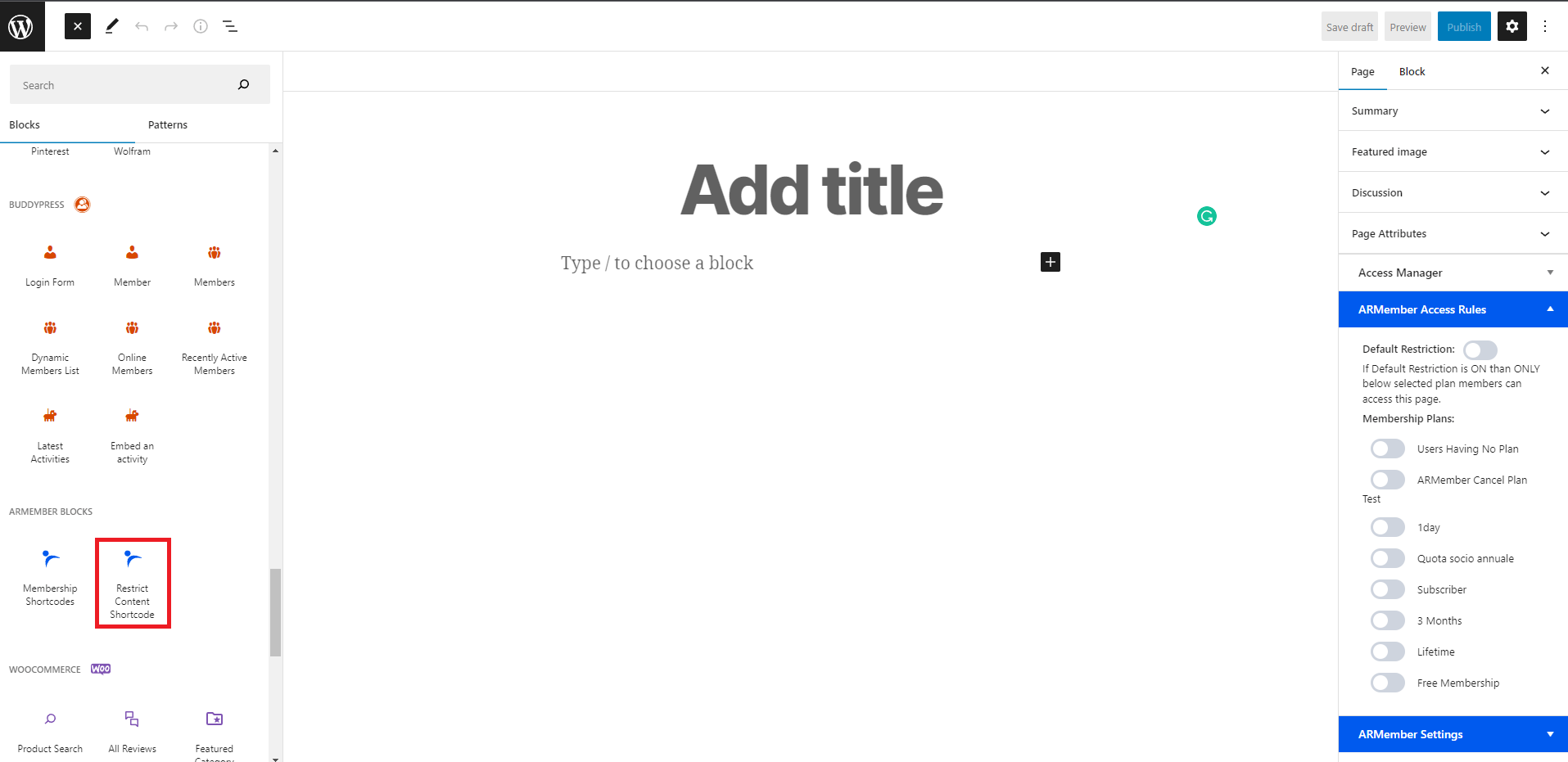
ARMember provides a facility to display the content partially using Restrict Content Shortcode. Restrict Content Shortcode can be configured from ARMember ⇾ Add/Edit, Page, Post.
For, WordPress Gutenberg Editor you can add ARMember restrict partial content shortcode as shown below:

For, WordPress Classic Editor you can add ARMember restrict partial content shortcode as shown below:

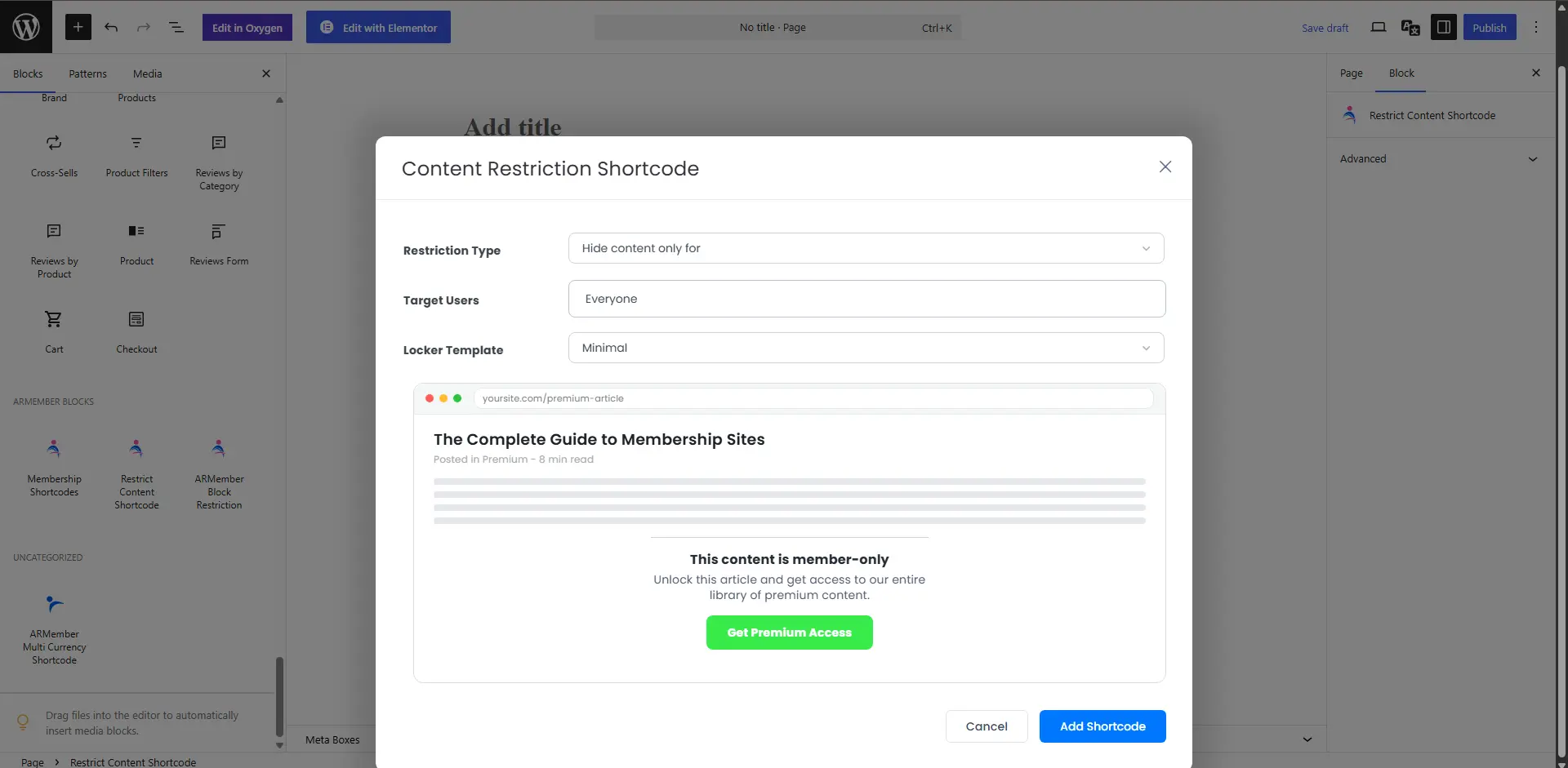
You can display the content partially by configuring two options for Content Restriction:
Restriction Type
You can set the restriction type between Hide/Show depending on your requirement to display or hide the specific content for the targeted user.
Target Users
You can apply the restrictions on the content by targeting the user between Logged-in users, Non-logged users, or by the Plans assigned to the members.
If no option is selected then restriction type will be applied for “Everyone”.
Locker Template
You can add the locker template which you want to show in restricted content shortcode.