


ARMember, a membership and subscription plugin for WordPress, ships with many strong retention methods integrated via different approaches.
For example, smooth member onboarding, progress tracking, and member profiles. To deliver new value on a regular basis and give members a reason to stay, you can use a lot of tools, such as scheduling new lessons, articles, templates, or videos; providing downloads, or even launching courses.
You can also send automated engagement reminders and launch community forums to improve relationships, thus, retention. It’s all already working on your WordPress site if you use ARMember.
This time, we’re happy to introduce another option to boost member retention on a WordPress site with ARMember! A dedicated Retention add-on that helps you automatically offer your members useful alternatives when they intend to cancel.
But before getting into it, let’s actually understand what helps you increase membership retention in WordPress after all.
TL;DR: Increase membership retention in WordPress with ARMember by engaging members with valuable content, flexible plans, automated emails and personalized cancellation offers. The new Membership Retention add-on helps you give members better alternatives before they cancel.
The Baseline Retention Tools For WordPress Membership Sites
ARMember already includes a lot of things for subscription membership websites that directly influence retention and customer engagement.
1. Welcome Emails
ARMember’s built-in email notifications let you have the right email sequence, where you can send an immediate welcome or subscription-started email. For multi-email onboarding, you may also connect ARMember to many services, such Omnisend, Mailchimp, AWeber, ActiveCampaign, or ConvertKit.
2. Regular Content or Benefits with Automated Announcements
With content dripping in ARMember for releasing posts, pages, lessons, or other protected content, you can organically boost retention.
3. Inactivity Emails
ARMember lets you use Zapier or Make for automating triggers through various CRMs or other tools, allowing you to build a whole strategy for inactive members.
4. Monthly and Annual Plan Options
It’s a great organic retention method in ARMember. You can create multiple recurring plans with different billing periods, including monthly and annual subscriptions. Automatic recurring payments depend on the payment gateways used.
5. Easy Upgrades, Downgrades, and Payment-Method Updates
This retention method can be implemented through ARMember’s plan-change workflows. The Pro-Rata integration can calculate the price difference when members upgrade or downgrade.
6. Cancellation Page with Alternatives
This also helps boost retention, and it’s easy to do that with the Membership Retention add-on now. It redirects members to a dedicated page where you can display discounts, alternative plans, or another reason to stay before they decide to leave your services.
7. Automatic Payment Retries and Grace Periods
You can also increase retention with ARMember’s failed-payment grace period at the membership-plan level. During that period, access can remain available before the plan is removed or replaced.
8. Reporting on Renewals and Failed Payments
ARMember’s Manage Subscriptions area shows active, cancelled, upcoming, and failed subscription transactions. From there, it’s easy to find the needed plan, status, gateway, and plan type.
Why Does The Membership Retention Add-on Help You Improve Retention?
What can you automate with the Membership Retention add-on from ARMember?
This add-on allows you to automate downgrades or plan switching options. This means, each time a client wants to cancel, they get an alternative option, increasing your chance of not losing them.
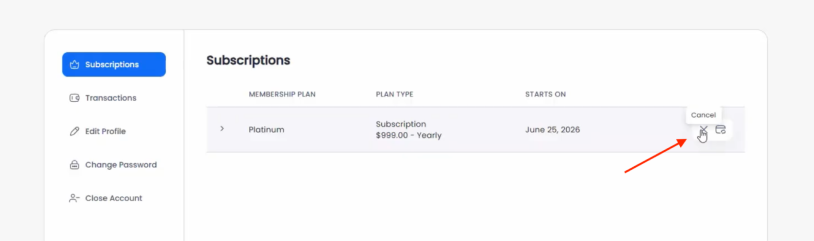
For instance, through the content message you can add with this add-on, you can offer your members popular things like:
- Switching to a cheaper plan
- Giving individual discounts
- Removing optional features
- Moving from monthly to annual billing
- Changing from individual to group membership
- Downgrading while preserving account history
- Contacting you for better options
Note: the calculations or plan changes are not automatic or scheduled, but at least you make your members aware that better options exist and they can get them as soon as they want instead of immediate cancellation.
Improve your retention now – install the new add-on (works for Professional & Enterprise plans). We’re explaining how to do that step by step below.
How to Enable The ARMember Membership Retention Add-on
Let’s briefly explain the tech part of getting started.
- Download the add-on from your ARMember account.
- Then go to WordPress, upload and activate this extension (Membership Retention). Activate it from the ARMember’s Add-ons menu.
- Creates a Membership Retention page
- Adds default retention content
- Assign the page in ARMember settings
- Go to ARMember → General Settings → General Options and click the toggle Membership Retention to enable it.
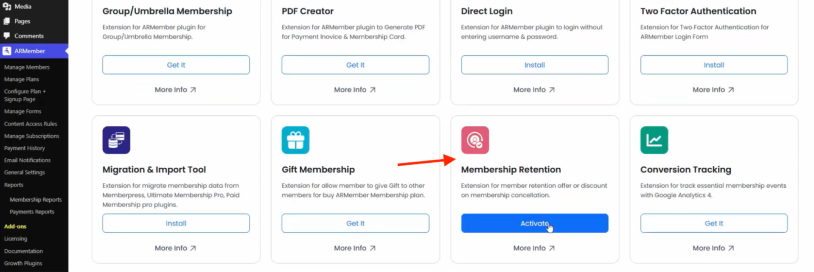
After activation, the add-on should automatically do a lot of things:
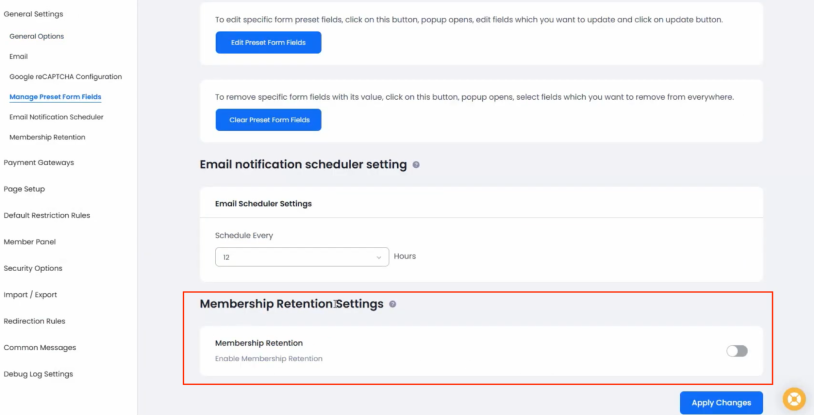
Customize The Retention Message & Page
For the retention details to appear, there should exist a page on your WordPress site with the associated shortcode. When members try to cancel, they are redirected to this page and see your retention offer before completing the cancellation.
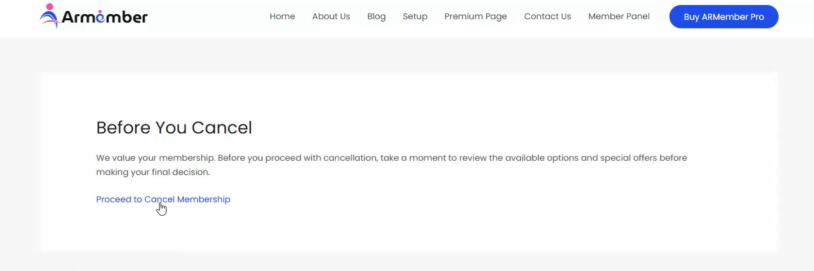
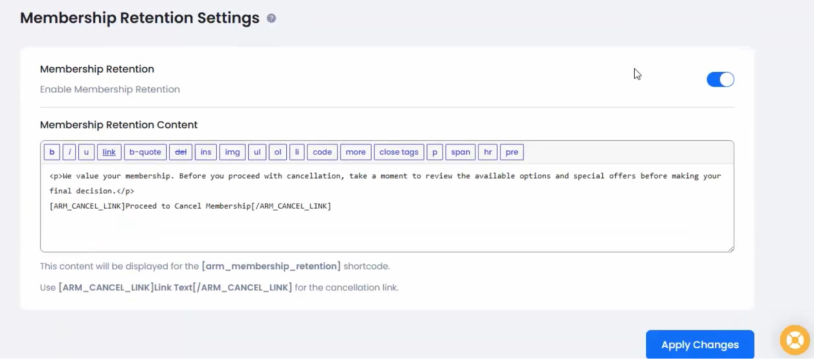
In the message editor, you can customize the message your members will be prompted with.
You can customize this message with text content and tags that get automatically replaced with cancellation links.
Feel free to place any offers, discount or contact details into this message to entice members to postpone their cancellation intention.
To let members continue with cancellation, add this shortcode around the cancellation text:
[ARM_CANCEL_LINK]Proceed to Cancel Membership[/ARM_CANCEL_LINK]
You may check that via ARMember → General Settings → Page Setup. Review the added one or assign another page.
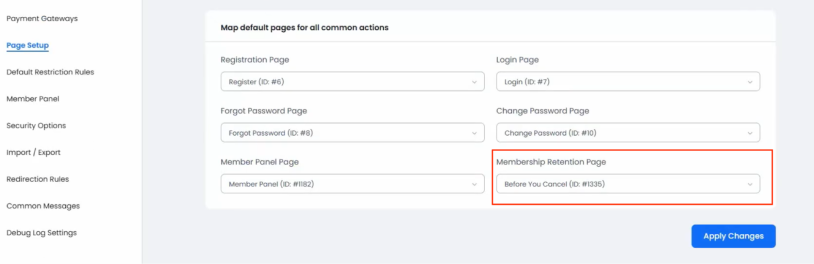
As we’ve said, this shortcode is normally created automatically when you install and activate the add-on.
If that didn’t work for some reason, use these details on the retention page:
The main shortcode:
[arm_membership_retention]
With optional parameters:
- cancel_message to show a custom message after cancellation.
- Cancelled_text to show custom text if the subscription has already been cancelled.
To create a new page manually, add the Membership Shortcodes block via the editor, open the Others tab, and select Membership Retention.
Launch Win-Back Campaigns If Members Eventually Canceled
Membership retention is actually one of the hardest things to implement but it allows you to work even with former members.
You may still try a few hot tips to win back customers who eventually clicked the Cancel button. For example:
- Send them a summary of content added since they left (you still have their email addresses!).
- Suggest a personal discounted reactivation offer.
- Offer an invitation to a new course or event.
- Let them know that their progress or profile is still saved.
- A survey asking what would bring them back.
Some of these may trigger the unsubscribe actions, but if the strategy actually meets the needs of a former member, you can successfully reactivate previously canceled subscriptions, although billing and invoice behavior differ by system.
Concluding: How to Increase Membership Retention In WordPress with ARMember?
Boosting membership retention on your WordPress site requires strategy, tools, and consistent engagement, but ARMember already handles the heavy lifting for you.
You already have automated email sequences, smart content dripping, detailed renewal reporting, and more as the foundation for creating a loyal community.
The new Membership Retention add-on is the perfect final touch for your strategy.
It has the power to transform a cancellation into a productive conversation. You get the tools to offer members personalized alternatives and incentives to stay before they walk away.
Moreover, it’s a super easy thing to implement yet with a huge potential for protecting your subscription revenue.
Related articles:

Share this post


