


In the context of a WordPress membership site, content restrictions may have different aims. Monetization, of course, is a primary goal you’ve just thought of. Marketing and lead generation are smaller supporting goals of monetization. For example?
That means, when you want to place a paywall on your site to sell premium content, it’s clearly monetization, requiring basic content restriction rules like plans, subscriptions, or tiers. When you want to better optimize this, e.g., make sure that the subscribing feels easy or even rewarding for prospects – then it’s more of a marketing-based restriction.
Next, you want to ensure the member experience is smooth and everything is secured – that’s the privacy and security goal you can achieve with specific content restriction rules. Long story short, content restriction strategies and technologies may be different based on your goals.
In this article, we want to specifically look at advanced content restriction techniques for premium memberships sites.
TL;DR: Content restriction is about monetizing your content, lead generation, security, and user flow. Use smart methods like drip content, partial previews and conditional access to boost conversions and member’s experience.
1. Advanced Content Restriction Strategies For Monetization (Primary Goal)
So, when you just want to sell premium lessons or courses, specific paid blog content, or exclusive downloads, basic by-plan/tier restriction is often enough. We’ve already explained multiple times how to restrict content with ARMember so that only paying users can access it.
However, advanced recommended methods include:
- Pay-per-content (unlock single lesson/page) – easy to do with Pay-per-post in ARMember.
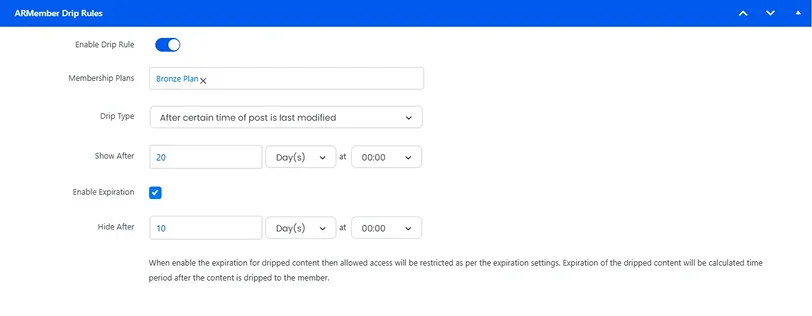
- Drip content (release lessons over time) – a built-in feature of ARMemember.
In ARMember, these methods are built around the best approaches of role-based access (e.g., “Basic”, “Pro”), payment integration (Stripe, PayPal), and access rules per page/post/category.
2. Advanced Restriction Rules For Marketing And Lead Generation
You may want to restrict content to collect emails or generate leads, not necessarily to charge money in the first place. For example, you may offer free lessons (or even courses) in exchange for email, create gated PDFs, webinars, or guides.
For this, most likely you will use methods like
- Freemium model (some free, some locked) – use the free trial option in the ARMember settings.
- Preview + signup wall (partial content restriction).
Use Case With Partial Restriction Using Armember
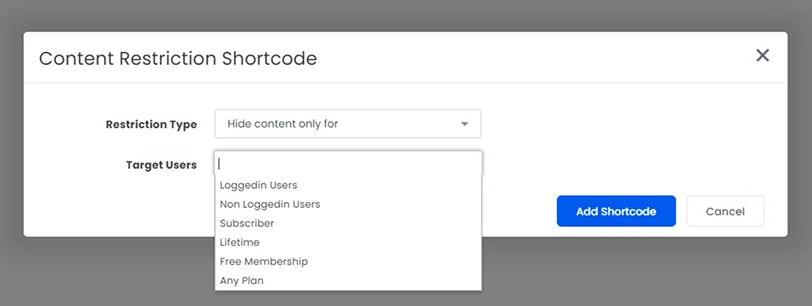
Partial content restriction is an advanced restriction rule, which means showing only part of a page or lesson to users, while locking the rest behind a login or paid plan. It lets visitors preview content before they gain full access.
This method is mainly used for such marketing goals of memberships sites:
- Conversion optimization (users see value before being asked to pay).
- Freemium models (free access with premium upgrades).
- SEO benefits, because search engines can still index visible content.
It makes it easy showing the first few steps of a tutorial, with advanced steps locked (or showing key takeaways from your lessons). You can also use this method to display sample templates, while full downloads hide behind a paid plan.
In ARMember, it works like a basic WordPress shortcode, when you wrap specific sections of content.
Example shortcode:
[arm_restrict_content plan="registered" type="show"]
Premium content
[armelse]
Teaser or upgrade message
[/arm_restrict_content]
This allows you to define:
- Who sees what (guests, logged-in users, or specific plans)
- What is displayed instead (teaser, message, or CTA)
For the best of this approach, you can further integrate with email tools. To improve the impressions of your future customers, you can also allow easy signup/login (Google/social login helps).
When you don’t try to over-lock early-stage users, you improve conversions.
3. Advanced Content Restriction For Security And Privacy
Restrict content to protect sensitive or private information even better. They can apply to some extra efforts (internal training materials, client-only dashboards, confidential resources), as well as basic security tactics.
Popular advanced methods:
- Role-based permissions
- IP restrictions (optional for high security)
- Blocking of specific users or email addresses
- Keywords-based URL blocking
Use Case With Keyword-Based Block Access Using ARMember
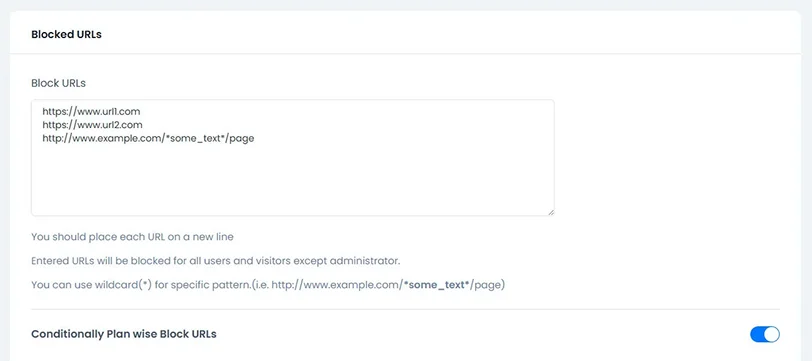
ARMember offers one of the advanced content restriction methods for membership sites: URLs that contain specific keywords are automatically blocked to protect your content.
This gives you a more tailored approach to restricting individual pages/URLs/slugs and content. This will also prevent users from accessing certain pages on your site based on their plan or permissions.
- Go to ARMember → General Settings → Security Options in your WordPress dashboard.
- Find “Block URLs” and scroll down to the Block URLs section.
You can block:
- A single page (example.com/premium-lesson)
- Or multiple pages at once using * (wildcard)
The means “anything in this place”. The wildcard is your rule, not the user’s input. It tells the plugin “Match any text in this part of the URL”. So the plugin checks URLs against your pattern.
Example:
- example.com/course/* → blocks all course pages
- example.com/*premium* → blocks any URL that contains “premium”
You define specific URLs (or patterns of URLs), and the plugin checks: “Is this user allowed to access this page?”
- If yes, they can view it normally.
- If not they either see a message (e.g., “Upgrade to access this page”), or get redirected (e.g., to a pricing or login page).
So, try keyword blocking with full URLs using ARMember’s default settings.
4. Advanced Rules For User Experience And Redirection
Restrict content to guide users through a structured journey. Use cases might include course progression (Lesson 2 unlocks after Lesson 1) and skill-based learning paths.
Method examples:
- Progress-based unlocking
- Sequential access rules
- Conditional redirection
A great way to go is to combine restriction with progress tracking by showing users what’s coming next to boost their motivation.
Use Case With Conditional Redirection Using ARMember
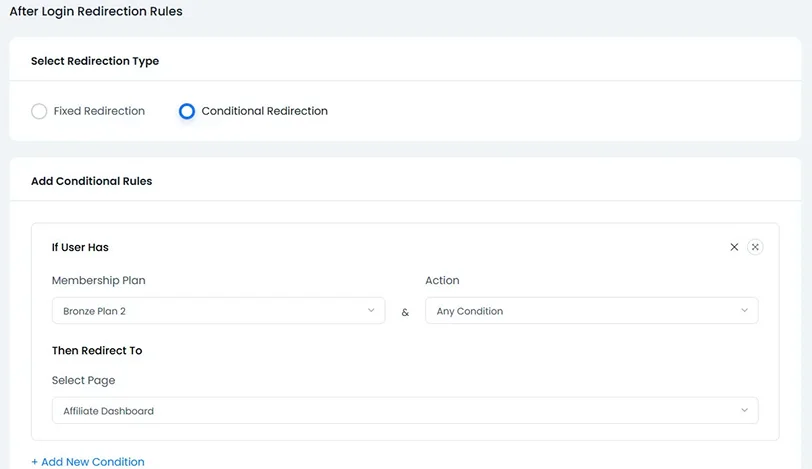
One of the ARMember redirection rules allows you to create a very tailored conditional redirection. It can be applied to login / signup / renew form redirection rules. Conditional rules basically let you send users to different pages based on their situation.
You can create rules based on things like:
- Membership plan.
- First-time login.
- Trial period.
- Grace period. (after expiration)
- Failed or pending payment.
- Time before subscription expires.
To set the rules, go to General Settings → Redirection Rules in your WP dashboard.
To explain it even simpler, use advanced conditional rules when not all users should go to the same place, for example:
- Different plans → different dashboards.
- Trial users → upgrade page.
- Users with payment issues → billing page.
- New users → onboarding flow.
When an action happens (like login or plan change), the plugin does the following:
- Checks the user’s condition (e.g., plan, payment status, account state).
- Match it with your rules.
- Redirects the user to the corresponding page.
If no condition matches, default redirect is used (can also be set along with conditional rules).
If you’re using conditional redirection with ARMember, don’t forget that these rules only work when user act through ARMember login or signup forms, and make sure to:
- Always set a default redirect; in case no condition matches.
- Keep rules simple because too many conditions can conflict or become hard to manage.
Concluding: Content Restriction Strategies for WordPress Membership Sites
To conclude on the advanced content restriction strategies with ARMember, let’s list a few best practices when these rules make sense for premium membership sites on WordPress:
- Show the value of your content or services before locking them.
- Keep access logical and simple.
- Improve monetization with clear upgrade paths and content dripping rules.
- Optimize login experiences for faster login and smarter redirection.
- Create content restriction rules for edge cases (subscription expires / payment fails)
Ready to create a membership content flow that feels seamless for your users and drives real conversions for your business?
Related articles:
- How to Run a “Pause Instead of Cancel” Membership Strategy
- Benefits to Setup Auto Drip Content on Membership Site
- 7 Membership Engagement Strategies That Actually Work in 2026
FAQs
What is content restriction in a WordPress membership site?
Content restriction in WordPress membership sites is the process of limiting access to specific pages, posts, partial content or any area of content based on user roles, membership plans or login status.
How do I restrict content in WordPress without affecting SEO?
You can use partial content restriction (preview + lock) so search engines can index visible content while premium sections stay protected.
What are the best content restriction strategies for monetization?
- Pay-per-content. (single purchase access)
- Membership tiers. (Basic, Pro, Premium)
- Drip content. (time-based access)
How can content restriction improve conversions?
By showing value before locking content like previews or free trials, people are more likely to trust and upgrade.
What is partial content restriction and when should I use it?
Partial content restriction shows a small portion of content (decided by you) while locking the rest behind a paywall. You can use it for better:
- Lead generation
- SEO visibility
- Conversion optimization
Can I restrict content based on user behavior or conditions?
Yes, you can! Most of all restrict content WordPress plugins such as ARMember has advanced rules that allows conditional access based on:
- Membership plan
- Login status
- Payment status
- Trial or subscription stage
How do I protect premium content from unauthorized access?
You can use advanced methods such as:
- Role-based access control
- URL keyword blocking
- IP restrictions
- User/email blocking
Which WordPress plugin is best for content restriction?
ARMember is the WordPress plugin for content restriction. It offers advanced features such as drip content, partial restriction and conditional redirection for full control.

Share this post


