


If you need to build a WordPress site with downloadable content from member-only pages, congrats, this is one of the most sustainable ways to generate recurring revenue online.
Digital products, educational resources, premium templates, business documents – you can sell anything inside a smart members-only download area on WordPress (or give for free to logged-in users, needless to say). And there is a simple plugin that allows you to control access while creating ongoing value for subscribers.
So, let’s build a secure download library where members gain access based on their subscription plan, so that only paying customers can access premium resources or anyone can get free content if they create an account.
In this WordPress member only downloads tutorial, you’ll learn how to create a WordPress members-only download area using ARMember and its Digital Download add-on.
TL;DR: Creating WordPress members only downloads without coding is easy using ARMember and its Digital Download add-on. It lets you build a secure members-only download library, restrict files based on membership plans, accept payments via 22+ payment gateways and automate member access in just a few steps.
When is Members-Only Download Area Used?

Many businesses and creators use it! If you want to protect downloadable resources behind a membership paywall, you might be in one of the categories:
- Online course creators: Provide students with course materials and worksheets, PDFs, lesson summaries, assignments, presentation slides, and bonus content.
- Fitness coaches and personal trainers: You may have a site to offer workout plans, nutrition guides, recipe books, exercise programs, and progress trackers as an addition to the main content or actually as the main one.
- Photographers and designers: Sell stock photos, graphic templates, presets, icons, fonts, and design resources.
- Software companies: Such companies may want to have a separate space to provide software downloads, updates, documentation, installation guides, and premium support resources.
- Marketing agencies and consultants: If you work as a coach or consultant, why not provide downloadable templates, marketing toolkits, business plans, checklists, contracts, and industry reports.
- Educational membership sites: Create a resource library containing study materials, eBooks, research papers, and training manuals.
- Professional associations: Any type of such may need to create members access to exclusive publications, certification materials, event recordings, and industry resources.
Why Use ARMember for WordPress Member Only Downloads?
Providing member-only downloads is a story that deals with accounts. ARMember is an all-in-one WordPress membership plugin that allows you to create subscription-based websites, allow people to register accounts, protect content, manage memberships, and sell access to exclusive resources.
It combines membership management, payment processing, digital downloads, access control, and user engagement tools within a single solution. Some of the truly important features you’ll love include:
- Create unlimited membership plans
- Choose billing type – recurring or one-time
- Apply content restriction rules
- Drip content scheduling
- Built-in payment gateway integrations
- Automated member communications
- Coupon and discount support
- Tax and VAT management
- Member profile management
- Social and community features.
Creating WordPress Member Only Downloads Without Coding
Next, we’re jumping to a step-by-step tutorial on creating a professional download portal where members receive access based on their subscription level.
Step 1: Install and Activate ARMember
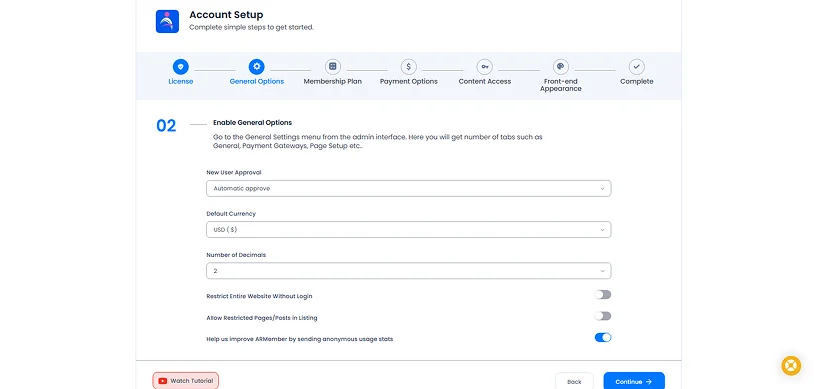
Install ARMember on your WordPress website via Plugins → Add New Plugin and then activate it.
After the activation, there will be a wizard to speed up the workflow with:
- Membership pages
- Registration forms
- Login forms
- Default settings
- Payment options
You can revisit these settings at any time.
Step 2: Create Membership Plans
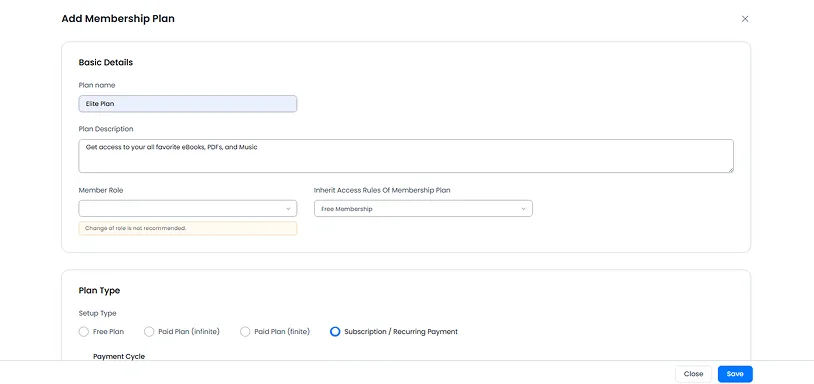
The next step is defining the membership levels that will determine download access. You can do it via ARMember → Manage Plans → Click Add New Plan.
Your plans should reflect how you want to organize your download library, for instance:
– Starter Download Plan (access to beginner resources)
– Professional Resource Plan (full download library access)
– Agency Plan (all plus exclusive releases).
– Monthly Membership (provides ongoing access while subscribed).
– Annual Membership (offers discounted yearly access).
– Lifetime Access (one-time payment for permanent download access).
Then, for every plan, you need to define:
– Plan Name (e.g Professional Resource Library)
– Plan Type (free, paid, recurring subscription)
– Pricing (monthly fee, annual fee, one-time)
– Billing settings (subscription intervals, trial periods, renewal options).
Step 3: Restrict Content and Download Access
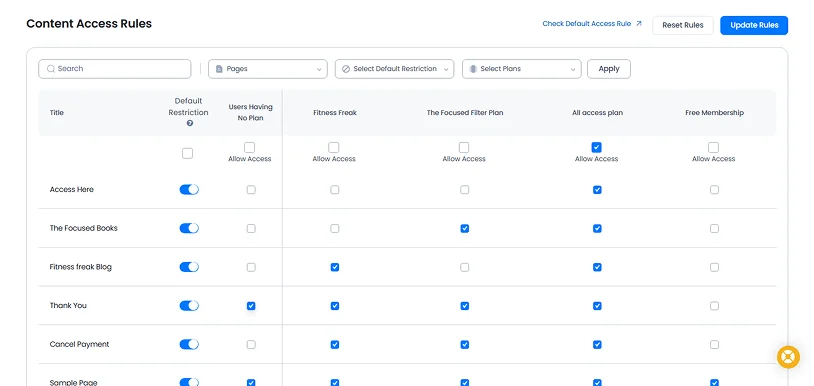
Now it’s time to decide which content members can access. Go to: ARMember → Content Access Rules.
This menu comes with an intuitive table, where you can set access to download libraries via
- Pages
- Posts
- Categories
- Custom Post Types
You can create rules based on membership level.
For example, if you create a page called ‘Premium Downloads’, you can restrict it to paying members only.
Non-members can be redirected to:
- Registration pages
- Pricing pages
- Upgrade pages
You can also apply content dripping rules to release downloadable resources to your members. It’s usually employed in premium content libraries, e.g. you may work for weekly training plans and monthly template packs.
Step 4: Set Up a Paywall with Online Payments
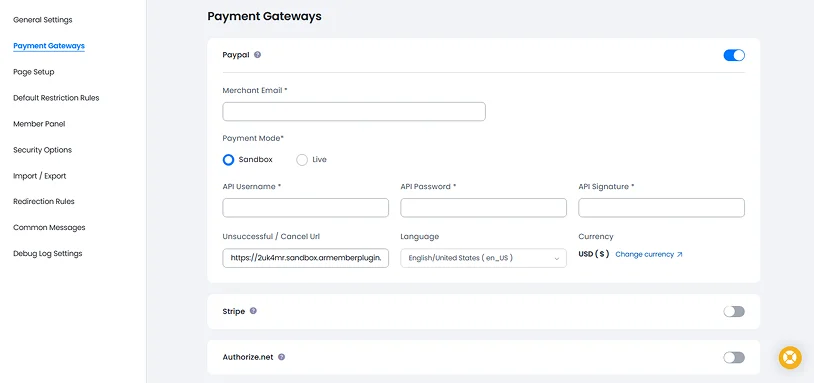
Time to set up monetization for your downloads! To collect payments for WordPress member only downloads in WordPress, configure your preferred payment gateway via ARMember → General Settings → Payment Gateways.
ARMember supports over 22+ payment gateways without coding or extra plugins, including:
- PayPal
- Stripe
- Square
- Skrill
- Braintree
- Klarna
- Authorize.Net
- Razorpay
- PayFast
- Mollie
Enable the gateway you want to use (it requires completing the API settings).
For the payment gateway you choose, you can also customize currency, taxes, VAT settings, coupons, promotional discounts, trial subscriptions, recurring billing, and one-time purchases.
ARMember gives you even more customization for:
- Invoice management
- Gift memberships
- Subscription management
- Affiliate marketing integrations
So, if your payment processing is ready, members can register, subscribe, and immediately gain access to protected downloads.
Step 5: Set Up Automated Member Communication
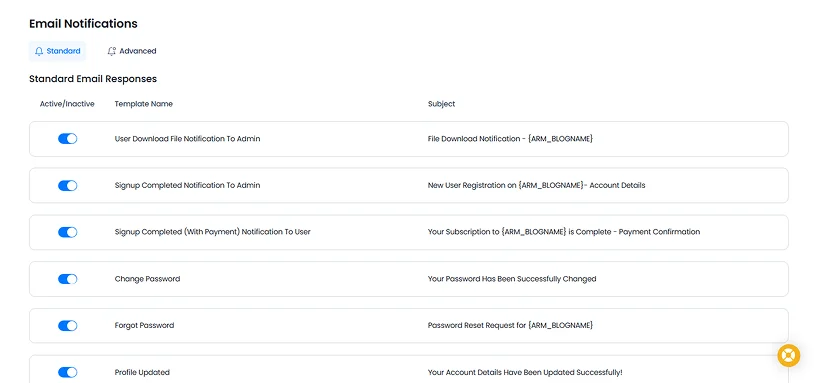
ARMember ships with automation tools for the most important actions: ARMember → Email Notifications.
Here, you can set templates to automate welcome emails, login details, member dashboard links, and download library instructions.
You can send renewal reminders, upgrade promotions, and automate various notifications. The plugin can send receipts, payment confirmations, and subscription updates via the methods you prefer, even SMS or messaging apps.
Step 6: Install and Configure the ARMember Digital Download Addon
To create a professional members-only download library, install the Digital Download addon from the Add-ons page via ARMember.
After you activate it, a dedicated download management section becomes available.
Upload Downloadable Files & Assign Downloads To Membership Plans
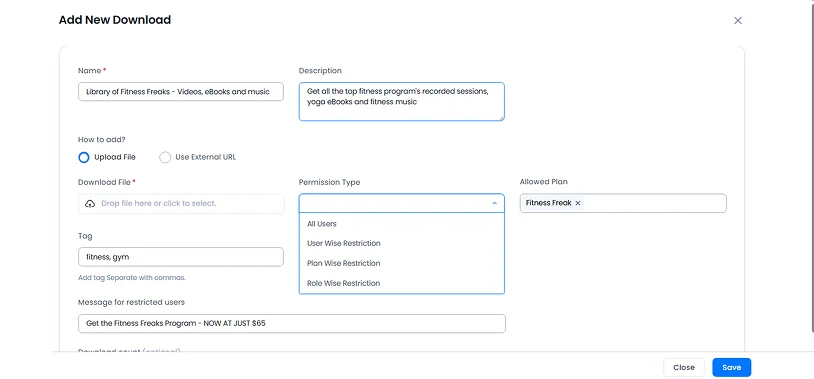
To upload your files, go to ARMember → Digital Downloads → Add New Download → Upload your files directly through WordPress.
What can you upload? A lot of things can be WordPress member only downloads:
- PDF guides
- eBooks
- Excel spreadsheets
- ZIP files
- Templates
- Software packages
- Audio files
- Video resources
For each download, the plugin allows you to configure:
– Download title and description
– File upload
– Define category
– Set permission type (for which members)
– Add a message to users
– Optionally set up a downloads limit
For example, you can organize resources into groups to make it easier to navigate with:
- Templates
- Guides
- Training materials
- Premium downloads
You can also use the bulk downloads by clicking Bulk Import in the top-right corner. Upload your CSV file, configure the import settings as needed, and start the import. You can also download the provided sample CSV template and simply replace the example data with your own download information.
The most important step is linking resources to specific plans. Within each download item, choose which membership plans can access it, so that only those memberships will see and download those files.
Use the permission type for this in the file upload settings:
- All Users (all members)
- User-Wise Restriction (for specific users)
- Plan Wise Restriction (restrict access based on membership plans)
- Role-wise Restriction (restrict access based on WordPress roles).
Display Downloads In Member Areas
You can place WordPress member only downloads on dedicated member pages using the provided ARMember shortcodes and display options (take a look at shortcodes). For example, if you want to add a specific downloadable item on a page in WordPress, add the ARMember shortcodes block first (in the WordPress block editor), then choose Digital Downloads, set your settings, and insert the file into the page.
Common examples include:
– Resource Center (a searchable library containing all available downloads).
– Plan-Specific Dashboards (members see only the files included in their subscription).
– Category-Based Libraries (separate sections for eBooks, templates, worksheets, and toolkits).
Managing Your Download Library
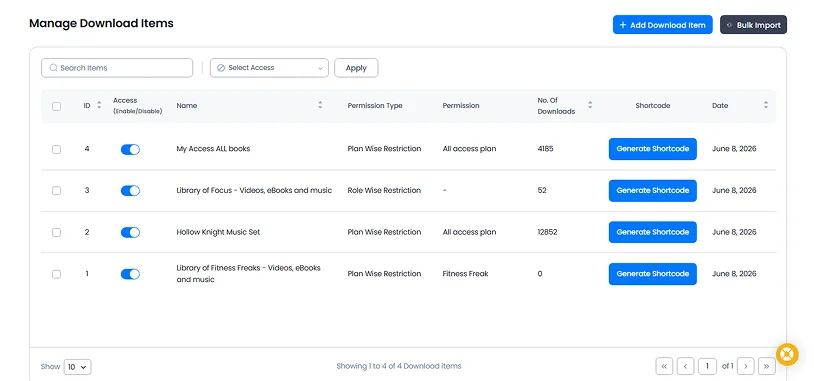
You can maintain your library with easy tools:
- Uploading new resources
- Updating existing files
- Removing outdated content
- Creating new categories
- Tracking member access.
Concluding: How to Create WordPress Member Only Downloads?
A members-only download area can transform a simple WordPress website into a recurring revenue business or simply meet your needs if you want to build a private library of downloads. If your goal is selling/giving away educational resources, digital products, templates, or software, controlling access through membership plans helps create a professional platform for that.
Using ARMember together with the Digital Download add-on, you are one step away from building a secure download library, automating memberships, accepting payments, managing subscribers, and delivering resources based on membership levels – without any coding!
Related articles:

Share this post


