


You spent hours creating your course, tutorial or premium video.
But if it’s hosted incorrectly on WordPress, someone can right-click, copy the URL, or share their login…and your paid content spreads for free.
Most creators think hiding the page is “protection.” It’s not.
Protecting video content in WordPress means adding layered security, hosting control, download prevention, access restrictions, and login abuse protection.
If you want to learn how to protect video content on WordPress the right way, without damaging user experience, this guide explains the exact framework to follow.
TL;DR: Effective WordPress video protection works as a layered system including hosting-Level protection, access control with ARMember WordPress membership plugin, download prevention, and login & session abuse prevention.
Can You Fully Protect a Video from Being Copied?

No, you cannot fully protect a video from being copied.
If someone can watch it on a screen, they can technically record it. Screen capture software, external recording devices and even smartphones make 100% protection impossible.
But that’s not the real question. The real question is: Can you make copying difficult, traceable and commercially pointless?
Yes! And that’s what smart WordPress video protection is about. There’s no such thing as “unbreakable” protection. It’s technically impossible. Even Netflix cannot stop screen recording, nor YouTube can stop downloads completely.
However, what you CAN do is lower the risk by:
- Preventing direct file downloads.
- Blocking public video URLs.
- Restricting access to paying users only.
- Limiting login sharing.
- Using private or token-based streaming.
This layered approach doesn’t promise perfection yet, it dramatically lowers casual piracy, protects recurring revenue and discourages abuse.
In other words, you don’t protect the file alone, you protect access.
WordPress video protection isn’t about locking a file. It’s about controlling access. When done the right way, layered protection prevents direct downloads, login sharing, URL leaks, and unauthorized access.
What Does “Video Protection” in WordPress Actually Mean?
Video protection in WordPress does not mean hiding a page or uploading a file privately. It means controlling:
- Who can access the video
- How they access it
- How long they can access it
- Whether the file URL is exposed
- Whether the video can be easily downloaded
- Whether accounts are being shared
In simple terms, WordPress video protection is about protecting access, not just the file itself.
- If your video file sits in the Media Library with a public URL, it can be shared.
- If user logins can be shared freely, paid content spreads.
- If downloads aren’t restricted, your product becomes a file on someone’s hard drive.
Protecting video content on WordPress is about lowering these exposure points before they become revenue leaks.
So when people search “protect video WordPress” or “secure video content,” what they actually need is a layered security framework, not a single plugin toggle.
Why Uploading Videos Directly to WordPress Is Risky
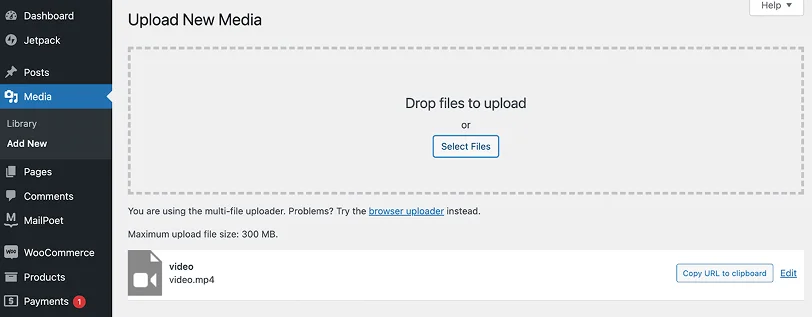
Uploading videos directly to the WordPress Media Library sure looks simple, but it creates security and performance risks that many creators overlook.
When you upload a video file to your WordPress, it generates a direct file URL. And if someone copies that URL, they can access the file outside your protected page right away.
Thus even if you restrict the page, the raw file is still reachable.
Here’s why that’s risky:
- Direct File Access: WordPress stores media files in the /wp-content/uploads/ directory. If the file URL becomes public, it can be shared, downloaded or embedded elsewhere. It’ll bypass your content protection strategy.
- Easy Download Exposure: When videos are hosted directly on your server, users (or browser tools) can often inspect the page source and find the file link. Once the URL is exposed, preventing video downloads is tough.
- Server Performance Problems: Video files are large. Hosting them directly on WordPress can slow down your site and SEO.
- No Built-In Access Intelligence: WordPress alone does not limit login sharing, track unusual viewing behavior or rotate temporary video URLs. Your content is far easier to redistribute.
Now let’s see how serious WordPress creators and business owners protect video content today.
The 4 Layers of WordPress Video Protection
1: Hosting-Level Protection (Where Most Creators Fail)

Most creators fail before they even begin protecting their video.
Why? Because they treat hosting and protection as separate decisions. They upload the file to the WordPress Media Library, embed it on a restricted page and assume the job is done.
It’s not!
Here’s what most creators and business owners get wrong. They focus only on:
- Disabling right click.
- Restricting the page.
- Adding an access rule.
- And that’s it!
But none of these protect the underlying file. If someone can access the direct video URL, they can bypass page level restrictions completely.
That’s why hosting level security is the foundation of WordPress video protection.
The hosting level protection controls how the video file is delivered before WordPress page rules even apply. Powerful hosting protection includes:
- Private or unlisted video storage.
- Signed or expiring URLs.
- Token-based playback.
- Referrer restrictions.
- CDN-level access control.
- HLS streaming instead of direct MP4 file serving.
Without this layer, even the best membership setup cannot fully protect your content because the file itself remains publicly accessible.
2. Restrict Access a Membership Plugin
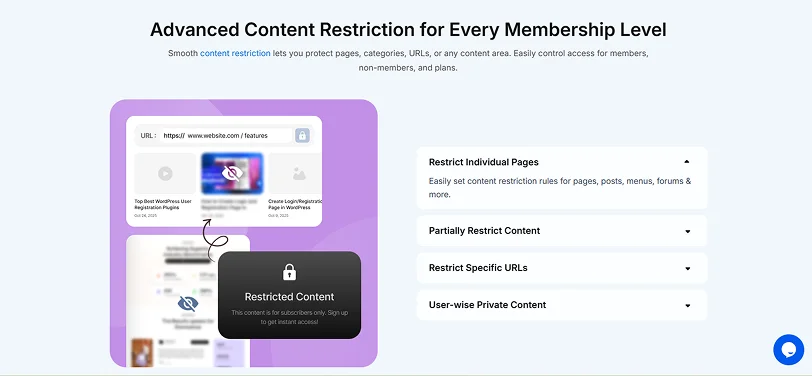
Once your video is securely hosted, the next layer is controlling who can actually view the video.
This is where many creators confuse “privacy” with protection. Password-protecting a page is not enough. Hiding a URL is not enough.
If you want to protect video content on WordPress, you must restrict access at the user level, and that’s exactly what a membership plugin offers.
WordPress alone does not offer structured subscription based protection. A dedicated membership plugin like ARMember allows you to:
- Create unlimited paid membership plans
- Restrict video pages to specific user roles or plans
- Protect custom post types and course content
- Drip videos over a period of time
- Restrict content access after subscription expires
- Manage recurring payments
- Automatically remove access if payment fails
- Control user permissions in a structured way
This turns your videos into controlled digital assets. Without this layer, anyone with a shared login or leaked URL could access your premium content.
If your videos are a part of:
- An online course.
- A coaching program.
- A corporate training system.
- A premium content library.
- A subscription-based learning platform.
Then your video is your product. And products need structured access control.
Hosting-level protection secures the video file. Yet, access control decides who is allowed to watch it. These are not the same thing.
- File security = delivery control (how the video is served)
- Page restriction = access control (who can reach the page)
You need both.
3. Blocking Direct Video Downloads in WordPress

If you want to protect video from download in WordPress, you must understand one important truth:
You can’t stop every possible recording method….but you can block direct file extraction.
This security layer is to prevent users from easily downloading your video file from the browser. And to prevent users from downloading videos from your WordPress page, lets understand why videos get downloaded so easily.
When a video is served as a direct MP4 file, users can simply:
- Inspect the page source
- Open the browser’s Network tab
- Copy the media file URL
- Use download extensions
- Save the file directly
If the raw file URL is accessible, your video can usually be downloaded in seconds. That’s not secure video content, that’s public file delivery.
Thus to avoid it and lower download risk in WordPress, you should:
- Avoid Direct MP4 Embeds: Never upload and serve raw MP4 files publicly from your Media Library.
- Use Streaming Instead of File Delivery: HLS or segmented streaming makes direct file extraction harder than simple file links.
- Enable Signed or Expiring URLs: Use temporary URLs to stop users from sharing video links for a long term.
- Disable Native Download Controls in Players: Many video players allow you to remove download buttons and stop right-click actions. Just do it.
- Restrict Access at the Page + Hosting Level: Download prevention works best when combined with membership access rules and secure hosting.
However, download prevention does not promise zero copying. It accomplishes something more practical:
- Stop casual downloading.
- Prevents easy file sharing.
- Blocks simple URL leaks.
- Lowers piracy at scale.
- Protects paid content value.
For most WordPress creators and business owners, stopping “easy extraction” is enough to protect revenue. But there’s one more risk many overlook.
Even if users can’t access the digital download file, they can share their login credentials.
That’s why Layer 4 : preventing login sharing and member abuse, is critical.
4. Preventing Login Sharing & Member Abuse
Even if you secure hosting and prevent downloads, there’s still one major vulnerability:
Users sharing their login credentials.
For membership sites, online courses and training libraries, this is one of the most common ways protected video content WordPress gets distributed.
If five people use one paid account, your WordPress video protection is technically working, but your revenue model isn’t.
When accounts are shared:
- Multiple users access premium videos from different locations.
- Subscription revenue is diluted.
- Tiered access structures break.
- Usage data becomes unreliable.
- Abuse becomes difficult to track.
And unlike file piracy, this type of abuse often goes unnoticed for months.
That’s why to properly protect your video content on WordPress sites, you need more than basic login limits.
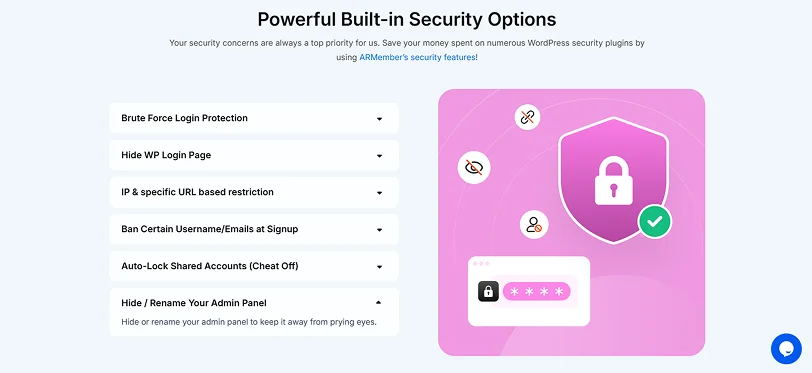
The best part? ARMember, the best WordPress membership plugin, comes with built-in security controls that actively monitor and restrict suspicious behavior.
ARMember membership plugin saves you hundreds of bucks spent on multiple WordPress security plugins by offering built-in security features that allows you to:
- Limit or Auto-Lock Shared Accounts: Automatically lock accounts if multiple users attempt to access the same membership again and again. This stops credential sharing right before it even spreads.
- Brute Force Login Protection: Block repeated failed login attempts from unauthorized users trying to guess credentials.
- Hide or Rename the WP Login Page: Changing or hiding the default login URL lowers automated attacks and targeted abuse.
- IP & Specific URL Restrictions: Restrict access based on IP rules or limit video access to specific secure URLs.
- Ban Certain Usernames or Emails at Signup: Simply restrict disposable, suspicious or blacklisted email domains from registering.
At this point, you’re no longer just trying to “protect a video file.” You’re protecting:
- Access.
- Revenue.
- Subscription value
- Business sustainability.
And that’s the real goal of WordPress video protection.
Final Thoughts: Protect Access, Not Just the File
You can’t make a video impossible to copy. No platform can. But you can control who accesses it, how long they can view it and how securely it’s delivered.
That’s what real protecting video content with WordPress means. Just focus on layered access control:
- Secure hosting
- Restricted pages
- Login monitoring
- And session limits.
When access is controlled, revenue is protected.
For online course creators and membership sites, protecting the user access layer is far more powerful than trying to hide the video file itself. And ARMember is Pro at it.
It is one of the high-end membership plugins that comes with built-in security features, advanced content restriction and drip content features to protect video content WordPress.
Ready to protect your video content the right way? Start creating a secure member-only video experience with ARMember today.
Related Articles:
- How to Sell Videos Online? 2026 Guide for Creators & Coaches
- 9 Best Video Membership WordPress Themes [Recommended]
- 7 Membership Site Security Tips to Protect Your Website
FAQs
How To Secure Video Content?
- Host videos on a private streaming platform.
- Restrict access with a membership plugin such as ARMember.
- Prevent direct file downloads.
- Limit login sharing.
How Can I Protect My Video From Being Copied?
You cannot fully prevent a video from being copied because screen recording is always possible. However, you can lower copying by using private hosting, disabling direct file access, enabling streaming instead of MP4 downloads and restricting access to paying users only.
How To Prevent Video Downloads In WordPress?
- Never upload raw MP4 files to the Media Library.
- Use a secure streaming service like HLS or token-based playback.
- Enable signed or expiring video URLs.
- Disable download buttons in the video player.
- Restrict page access with a membership plugin.
How To Secure Media Files In WordPress?
For securing paid media files in WordPress, use a secure hosting with membership based access control.

Share this post


