





Not sure which WordPress affiliate plugin to choose? Starting off, think about how you plan to use it.
Do you want to start an affiliate marketing program and let others promote your products? Or do you want to manage links for products you promote? No matter which side of affiliate marketing you’re on, a good plugin can handle the routine work, so you don’t have to track referrals, manage links, or send payouts by hand.
I tested affiliate marketing plugins for both uses. I compared their main features, integrations, user interface, strengths and limitations to help you find one that fits your needs. Plus, I also reviewed and ranked them based on 4 things:
- What they’re built for
- The features they offer
- How easy they are to set up
- How much they cost
So, let’s get into the list.
TL;DR: I tested more than 30 affiliate marketing plugins on a WordPress test site. For running your own affiliate program, I’ll recommend AffiliatePress as the best WordPress affiliate plugin. For managing and clocking affiliate links, I’ll go with Pretty Links.
How I Tested These Affiliate Marketing Plugins
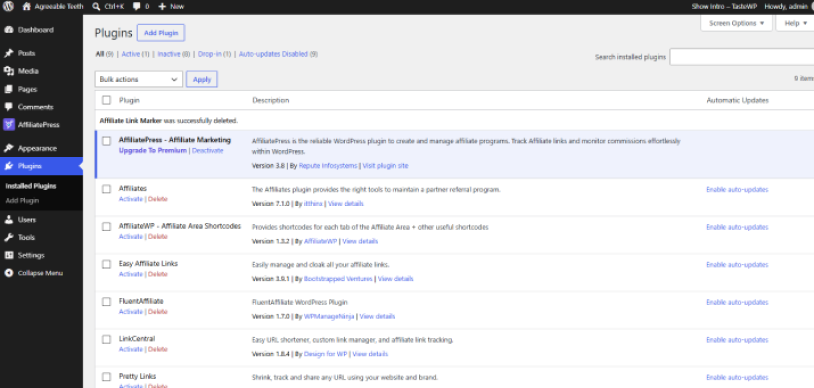
To hand you over an authentic, hands-on review of top rated affiliate tools, I installed, tried, and tested over 30+ affiliate plugins, on a dedicated WordPress test site. Out of which, only the top 6 managed to make it into my list.
Hands-on testing allows me to put each of the plugins through its paces in a controlled, real WordPress environment and see exactly how it performs your day-to-day tasks, separating actual value from marketing hype. Plus, testing every plugin myself lets me judge what really works, not what sounds good.
My Testing Environment
| Environment component | Test configuration |
| CMS | WordPress 6.8.x |
| PHP version | 8.2 |
| Database | MySQL 8.0 |
| E-commerce platform | WooCommerce 10.x |
| Website theme | Astra |
| Hosting environment | Managed WordPress staging |
| Test website | 1 staging website |
| Sample products | 100 |
| Sample orders | 1000 |
| Test affiliates | 25 |
| Test referral links | 50 |
| Test browsers | Chrome, Firefox, Safari |
| Test devices | Desktop, tablet, mobile |
The goal behind this honest comparison guide is simple: show you which affiliate plugin truly gives you value, affiliate management features, and the right set of the integrations you want.
To compare these plugins fairly, we looked at six practical areas:
- Ease of Use: How simple it is to set up and use inside WordPress
- Click Reporting: What click data it tracks and how clearly it reports it
- Link Organization: How well it helps you create, sort and manage affiliate links
- Link Presentation: What options it offers for customizing and showing links
- Automation: Whether it can automate repetitive tasks such as adding affiliate
- links to keywords
- Technical Health: How it manages redirects and broken links. Plus, whether it creates any SEO or site management concerns
- Money Worth: If you’re buying premium, does it gives you ongoing updates, good technical support and beginner-friendly documentation
However, for affiliate program management plugins, this key criteria changes a little bit. Because I also checked and ranked them based on the integrations they offer, commission flexibility and payout process. Afterall, that’s what matters most for affiliate program managers.
Quick Comparison: Best WordPress Affiliate Plugins
Before the full reviews, here’s a side-by-side look at the six plugins.
However, I still insist that you not stop at just a quick look, and actually read the detailed review to make the right buying decision.
| Plugin | Type | Best For | Free Version | Starting Price |
| AffiliatePress | Affiliate program management | Businesses launching their own affiliate programs | Yes | $79/year |
| Pretty Links | Affiliate link management | Bloggers and marketers managing affiliate links | Yes | $99.60/year (first year) |
| ThirstyAffiliates | Affiliate link management | Bloggers who want link cloaking and automation | Yes | $99.60/year (first year) |
| Affiliate for WooCommerce | Affiliate program management | WooCommerce store owners | No | $99/year |
| YITH WooCommerce Affiliates | Affiliate program management | WooCommerce stores running referral programs | Yes | $179.99/year |
| AAWP | Amazon affiliate marketing | Amazon Associates and product review websites | No | €79/year |
Pricing verified from vendor’s official websites on November 26, 2026.
6 Best Affiliate Plugins For WordPress (Expert Review)
1. AffiliatePress
AffiliatePress is the best WordPress affiliate plugin for running your own in-house affiliate program, bringing complete affiliate management right into your dashboard.
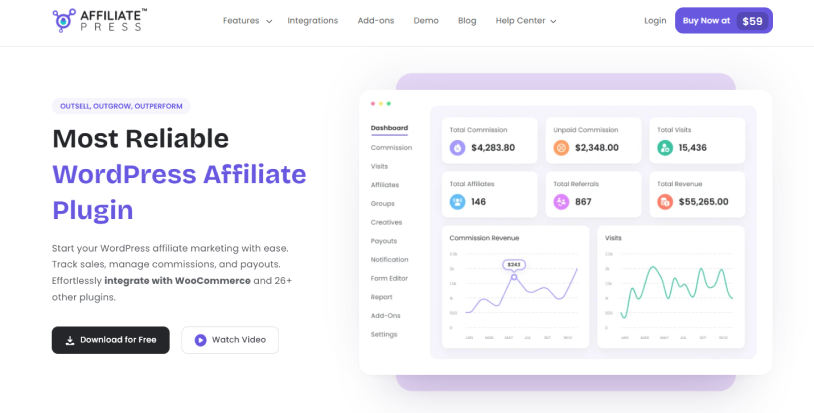
It’s the most reliable and complete affiliate program manager in the whole WordPress ecosystem, and it’s the one I personally recommend first to any business owner.
No matter whether you run an eCommerce store, service business, a nonprofit organization, membership platform, or an online eLearning academy, AffiliatePress connects and works with 26+ popular WordPress plugins.
My Experience
When I first installed and activated it, this plugin felt like a breath of fresh air. Most WordPress affiliate plugins I tested (like AffiliateWP and Easy Affiliate) feel like they were designed ten years ago, so AffiliatePress’s clean and modern interface was a welcome surprise.
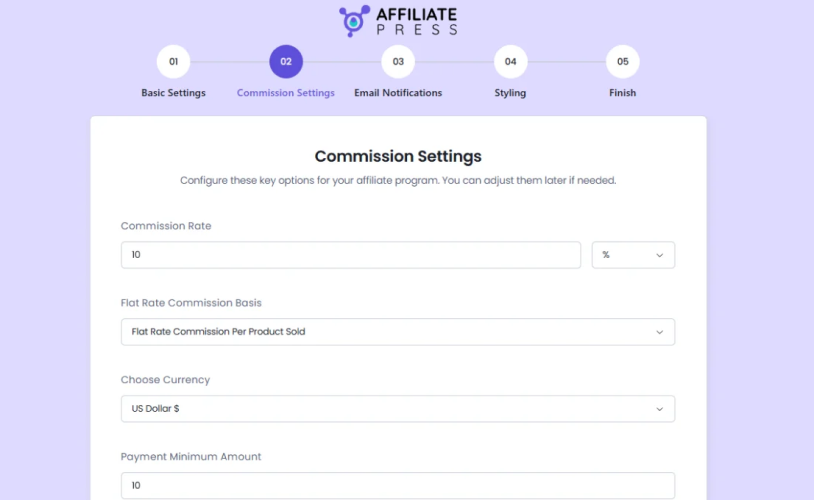
The setup is genuinely easy thanks to its setup wizard that walks you through all initial settings including currency, integrations, default commission rates, and styling.
The best part? It automatically generates both the Affiliate signup page and the Affiliate dashboard using shortcodes, meaning I didn’t have to mess with custom CSS just to make the portal look more presentable.
My favorite feature is the Affiliate panel that comes even in free plan. It onboards affiliates automatically and gives each one them their own dedicated dashboard to track clicks, visits, and access creatives given by you. You can also assign coupon codes, dedicated landing pages, and even unique QR codes to each affiliate.
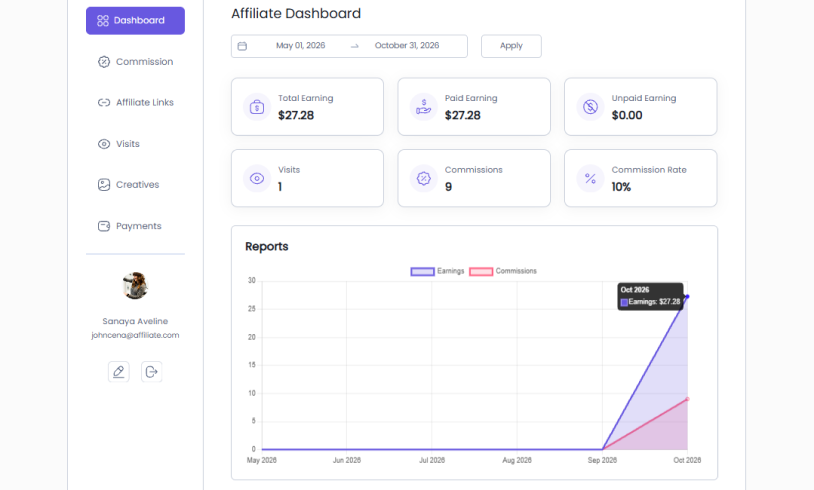
Once the test store was live, I ran a few mock referral purchases and tested different reward rules. Connecting it to WooCommerce took one click, and it supports over 26+ other popular tools including EDD, MemberPress and LearnDash, right out of the box.
Apart from that, beyond just basic flat-rate or percentage commissions, I tested product-specific rates, tiered groups (like Bronze, Silver, and Gold Partners), recurring commissions for subscriptions as well as lifetime and multi-level affiliate commissions. To my surprise, everything was calculated accurately in real time.
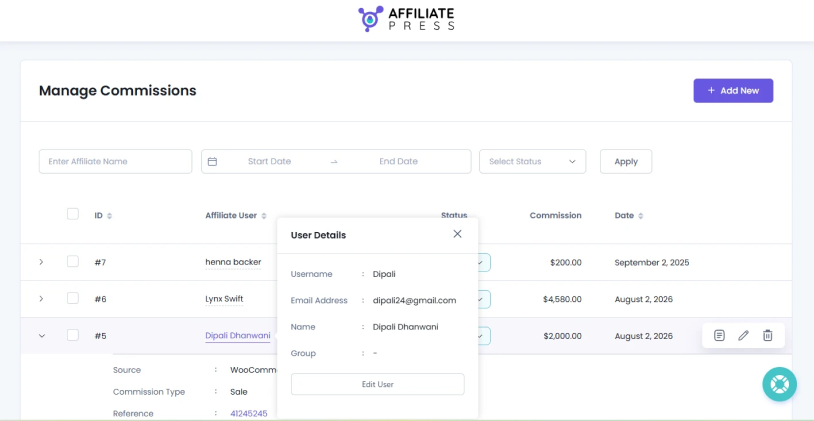
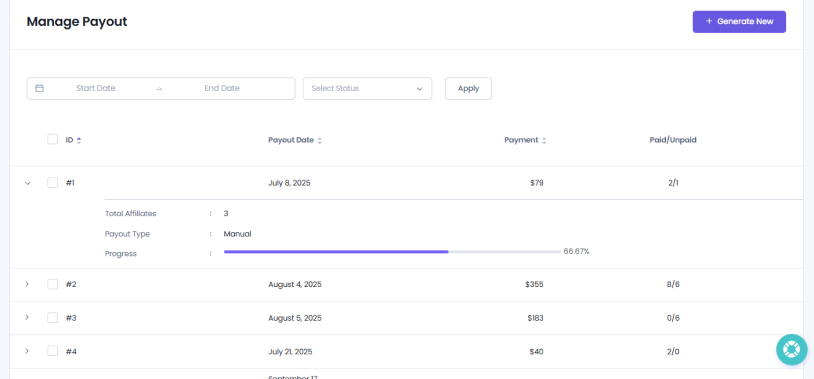
From the admin side, the dashboard gives a clear snapshot of clicks, unpaid commissions and top-performing partners. When it came time to test payouts, having automatic or 1-click mass payouts via PayPal and Stripe meant you wouldn’t have to export spreadsheets and pay people one by one.
Top Features
- Easy setup thanks to 10-minute setup wizard
- Deep integrations with 26+ WordPress plugins
- Flexible Commission structures
- Automatic or 1-click payouts
- Modern affiliate panel
- Smart fraud detection and refund protection
- Performance and signup bonus
Pricing and plans
AffiliatePress comes with a generous free version, including WooCommerce & 24+ other plugins integration, unlimited affiliates, commissions and payouts alongside smart admin and affiliate panel. Premium plans start at $79/year, then $139/year and $249/year with free installation and setup on high-tier plans. The lifetime plans are also available starting at $179/year.
My Honest Take
If you want an all-in-one, self-hosted affiliate system that doesn’t require a developer to set up, AffiliatePress hits a sweet spot between beginner friendly design and advanced features. It works perfectly well for WooCommerce store owners, course creators and membership sites looking to scale word-of-mouth sales without losing a cut of their revenue to a third-party network.
2. Pretty Links
Pretty Links is the pick for the other side of affiliate marketing: auto-monetization, managing and link cloaking as you promote as an affiliate.

If you ever started at a messy, 150-character affiliate URL and hesitated to paste it into a blog post, Pretty Links is the exact fix I keep coming back to.
As it name suggests, Pretty Links will turn your ugly-looking URLS into short, pretty gorgeous links on your own domains (like ://yoursite.com)
My Experience
Pasting a raw affiliate link and turning it into a branded short URL takes less than ten seconds. Plus, it lets you toggle ‘nofollow’ and ‘sponsored’ tags with just a single click so your links stay SEO-safe always, right out of the box.
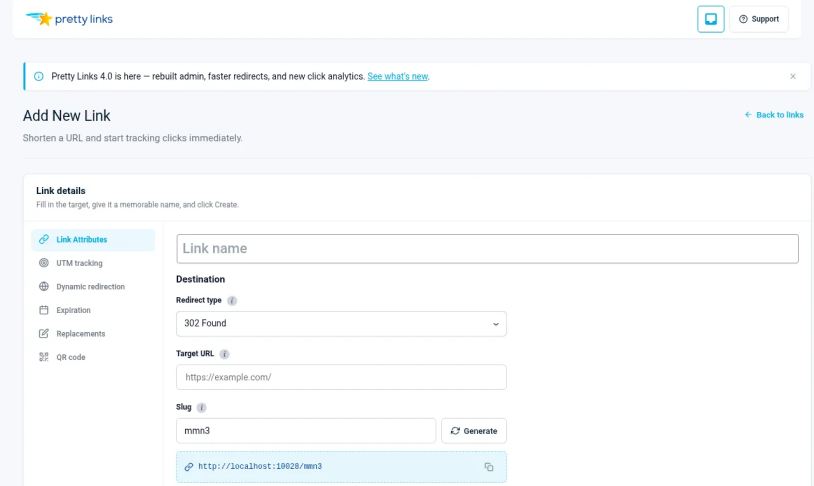
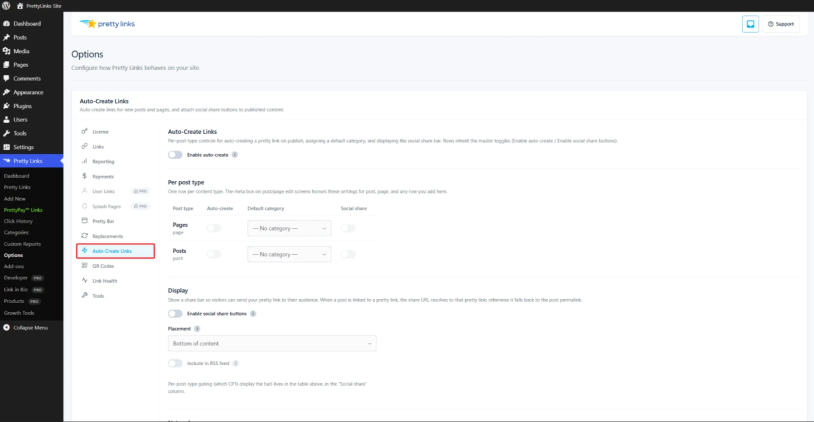
In the pro version, you can assign specific keywords such as a software name, so the plugin automatically also links them across your blog posts. This way, you don’t have to search around to find and edit articles by hand.
Apart from that, you get a clean dashboard showing total clicks and unique clicks – saves you money on third-party analytics tools. Better yet, it filters out bot traffic so your numbers reflect real readers only.
Beyond normal redirects, the Pro add-ons even lets you build product display boxes, generate QR codes, run A/B split tests on different landing pages and even replace third-party “Link in Bio” tools with a page hosted on your own site.
The only downside I noticed is in the Pretty Links free version. The free version only handles basic 301/302/307 redirects and click tracking well, while automation features like keyword auto-linking, expiring links and product displays need a paid pro licence.
Top Features
- Direct WordPress and domain ownership
- PrettyPay one-click checkouts
- Automated keyword replacement
- Dynamic and conditional redirects based on geographic location, device type, time/date or link expiration rules
- Link rotation and built-in A/B testing
- LinkHealth continuous monitoring
- Compliant link clocking and QR codes
Pricing and plans
Pretty Links comes with a basic free version. Premium plans start at $99.60 for 1st year (renews at $249), then $130.90 for 1st year (renews at $374/year) and $149.70 for first year(renews at $499/year). No lifetime plans are available.
My Honest Take
If you want to promote affiliate products via blog posts, podcasts, or social media with no broken URLS, Pretty Links plugin saves hours of busywork while making your links look way more trustworthy and pretty to click.
3. ThirstyAffiliates
ThirstyAffiliates is another best plugin for affiliates who want to promote other products.

After testing plenty of link managers over the years, ThirstyAffiliates still remains my top pick for WordPress users who want a super lightweight tool with enough automation to save hours of labour – converting messed up URLS into professional-looking URLS.
My Experience
The main reason I installed it was link cloaking. You can use it to turn spammy-looking tracking URLs into a clean, trustworthy link using my own domain (like ://mysite.com) in seconds.
When writing a post, I now don’t have to keep switching browser tabs to copy and paste URLS. Simply highlight the product name, click on the little ThirstyAffiliates icon right in your WordPress toolbar, search for the link you saved earlier and drop it. No hassle. No extra time managing links.
One of my favorite features is updating links. This was a huge relief during testing. If an affiliate program changes its destination URL or if a product goes out of stock, you don’t have to hunt down every single blog post where you mentioned it. You simply have to change the URL once inside the plugin dashboard and it updates everywhere automatically.
Moreover, if you use Amazon Associates, you know just how strict they are about forbidding cloaking their links. I tested its smart uncloaking feature and it handled this smoothly, keeping links organized in my dashboard while showing the required raw Amazon URL on the front end so the account stays compliant.
Best of all, unlike others, the free ThirtyAffiliate plugin on WordPres.org gives you unlimited link cloaking, basic click stats and categories. You must have to watch out for its high renewal price (just like Pretty Links).
Top Features
- Smart uncloaking for Amazon compliance
- Geographic redirects
- Shortening and destination cloaking
- Affiliate link picker tool
- Automatic affiliate disclosure
- Retroactive keyword auto-linking
- Amazon API importing
Pricing and plans
ThirstyAffiliates Links comes with a robust free version. Premium plans start at $99.60 for 1st year (renews at $249), then $130.90 for 1st year (renews at $374/year) and $149.70 for first year(renews at $499/year). No lifetime plans are available.
My Honest Take
If you want a fast and reliable way to organize your affiliate links without bogging down your WordPress site, start with the free version of ThirstyAffiliates. After your traffic grows and manually adding links becomes a chore, upgrading to Pro easily pays for itself in saved time.
4. Affiliate for WooCommerce
Affiliate for WooCommerce is the best built-in WooCommerce affiliate plugin for eCommerce store owners. Developed by StoreApps, this is actually an extension that lets you run referral, influencer and affiliate programs.

Trusted by 6000+ WooCommerce stores and with a solid rating of 4.5/5, this lets you track sales, set commissions and auto-pay affiliates.
My Experience
I tested this plugin on a live WooCommerce setup, and the biggest difference I noticed compared to other WooCommerce affiliate marketing plugins is how clean the dashboard is. Plus, it works right out of the box with WooCommerce. Thus, your existing customers don’t even have to create separate accounts – their affiliate dashboard sits right inside their WooCommerce “My Account” page.
Setting up custom payouts took me less than two minutes. You can give a standard percentage across your whole store, bump up rates for VIP affiliates, set specific rules for individual product categories, or enable multi-tier and lifetime commissions so partners earn on repeat orders.
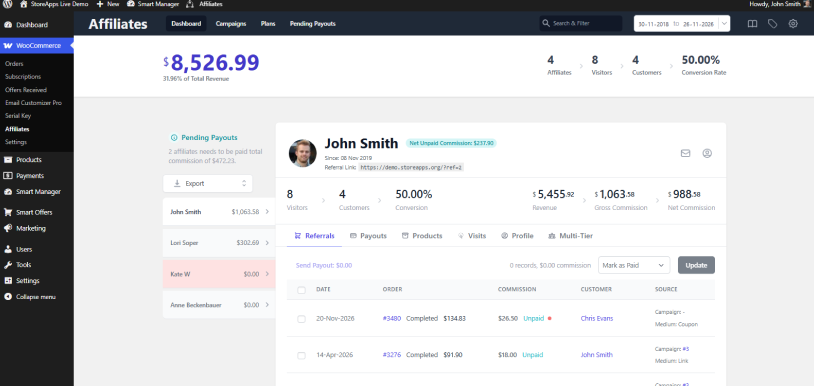
Best of all, you can upload banners, swipe copy and product links into organized “Campaigns” which makes it super easy for your affiliates to grab a link and start promoting. Here, you can also send automated or one-click payouts via PayPal and Stripe, export a CSV for bank transfer, or even issue store credits.
The catch? While you can pay affiliates in store credit, you actually need StoreApps’ separate Smart Coupons plugin to make that feature work. Apart from that, if you ever plan to move away from WooCommerce or want to run affiliates for non store pages like standalone courses or memberships, this won’t cover them. It is locked into only WooCommerce.
Top Features
- Dynamic commission plans
- Multi-tier commission structures
- Unlimited affiliates and campaigns
- First-party cookie tracking
- Built-in affiliate portal and link tools
- Customer-to-affiliate conversion and store credits
- Real time reporting
Pricing and plans
The affiliate for WooCommerce has no free version. Plans start at $99/year and $158 for 2 year plans. No lifetime plans are available.
My Honest Take
Running a WooCommerce store and want a reliable affiliate program, then Affiliate for WooCommerce, developed by StoreApps is easily the top plugin to install. Just remember you don’t get any extra integrations nor you can switch from WooCommerce in future.
5. YITH WooCommerce Affiliates
Next on our list is YITH WooCommerce Affiliates, another best affiliate plugin for WooCommerce to set up a complete affiliate program.
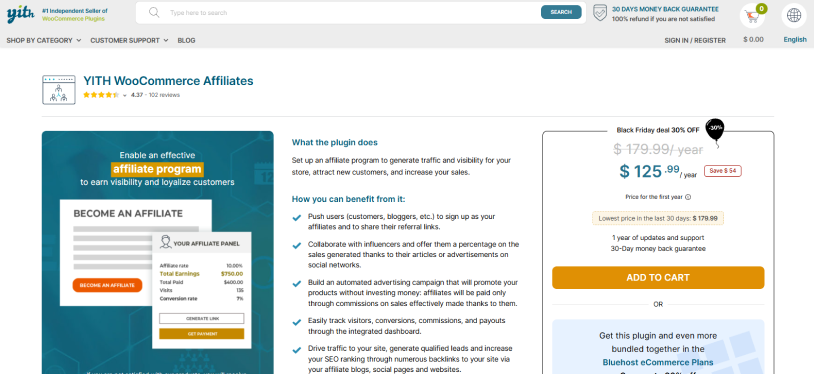
I tested it on a live WooCommerce setup to see how it actually feels to run, and to my surprise, it nailed the balance between keeping things simple for store owners and giving affiliates a clean experience
My Experience
Getting started was simple and easy, barely taking 20 minutes to set up a basic affiliate registration page and referral link generator. However, if you’re not a tech-savvy person like me, it has a steep learning curve for you. Because it doesn’t have a setup wizard, you have to set the plugin on your own through settings tabs under YITH > Affiliates.
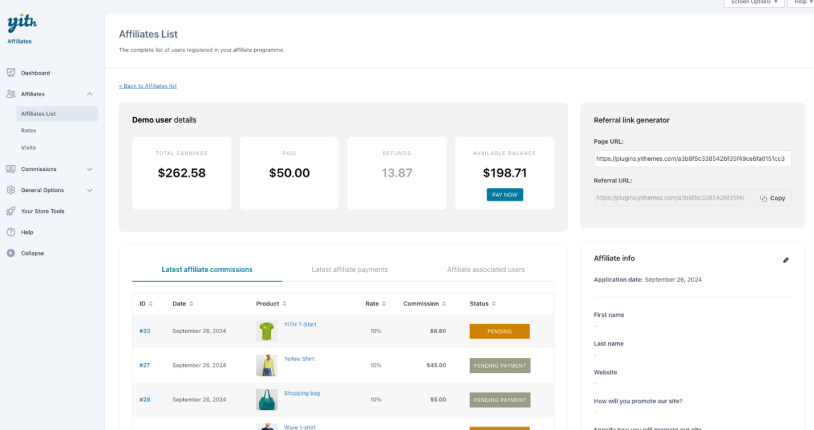
When I logged in as a test affiliate, everything was right inside the standard WooCommerce “My Account” area. Affiliates can grab their link, check clicks, see pending commissions, and track conversions. Yet again, to me, I feel the affiliate dashboard was a little too simple (not modern enough for 2026), so a little CSS might help.
Setting a global flat rate took seconds, but where YITH really shines is flexibility. You can set up custom commission rules for specific high-margin products and individual VIP affiliates. Plus, the built-in refund protection is a lifesaver if a customer returns an item within your set refund window (like 30 days), the plugin automatically deducts that commission so you aren’t paying out of pocket.
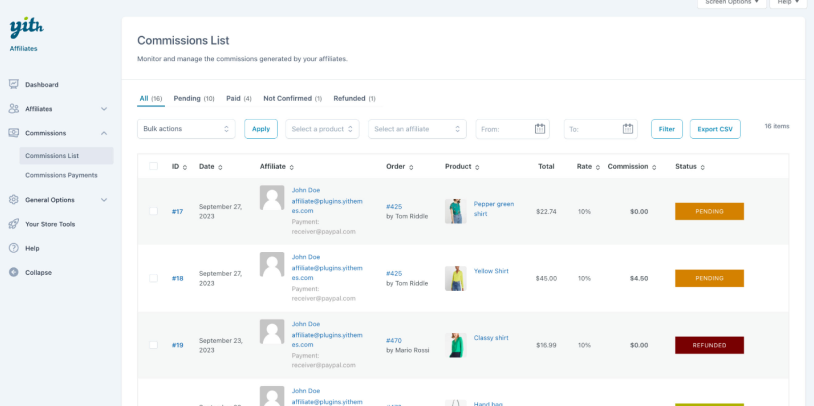
One feature I loved testing is pairing WooCommerce coupons directly with specific affiliates. If an influencer shares a discount code on Instagram or a podcast without a clickable link, YITH still tracks the sale and credits them automatically.
Furthermore, the pro version automates payouts via PayPal or Stripe once an affiliate hits your minimum threshold.
Top Features
- Flexible commission structure
- Affiliate coupon attribution
- Automated and scheduled payouts via PayPal, Stripe or Account Funds (requires the YITH WooCommerce Stripe add-on for Stripe)
- Automatic refund reversals
- Dedicated affiliate dashboard
- Deep WooCommerce and YITH ecosystem fit
- Built-in automatic affiliate approval and onboarding
Pricing and plans
YITH WooCommerce Affiliates has a free version available. Premium plans start at $179.99/year with 1 year updates and support. No lifetime plans are available.
My Honest Take
YITH WooCommerce Affiliates is a reliable affiliate marketing plugin for WooCommerce that works perfectly with WooCommerce coupons, handles refunds automatically and grows as your program grows. For WooCommerce stores, it is a solid winner.
6. AAWP (Amazon Affiliate WordPress Plugin)
AWP (Amazon Affiliate WordPress Plugin) is a top choice for Amazon affiliates on WordPress, though yearly pricing is in euros plus tax and requires an Amazon Associates setup.
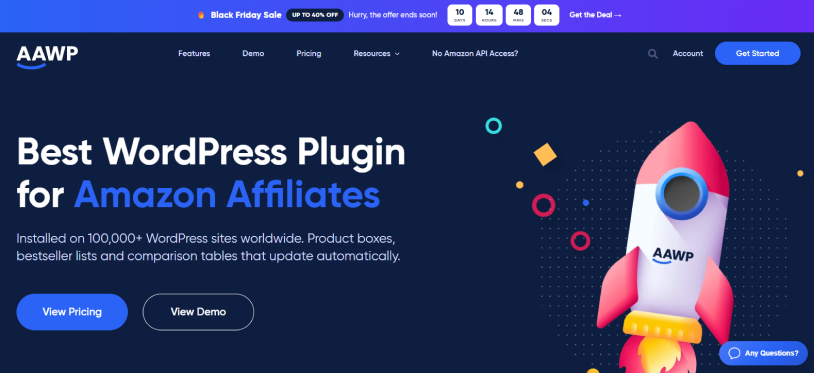
In simple words, this plugin is also for affiliates who promote Amazon products.
My Experience
After testing plenty of free and paid affiliate tools, AAWP stands out because it solves the two biggest problems for Amazon bloggers: saving time and boosting click-through rates. You get clean high-converting product boxes and comparison tables that update themselves automatically.
The setup, to be honest, is very simple. Install the plugin, plug in your tracking ID and API keys and drop shortcodes into your posts.
As we all know, Amazon strictly forbids hardcoding prices on your site because they always change. However, AAWP connects to the API and refreshes prices, ratings and prime badges automatically to keep your site compliant on its own.
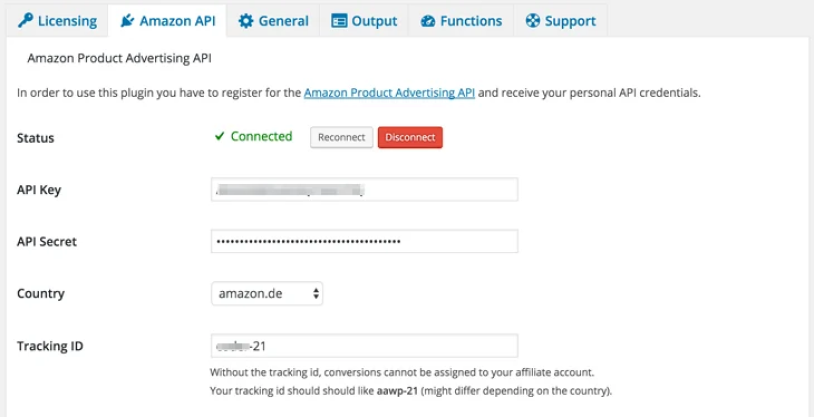
The best part? You don’t need to know a single line of CSS. Out of the box, the product boxes, bestseller lists, and side-by-side comparison tables look sharp and work cleanly with any WordPress theme
Moreover, if someone from the UK, Canada, or India clicks a link meant for the US Amazon store, AAWP automatically routes them to their local Amazon storefront so you don’t lose out on international commissions.
Top Features
- Built-in AAWP API
- Advanced click tracking
- Built-in geotargeting
- Automated bestsellers and new release lists
- Conversion focused product boxes
- Drag and drop comparison tables
- Compliant with Amazon Associates terms and local caching
Pricing and plans
AAWP (Amazon Affiliate WordPress Plugin) has no free version available. Premium plans start at €79/year for a single site. The lifetime plans are available starting at €299.
My Honest Take
If you are just starting a brand-new blog with zero traffic, hold off and use Amazon’s basic SiteStripe links until you get your first few sales. After your site starts getting steady clicks, AAWP easily pays for itself by turning casual readers into buyers with cleaner visuals and automated tables.
Which Affiliate Marketing Plugin Fits Your Business Needs?
| Plugin | Best For | Choose It If…. |
| AffiliatePress | Running an in-house affiliate program. | You want an all-in-one solution with flexible commissions, affiliate dashboards, integrations and automated payouts. |
| Pretty Links | Affiliate link management | You want to cloak, shorten, track, and automatically insert affiliate links across your content. |
| ThirstyAffiliates | Affiliate link organization | You want a lightweight link management tool with Amazon uncloaking, automatic keyword linking, and link categorization. |
| Affiliate for WooCommerce | WooCommerce affiliate programs | You run a WooCommerce store and want to manage affiliates, commissions, campaigns, and payouts directly from your store. |
| YITH WooCommerce Affiliates | WooCommerce referral programs | You need flexible commission rules, coupon-based attribution, and refund protection for your WooCommerce store. |
| AAWP | Amazon affiliate marketing | You monetize a content website through Amazon Associates and need automated product boxes, comparison tables, and updated product information. |
The Final Say
After testing 30+ WordPress affiliate program plugins and affiliate link management plugins, I finally came to a conclusion. At ARMember, we personally use AffiliatePress for running our affiliate program.
So, if you’re also starting your own affiliate program, get AffiliatePress. It’s one of the most reliable affiliate program systems on the market, with 26+ integrations, flexible commissions, real-time tracking, leaderboards, coupon & QR codes, and automatic payouts.
On the other hand, if you’re an affiliate promoting other products, Pretty Links and AAWP are worth considering to grow your revenue.
Related articles:
- 12+ Best WordPress eCommerce Plugins for Your Site 2026
- How to Set Up Affiliates on a WordPress Membership Website
- How to Grow Affiliates with Memberships: ARMember + AffiliatePress
FAQS
What is the best WordPress affiliate plugin?
AffiliatePress is the best WordPress affiliate plugins for 2026, and for good reasons. It integrates with WooCommerce and 26+ other plugins deeply, tracks sales in real time, manages multiple commission structures and automates payouts via PayPal and Stripe.
What’s the difference between an affiliate program plugin and an affiliate link manager?
An Affiliate program plugin (like AffiliatePress and YITH WooCommerce Affiliates) lets you create your own affiliate program that tracks affiliate sales, manages commission models, and automates payouts. If you want to onboard and allow affiliates to promote your products, this is the one you need. An affiliate link manager plugin, on the flip site, is for affiliates who promote others products. Thus, if you’re an affiliate, you need plugins like Pretty Links or ThirstyAffiliate to turn your messed up URLS into beautiful-looking URLS.
Do I need a plugin for Amazon affiliate links?
Not at all. You don’t necessarily need a plugin to add Amazon affiliate links. You can just grab your tagged link from Amazon’s SiteStripe toolbar and paste it into the text or button on your site. You can use plugins like AAWP, but only for you to get a steady stream of clicks and readers.
Can I do affiliate marketing for free?
Yes, you can. All you have to do is use free affiliate plugins like AffiliatePress Lite. It connects with your eCommerce store, membership site or online course platform in just one-click, and lets you onboard affiliates, manage commissions, track sales and automate payouts.
What are the best affiliate plugins for WooCommerce?
Here are the best affiliate plugins for WooCommerce stores:
- AffiliatePress
- Affiliate for WooCommerce
- YITH WooCommerce Affiliates
What is the best free WordPress affiliate plugin?
AffiliatePress is the best free WordPress affiliate plugin in this list. It lets you manage unlimited affiliates, commissions and payouts, all from a modern, SaaS-like user interface. Best of all, it integrates deeply with WooCommerce and 24+ other WordPress plugins. It even offers smart admin and affiliate panels, so even your affiliates can track their clicks, visitors and access creatives.

Share this post


Subscribe Newsletter
Never miss any of our tips, tricks, and news, Subscribe now!