


Managing a membership site means doing the same tasks over and over again. Tasks such as welcoming new members, handling subscription changes and dealing with cancellations becomes a daily routine.
So here’s the good news? Automating these processes in WordPress can save time and reduce stress.
ARMember already includes built-in integrations that help automate many of these tasks. But when you connect ARMember with Bit Integrations, you get straight off access to over 300 more integrations, giving you even more ways to streamline your site and work effortlessly.
In this blog, we’ll show you some best ways to make it all work automatically.
Save Serious Time Running Your Membership Site On Automation
ARMember already handles the big stuff really well: recurring payments, content restriction, and basic member emails. That foundation is solid.
The Small Tasks That Still Eat Your Time
But a few important things still fall on you manually:
- Adding every new member to your email list or CRM by hand
- Making sure your team gets notified the second someone cancels
- Or adding every member’s info on a spreadsheet manually
These little jobs may seem minor, but they pile up fast and steal hours every week, unless you Automate WordPress Membership Site properly.
How Automation Actually Fixes This
Automation watches for key membership events, new signups, cancellations, plan changes, profile updates, and instantly triggers the right actions behind the scenes.
No waiting, no forgetting.
Many successful subscription site owners focus on Automate WordPress Membership Site strategies in member communication, onboarding flows, and payment-related follow-ups. Doing so frees up huge amounts of time.
ARMember + Bit Integrations: Your Perfect Combo for Smarter Membership Site Management
ARMember is a powerful WordPress membership plugin that keeps everything in one place. It lets you create and manage unlimited members, subscription plans, payments and content access via simple and friendly user interface.
The best part is it comes with a robust set of features such as drip content, Social Community, Online Courses Addon, in-built security options and so on.
What Bit Integrations Brings to the Table
Bit Integrations is a no-code automation plugin built right for WordPress.
It connects your ARMember membership site to over 300 tools such as HubSpot, Mailchimp, Google Sheets, Slack, team chat apps and more.
How the Two Work Together Seamlessly
When some action occurs in ARMember like a new user registers, a profile gets updated, a plan changes or a membership is canceled, Bit Integrations picks it up instantly. So we can say ARMember acts as the trigger source.
Then it runs your chosen actions in other apps, all automatically.
Real-World Example in Action
Imagine a new member signs up through ARMember.
In seconds, Bit Integrations can:
- Add their details to your favourite email tool list for a welcome notification.
- Log the signup in a Google Sheet for easy tracking.
- And send a quick notification to your team too.
This lowers manual copying, data entry errors and delays. Thus, you focus on growing your site, no admin busywork.
Common Membership Tasks You Can Automate
There are many membership tasks that happen over and over again. And they’re perfect for automation.
New member sign-ups, updating profiles, changing plans, payments and renewals, and cancellations or expired memberships. You can automate all of these by using ARMember triggers with Bit Integrations.
- New Member Registration: When a user signs up, site admins often need to perform multiple follow-up steps, sending welcome emails, updating spreadsheets, adding the user to a newsletter or CRM, etc.
- Membership Profile Updates: If a member updates their profile information (email, name, preferences), keeping external systems in sync can be a pain. Users search for ways to automatically update CRM records or email lists whenever profile changes occur, to avoid inconsistency.
- Subscription Plan Changes: ARMember allows members or admins to upgrade/downgrade plans. Automating tasks on plan change such as adjusting the member’s segment, notifying account managers or updating access avoids things from slipping through the cracks.
- Renewals and Payments: When a membership plan is renewed, it opens up opportunities for engagement such as sending a thank-you message or logging the renewal in accounting sheets. Automation ensures these happen every time.
- Cancellations and Expirations: A member canceling their subscription or reaching plan expiration is critical to handle gracefully. And manually tracking cancellations is error-prone, hence users often seek to automate off-boarding.
- Admin Actions: Sometimes, admins add members or change plans on behalf of users. These actions can also be automated triggers, ensuring internal admin changes reflect externally is another common requirement.
Each of these scenarios corresponds to real ARMember trigger events available in Bit Integrations. In fact, the ARMember plugin exposes hooks for events like User Registration, Profile Update, Plan Renewal, Plan Change, Plan Cancellation, and even User Deletion. These will serve as the backbone for the automations we discuss.
Setting Up ARMember Automation with Bit Integrations (Step-by-Step)
Setting up automation between ARMember and other tools is straightforward with Bit Integrations.
Everything happens inside your WordPress dashboard, no coding, just simple clicks.
Follow these steps to create your first workflow.
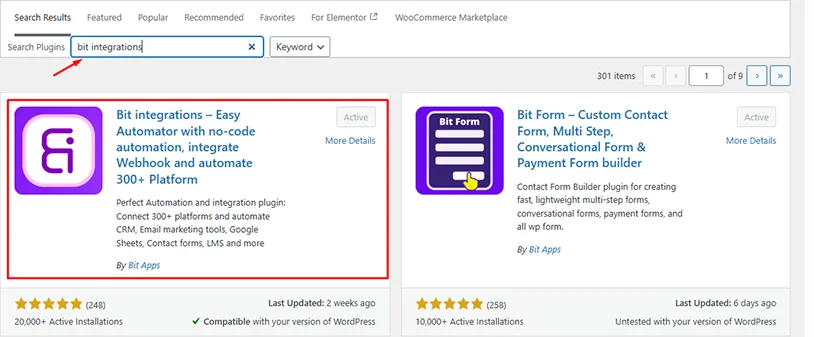
Step 1: Install and Activate the Plugins
First of all, make sure both ARMember and Bit Integrations are installed and active on your WordPress site.
- Now go to Plugins > Add New.
- Search for and install Bit Integrations (free or Pro version as needed).
- Activate it.
ARMember should already be running since you’re using it for your membership site.
Step 2: Start a New Integration
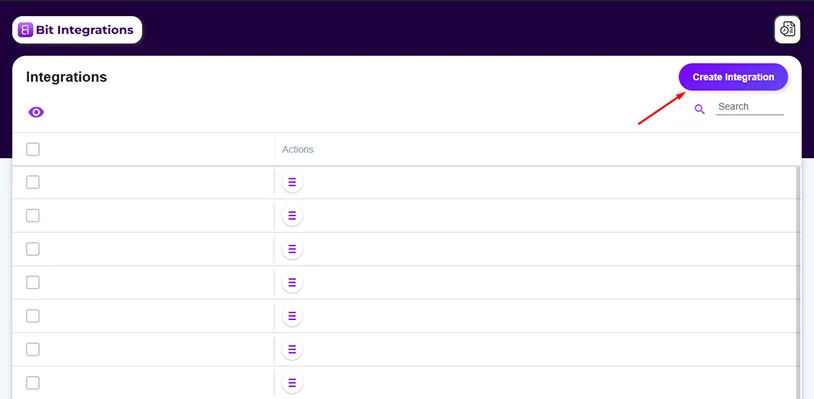
Head to your WordPress dashboard.
Navigate to Bit Integrations (it appears in the left menu after activation).
Click the big Create Integration button to begin building a new workflow.
Step 3: Select ARMember as Your Trigger
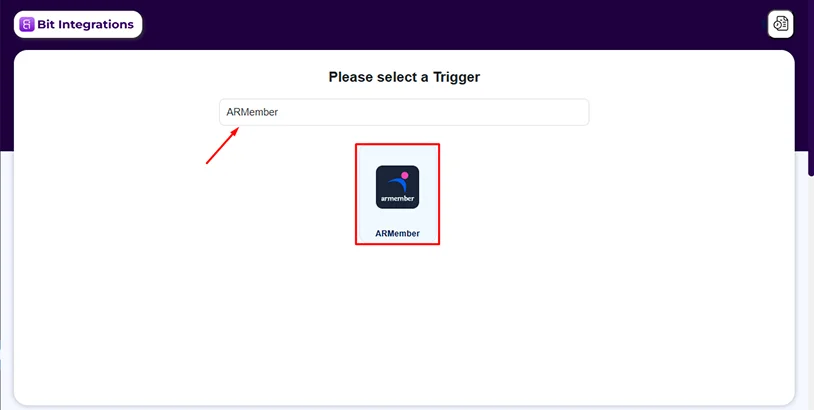
In the trigger selection screen, scroll or search for ARMember.
Click to choose it as the trigger source.
This tells Bit Integrations to watch for events happening inside ARMember.
Step 4: Pick the Specific ARMember Event
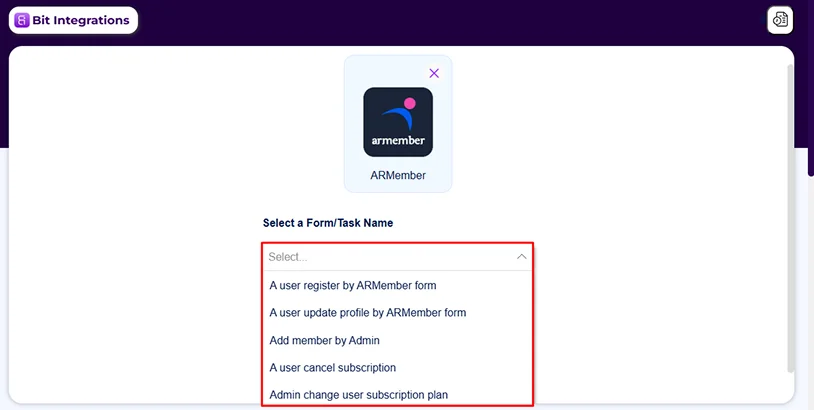
A dropdown appears labeled something like “Form or Task” or event selector.
Choose the event you want to trigger on, for example:
- User Register – perfect for new signups
- Membership Plan Cancel – great for handling cancellations
- Other common ones include profile updates, plan changes, renewals, etc.
Select your desired ARMember event that you want to automate, then click Next or continue.
Step 5: Add Conditional logic (Optional but Useful)
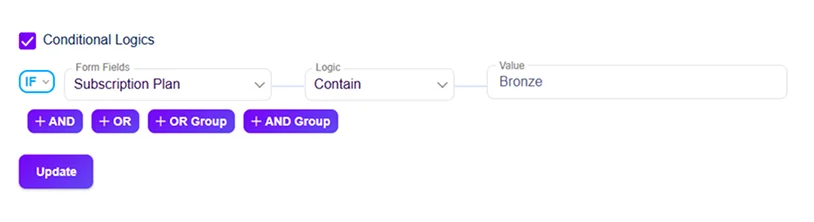
If you want the automation to run only in specific cases, look for any conditional logic or filters here.
For example:
- Only trigger if the signup is for a certain membership plan (e.g., Plan Bronze)
- Skip free plans or certain user roles
This keeps things targeted; skip if you want it to fire every time.
Step 6: Choose Your Action (External app)
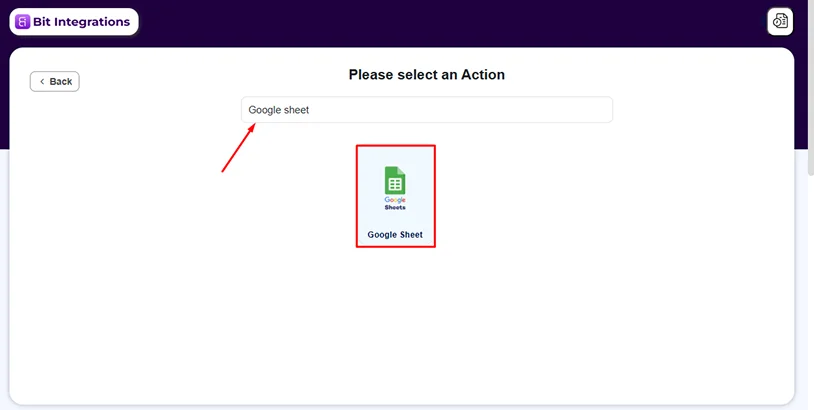
Now you see the actions screen, a long list of 160+ supported apps and platforms.
Search for and select what you want to happen, for example:
- Mailchimp → Add Subscriber
- Google Sheets → Store members’ details
- Slack → Send Channel Message
- HubSpot → Create Contact
Pick the app and the specific action that matches your goal. (I am integrating Google Sheets as part of a demo.)
Step 7: Connect the Account and Map Fields
Authorize the external service first.
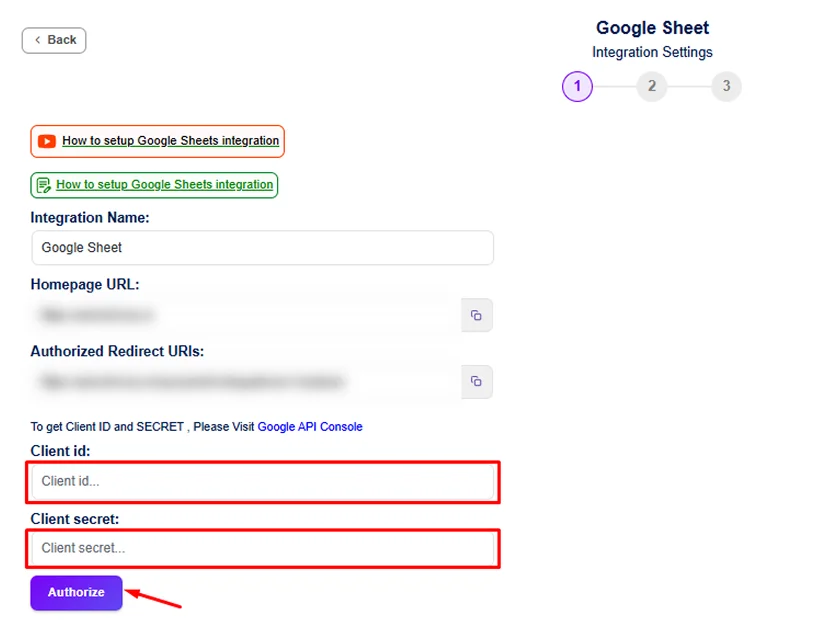
For Google Sheet connection: First, create a spreadsheet under the Google account you wish to authorize. Add rows such as ID, username, first name, last name, and email. You can also add any additional rows to store the membership data you need, like subscription details, payment details, and more.
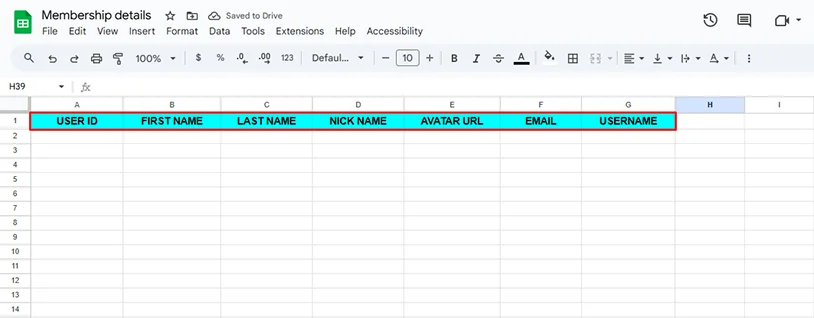
And authorize your desired Google account – It usually asks for client secret and client id for authorization. Provide the client id and client secret and authorize it.
Once connected, you will be able to choose your desired spreadsheets and worksheets. And you’ll see a field-mapping area.
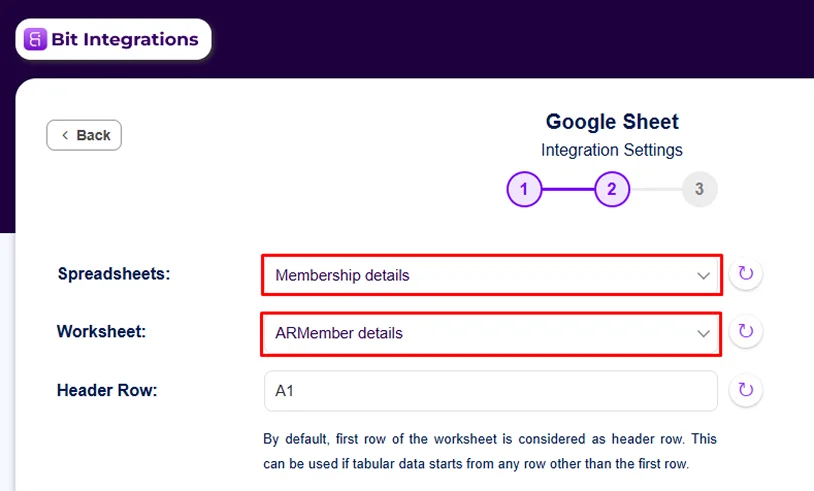
Match fields from ARMember (like user email, name, plan name, registration date) and map them to the matching spots in the action app (e.g., Google Sheets email field, first name field).
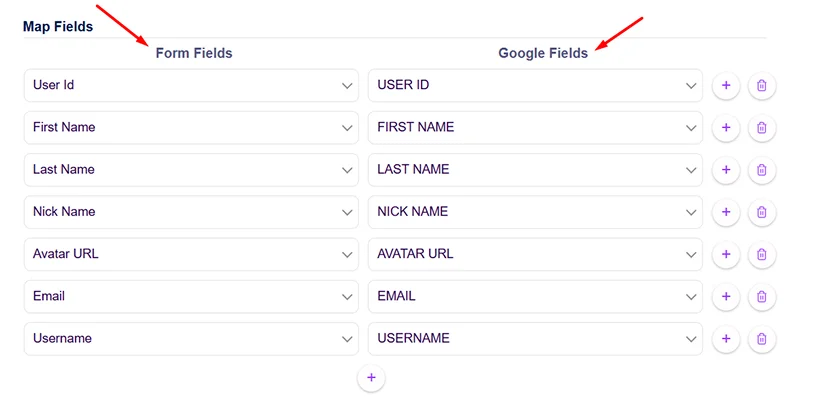
Double-check everything matches so data flows correctly.
Step 8: Test and Activate
Before going live, test it!
- Save the integration temporarily somewhere.
- Perform the trigger manually (such as: create a test user signup).
- Check the action app: Do the new member details appear in Google Sheets? Did Slack get the message?
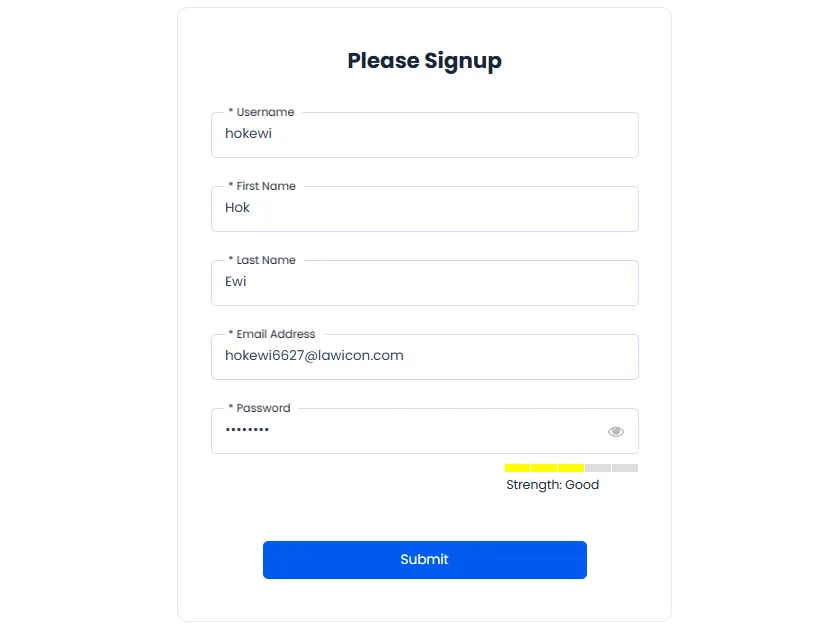
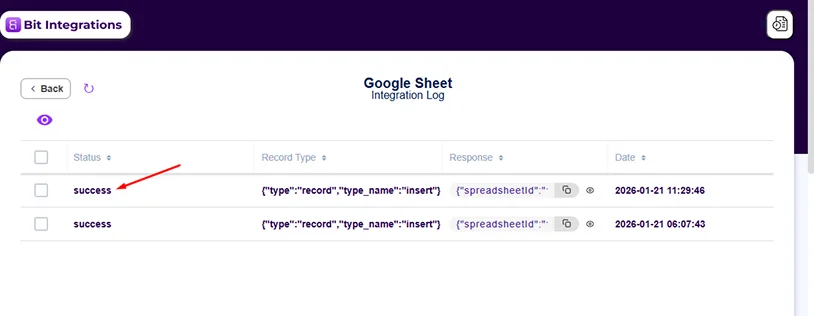
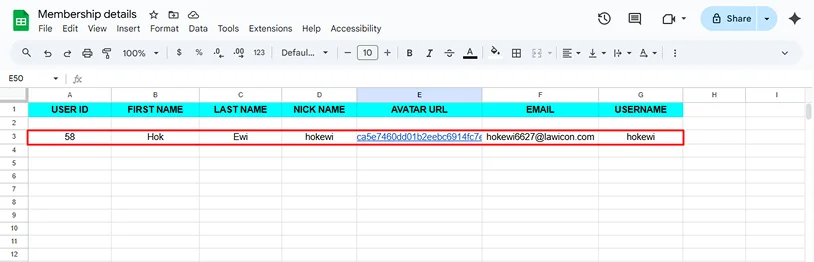
If everything works, go back and activate/save the integration fully.
It runs automatically from now on.
By following these point-and-click steps, you can hook into a wide range of ARMember events without writing any code.
Start with something simple, like new member onboarding, test it once, and watch how much time it saves you every day.
Key Automation Use Cases for Your ARMember Site
Now that you’ve seen how quick setup is, let’s look at real scenarios where ARMember + Bit Integrations saves time and improves results.
These are the most common ones ARMember users set up first; each uses a specific trigger event from ARMember (like new registration or plan cancel) to fire actions in your favorite tools.
Pick one that matches your biggest headache and build it next.
1. Automate New Member Onboarding (Welcome Them Right Away)
A new signup hits, that’s your chance to make a strong first impression.
Trigger: User Register (via ARMember form)
What to set up automatically:
- Add the new member to the desired email tool → Start a personalized welcome sequence with login details, quick-start guide, or bonus content.
- Push their info (name, email, plan level) to your favourite CRM or a simple Google Sheet for tracking and follow-up.
- Apply tags/segments in your email platform based on membership level (e.g., “Gold Plan” tag) so future emails hit the right group.
Why this matters:
Every new member gets instant attention with no manual admin work. No more manual data entry or forgotten welcomes. Members feel valued from day one, which helps with early retention.
2. Keep Profiles in Sync When Members Update Details
Members, sometimes, update their email, name, or preferences in ARMember. But if those changes don’t update everywhere else like your CRM or email list, the data is just wrong or outdated.
Trigger: User Update Profile via ARMember form
What to set up automatically:
- The member’s new details are updated in Google Sheets, Airtable, or your email service.
- Sync changes to the CRM so your team can always sees the updated info.
- The update is saved in Google Sheets with the date and what was changed, or a quick note is sent to your team.
Why this matters:
No mismatched data means less bounced emails or confused support tickets. It keeps everything consistent across tools.
3. Get Real-Time Alerts for Upgrades and Cancellations
When members change their plans, it’s a big deal. Upgrades mean happy members yet cancellations means someone might be leaving as they don’t like it.
Triggers: When a member upgrades or downgrades their plan, or cancels their membership.
What to set up automatically:
- Post a Slack, Telegram, or Discord message to your team such as, ” John upgraded to Platinum!” or “ Jane canceled her plan”.
- Send a custom email to you or support for quick follow up.
- For important events, a text or WhatsApp message can be sent right away.
Why this matters:
You react fast, reach out to canceling members before they’re gone, or thank upgraders personally. No more digging through logs. Matches searches for “ARMember cancellation notification” or “notify team on ARMember plan upgrade”.
4. Handle Renewals Like a Pro (Thank, Upsell, Track)
A subscription renews, celebrates it, and keeps the momentum going.
Trigger: Membership Plan Renewal
What to set up automatically:
- A “Thanks for renewing!” email is sent, along with a small offer or a short survey.
- The renewal details (member name, date, and amount) are saved in Google Sheets for easy tracking.
- If you use an online course system like LearnDash, the member can be given access to new lessons or content right away.
Why this matters:
Renewals become engagement opportunities, not just transactions. Boosts retention and revenue. Hits terms like “ARMember automate renewal emails” or “membership renewal automation WordPress”.
5. Manage Cancellations Smoothly (Off-Board Without Drama)
Someone cancels, handling it gracefully to possibly win them back.
Trigger: Membership Plan Cancel (or Deleted User if account is removed)
What to set up automatically:
- Tag as “Cancelled” in your email list or move to a re-engagement/past customers list (stop member-only sends but keep win-back open).
- Update CRM status to inactive or add notes for follow-up if high-value.
- Send an exit survey email (“Sorry to see you go, quick feedback?”) via an external service.
- Notify the team via Slack for immediate review.
Why this matters:
You collect feedback consistently, update records instantly, and avoid access leaks. Turns departures into data points. Aligns with “ARMember cancel membership automation” or “automate off-boarding ARMember”.
Bonus Ideas to Level Up Even More
Want to do even more cool stuff? Here are some extra ideas that many ARMember users really like:
Timed Content or Milestone Emails: Send special emails when members reach a certain point, like unlocking new content or getting access to special pages.
Connect with Courses or Forums: When someone signs up, they can be automatically added to an online course (like Tutor LMS) or a community group (like BuddyBoss). You can connect ARMember to these tools using Bit Integrations.
Referral Tracking: When someone signs up using a referral code, that information is saved automatically. It can be added to Google Sheets or sent to your affiliate manager so you know who referred them.
Webhooks for Anything: If ARMember doesn’t connect directly to another tool, you can still share the data. Webhooks send member info to other apps or custom systems so everything stays connected.
Wrapping It Up: Make Your ARMember Site Run Smoother Today
Automate WordPress Membership Site with Bit Integrations takes the repetitive admin load off your shoulders.
New signups get welcomed instantly. Profile updates sync everywhere. Renewals trigger thank-yous and upsells. Cancellations get handled cleanly with feedback collection and team alerts.
All of it happens in the background, no more manual spreadsheet updates, no forgotten follow-up emails, no scrambling to notify your team.
You stay responsive, data stays consistent, and members get a more polished experience from start to finish.
The real win? You get your time back.
No need to wrestle with routine tasks. Just focus on what actually grows your community:
- Creating better content.
- Engaging with members.
- Planning new offers.
- Or simply taking a break without things falling apart.
Ready to see the difference yourself?
Pick one workflow from the examples above; new member onboarding is a great place to start, and build it in Bit Integrations right now.
It takes just a few minutes, and once it’s running, you’ll wonder how you managed without it.
Related Articles:
- 5 Best WordPress User Registration Plugins in 2026
- 6 Automation Ideas Using ARMember Integrations & Features
- Why You Should Offer Multiple Tiers for Membership Site
FAQs
How can I automate member registration with ARMember?
With Bit Integrations, you can automatically add new members to your CRM, email list, or even notify your team on Slack as soon as they register via ARMember.
Can I automate profile updates in ARMember?
Yes, of course! When a member updates their profile, Bit Integrations can automatically sync those changes with your CRM or email platform right away.
How do I handle membership cancellations automatically?
Bit Integrations can automatically handle membership cancellations by tagging the user in your email system, updating their CRM status to “inactive,” and even sending them a cancellation confirmation email. You can also receive instant alerts for follow-up.
Do I need coding skills to use Bit Integrations?
Not at all! Bit Integrations is a no code automation tool for users of all technical backgrounds so even beginners and non tech-savvy people can use it.
Can I set up automated reminders for upcoming renewals or cancellations?
Yes! You can set up automatic reminder emails for upcoming renewals or notifications for cancellations using Bit Integrations.

Share this post


