



Paid Memberships Pro is a popular choice for creating WordPress membership websites. But popularity doesn’t mean it’s the right fit for every site.
The real differences start showing up when you move beyond basic content restriction.
Need a course platform? You may need an LMS.
Need a specific type of content protection? You may need another solution.
Need advanced functionality? You may find yourself adding more extensions.
And the more pieces you add, the more there is to configure, maintain, and pay for.
So I tested 6 Paid Memberships Pro alternatives to see what you actually get when you pick another WordPress membership plugin.
I compared their features, membership experience, content protection, payments, integrations, pricing, and ease of use, so you can get a feel for which one works best for your site. And if you decide to switch, no big deal – it’s pretty easy to move over.
Paid Memberships Pro vs Alternatives: Quick Comparison
| Rank / Plugin | Score | Starting paid price | Best for |
| #1. ARMember | 92/100 | $89/yr | All-in-one membership websites. |
| #2. WooCommerce Memberships | 88/100 | $199/yr | WooCommerce stores with memberships. |
| #3. Ultimate Member | 86/100 | $276/yr | Membership communities, profiles, and directories. |
| #4. ProfilePress | 90/100 | $129/yr | Selling memberships, subscriptions, and digital products. |
| #5. MemberMouse | 82/100 | $299/yr | Scalable membership and subscription businesses. |
| #6. s2Member | 84/100 | $89 one-time | Developers and advanced WordPress users. |
What To Look For In a Paid Memberships Pro Alternative
Paid Memberships Pro is all well and good for the basics. But once things get a little more complicated, you start running into walls.
You might find yourself wanting:
- A built-in course experience, rather than having to rely on a separate LMS.
- More better content protection is needed for specific files, downloads, pages, or custom content.
- More features built in, instead of having to add an extension every time you need something new.
- A simpler setup and easier management, without juggling multiple add-ons.
- You want more predictable payment costs. Paid Memberships Pro can add a 2% fee to Stripe transactions on top of Stripe’s fees which can add up as your membership site grows. And with version 3.5, the previous code-based way of lowering that fee to 0% is no longer available.
That doesn’t mean Paid Memberships Pro is a bad choice. It just means the right WordPress membership plugin depends on what you’re actually trying to build.
And that’s where these alternatives come in.
I tested 6 popular options to see how they stack up on the things that matter when you’re building and managing a membership sit, from features and flexibility to setup, pricing, and day to day management
How I Tested These Plugins
Every WordPress membership plugin was evaluated against a common membership website scenario: create membership levels, set pricing and access rules, protect different types of content, walk through the member journey from registration to accessing protected content; and then manage everything from the admin side.
For each product, I checked how easy it was to set up the membership experience, how much control you get over content protection, how payments and recurring subscriptions work and what the member experience actually feels like.
Taking a step further, I even cross-checked live pricing pages, official documentation, available integrations, changelog history and public user feedback to see what each subscription plugin offers beyond the basic feature list.
Test environments used:
- ARMember: WordPress test environment with ARMember Pro activated, using multiple membership plans, content restriction, registration/login forms, recurring payments and member account management.
- WooCommerce Memberships: WordPress test environment with WooCommerce and WooCommerce Memberships active, using membership plans, restricted content, member discounts and WooCommerce-based purchasing.
- Ultimate Member: WordPress test environment with the Ultimate Member core plugin and relevant paid extensions, testing user registration, profiles, member directories, content restriction, and membership related workflows.
- ProfilePress: WordPress test environment with ProfilePress Pro activated, testing paid membership plans, recurring subscriptions, checkout, content protection, member accounts, and payment integrations.
- MemberMouse: WordPress test environment with MemberMouse active, testing membership levels, products, protected content, recurring subscriptions, checkout, member management, and account workflows.
- s2Member: WordPress test environment using the free framework and Pro features, testing membership levels, content protection, registration, payment forms and subscription options.
- Simple Membership: Fresh WordPress test environment with the Simple Membership plugin active, testing membership levels, content protection, member registration, payments and basic member management
Also, I verified current pricing and plan limits, checked official documentation when testing specific features, and reviewed public feedback from sources such as WordPress.org, G2, Capterra, Trustpilot and Reddit where relevant.
Scores are editorial evaluations based on the testing above, supporting research, and the scoring model below. They are not vendor provided scores.
Scoring Model
Each WordPress membership plugin is scored out of 100 across 6 weighted categories.
| Category | What it measures | Max points |
| Membership experience | Registration, login, account management, and the overall experience for members. | 20 |
| Admin usability | Setup, dashboard clarity, membership management, and day to day workflow. | 15 |
| Membership features | Membership levels, subscriptions, access rules, and core membership functionality. | 20 |
| Content protection | Control over pages, posts, files, downloads, and other protected content. | 10 |
| Payments / integrations | Payment gateways, recurring payments, transaction fees, and connections with other tools. | 15 |
| Pricing / value | Starting price, plan limits, included features, add-ons, and overall cost. | 10 |
| Documentation / support | Documentation quality, support availability, and how easy it is to find help. | 10 |
| Total | 100 |
6 Best Paid Memberships Pro Alternatives (Reviewed and Compared)
1. ARMember

| Feature | Details |
| Score | 92/100 |
| User Rating | 4.7/5 (418 reviews) |
| Best for | All-in-one membership websites |
| Free version | Yes |
| Starting Price | $89/year |
My Experience Testing ARMember:
ARMember is the most complete WordPress membership subscription plugin that offers an all-in-one approach to creating your own membership site.
Unlike PMPro which must require you to install multiple add-ons or write code recipes for advanced features, ARMember comes with built-in capabilities such as form builders, directory templates, point systems and content restriction out of the box.
When I tested ARMember, after being a PMPro user myself, I felt its user interface incredibly smooth, and modern right out of the box. It uses a built-in wizard that walks you through setting up your payment gateways, membership tiers and page redirections.
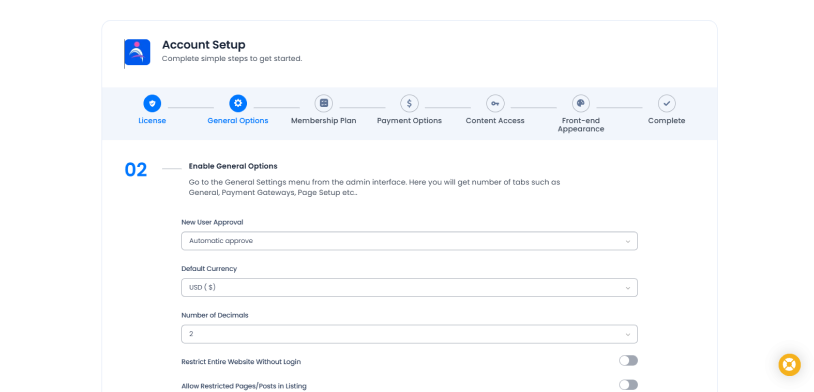
During my PMPro testing, I felt like I was constantly installing 10 different mini-plugins just to get basic features like email list syncing or content dripping working. ARMember includes these core elements directly inside the main interface alongside 62+ in-built addons.
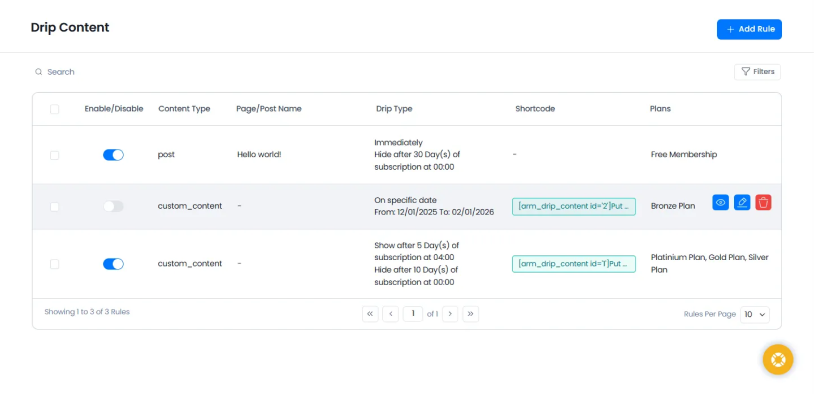
In my test runs, ARMember allowed me to set up global restriction rules effortlessly using a highly visual grid. I could drip content (e.g., releasing Lesson 2 exactly 7 days after signup) without installing extra extensions. Although, PMPro is unmatched if you want to write custom PHP code snippets to restrict unique content types, ARMember is far easier if you want to create a complete membership site with zero line of codes.
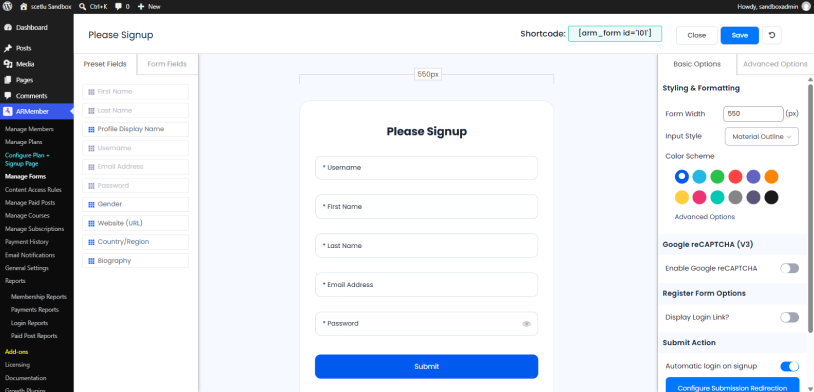
Last not the least, both handle the essentials like Stripe and PayPal cleanly. However, ARMember native forms let me style credit card fields and login loops directly inside the WordPress dashboard using a drag-and-drop builder. Plus, it comes with 22+ payment gateways. With PMPro, your forms mostly adopt the styling of whatever theme you are running unless you know CSS.
Overall, ARMember felt more complete in testing. While Paid Memberships Pro relies more on add-ons and custom code as your needs grow, ARMember packs more of the functionality you need directly into the plugin.
What’s Different From Paid Memberships Pro?
| What matters | ARMember | Paid Memberships Pro |
| Overall approach | All-in-one plugin with 62+ in-built add-ons | Core plugin with 25 free + 54 premium add-ons |
| Membership plans | Unlimited membership plans | Unlimited membership levels |
| Content protection | Built-in advanced restriction + drip content | Core restriction + dedicated add-ons |
| Online courses | Online Courses Addon for structured lesions and auto-generative certifications | 1 free Courses for Membership add-on + LMS integrations |
| Member community | Social Community add-on | BuddyPress/BuddyBoss and other integrations |
| Digital downloads | Built-in download functionality on selected plans | 1 Protected Downloads add-on |
| Form builder | Built-in Live Form Editor | Checkout/forms extended through add-ons and customization |
| Member directories | Built-in Member Directory module | 1 premium Member Directory and Profile Pages add-on |
| Payment gateways | 22+ payment gateways | 5 are listed in PMPro’s current payment-gateway page as core/free options |
| Customization | Visual controls + built-in tools | Extensive hooks, filters, add-ons, and custom code |
| Premium add-ons | 56+ premium add-ons listed on the Enterprise plan | 54 premium add-ons |
| Starting paid plan | $89/year for Standard | $499/year for Standard |
My Verdict: If you’re moving away from Paid Memberships Pro because you want more features and user friendliness, ARMember is my top recommendation. This is the best Paid Membership Pro alternative for those who want ease-of-use, rich feature set, and money worth built-in tools alongside excellent support, documentation and video tutorials.
2. WooCommerce Memberships

| Feature | Details |
| Score | 88/100 |
| User Rating | 4/5 (151 reviews) |
| Best for | WooCommerce stores selling memberships and member only products |
| Free version | No |
| Starting Price | $199/year |
My Experience Testing WooCommerce Memberships:
WooCommerce Memberships takes a very different approach from an all-in-one membership plugin like ARMember.
It builds the membership experience directly around WooCommerce, so products, memberships, discounts and restricted content all work together.
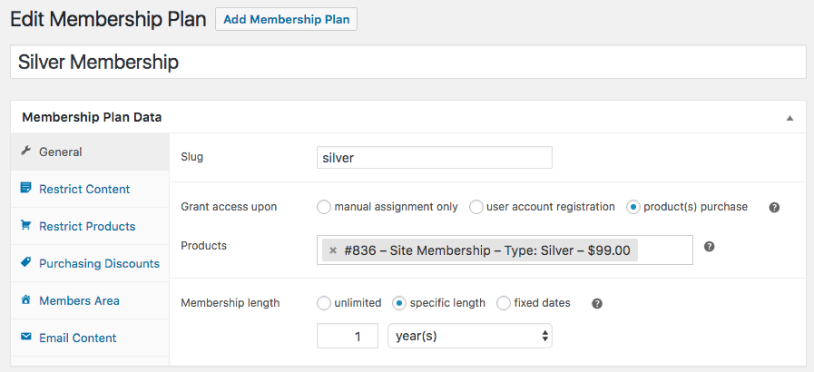
I started by creating a membership plan and connecting it to a WooCommerce product. The setup is simple: membership plans are created separately from products, then products can be used to grant access to those plans. Also, you can manually assign memberships or let a product purchase trigger access.
The Restrict Content section gives you a good amount of control. You can restrict pages, posts, categories, tags, and custom post types, then choose whether members get access immediately or after a set period. That makes content dripping easy to configure without another membership extension.
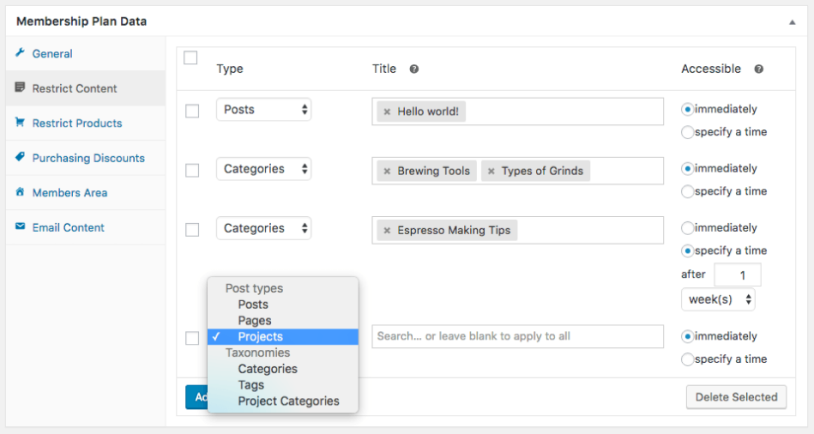
WooCommerce Memberships also handle products differently from standard content restriction. You can restrict a product from being viewed by non-members, or leave the product visible while limiting who can purchase it. This makes sense for stores where membership is part of the shopping experience.
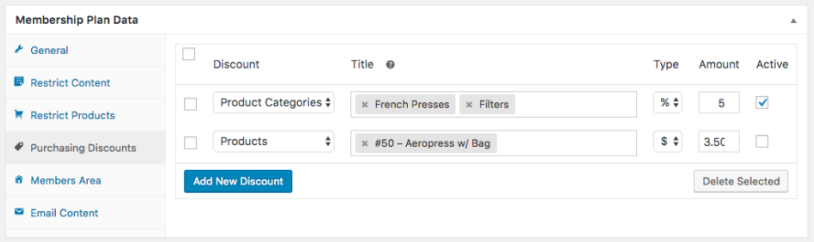
The member discounts are another area where the WooCommerce connection becomes useful. You can offer discounts across products or product categories, while members can see their available benefits from the Member Area. WooCommerce Memberships also supports member-only free shipping.
Recurring memberships are where you need to pay attention to the setup. WooCommerce Memberships itself can work as a standalone membership solution, but recurring billing needs WooCommerce Subscriptions. After both are active, you can support recurring payments, trials, upgrades, downgrades, and subscription based membership access.
One thing I noticed is that this makes WooCommerce Memberships best-fit to membership stores, rather than sites that simply want a membership layer on top of WordPress.
What’s Different From Paid Memberships Pro?
| What matters | WooCommerce Memberships | Paid Memberships Pro |
| Overall approach | Built around WooCommerce | Dedicated membership platform |
| Membership plans | Membership plans connected to WooCommerce products | Native membership levels |
| Content protection | Pages, posts, products, categories, tags, custom post types | Broad content restriction through core + add-ons |
| Content dripping | Built in | Available through add-ons |
| Product access | Restrict product viewing or purchasing | Primarily focused on membership/content access |
| Member discounts | Built in | Available through add-ons/integrations |
| Recurring billing | Requires WooCommerce Subscriptions | Available through supported gateways |
| Member area | WooCommerce My Account-based | Dedicated membership account features |
| Starting price | $199/year | $499/year Standard |
| Best fit | WooCommerce stores with memberships | Dedicated membership websites |
My Verdict: WooCommerce Memberships makes the most sense if your membership website is also a WooCommerce store. Its biggest advantage is the way memberships connect directly with products, discounts, purchasing rules and the customer account area, making it a good alternative to Paid Membership Pro.
3. Ultimate Member

| Feature | Details |
| Score | 86/100 |
| User Rating | 4.4/5 (1,445 reviews) |
| Best for | Membership communities, user profiles, and member directories |
| Free version | Yes |
| Starting Price | $276/year |
My Experience Testing s2Member:
Ultimate Member takes a more community-focused approach to membership than Paid Memberships Pro.
Rather than putting most of the emphasis on selling memberships and restricting content, Ultimate Member puts user profiles, registration, member directories, roles and account management right at the center of the experience.
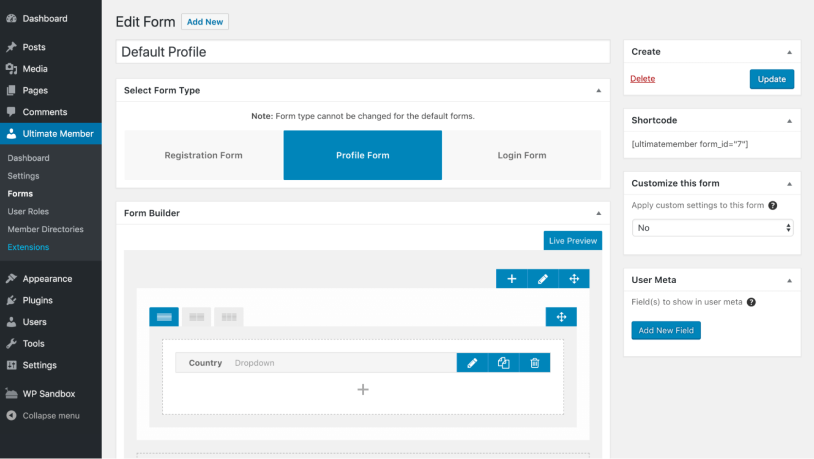
When I tested Ultimate Member, the first thing that caught my eye was how much of the member-facing experience is handled from the front end. Registration, login, profiles, directories and account pages can all be built into the site without sending members into the WordPress dashboard.
The registration form builder gives you control over the fields members see when they sign up. You can also decide whether new users are automatically approved, need to confirm their email, or require manual approval.
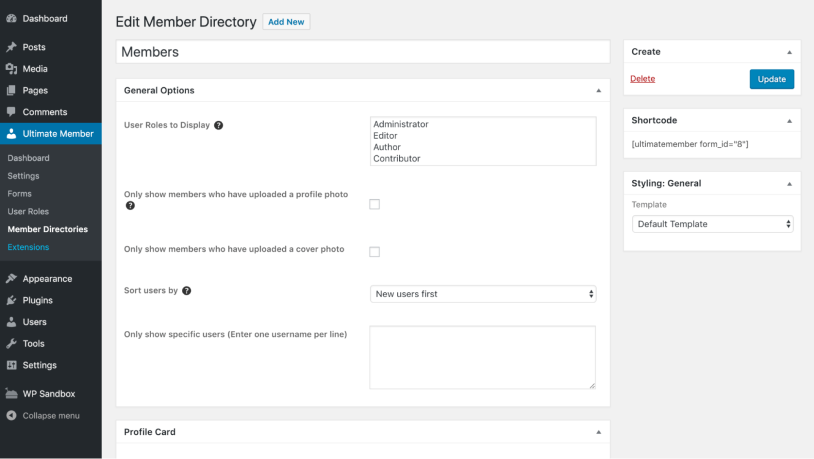
The member directory is another area where Ultimate Member feels different from PMPro, by turning it into a searchable community where users have profiles and can discover other members.
You can extend this further with features such as private messaging, followers, real-time notifications, social login, and bbPress integration. These are provided through extensions rather than the free core plugin.
Paid memberships are possible through the Stripe extension. The extension supports recurring and one time pricing, with subscription periods including daily, weekly, monthly, quarterly, six-monthly, yearly and custom options.
If your membership site revolves around profiles, directories, user interaction, and front-end account management, this WordPress membership plugin makes a lot of sense.
What’s Different From Paid Memberships Pro?
| What matters | Ultimate Member | Paid Memberships Pro |
| Overall approach | User profiles + community + membership | Membership + subscriptions + content access |
| Free version | Yes | Yes |
| User profiles | Built into core | Available through membership/account features and add-ons |
| Member directories | Built into core | Premium Member Directory and Profile Pages add-on |
| Registration | Front-end registration and form builder | Membership-focused registration and checkout |
| Community features | Extensions for messaging, followers, notifications, etc. | Usually handled through integrations |
| Content restriction | Built into core | Built into core |
| Paid memberships | Stripe extension | Native membership billing + gateway options |
| Paid extensions | 21 standard extensions in Standard plan | 54 premium add-ons in Standard plan |
| Starting paid plan | $276/year | $499/year |
| Best fit | Community and profile-driven memberships | Membership sites centered around access and subscriptions |
My Verdict: Ultimate Member is a great Paid Memberships Pro alternative if your membership site is built around people rather than just protected content. Its profiles, directories, registration tools, and community extensions give it a different focus from PMPro.
4. ProfilePress
| Feature | Details |
| Score | 90/100 |
| User Rating | 3.1/5 (938 reviews) |
| Best for | Selling memberships, subscriptions, and digital products |
| Free version | Yes |
| Starting Price | $129/year |
My Experience Testing ProfilePress:
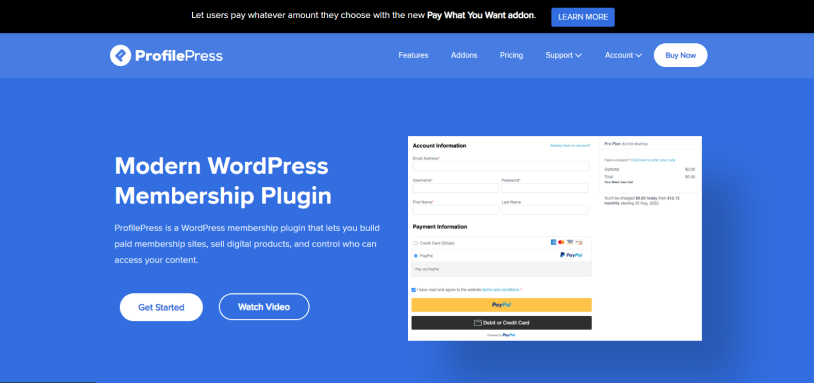
When I tested ProfilePress, I noticed that the setup revolves heavily around the things you need to actually sell a membership: plans, checkout, payments, content protection and member accounts.
The checkout builder is one of the first areas where the difference becomes obvious. ProfilePress gives you dedicated forms for registration, login, checkout, and account management.

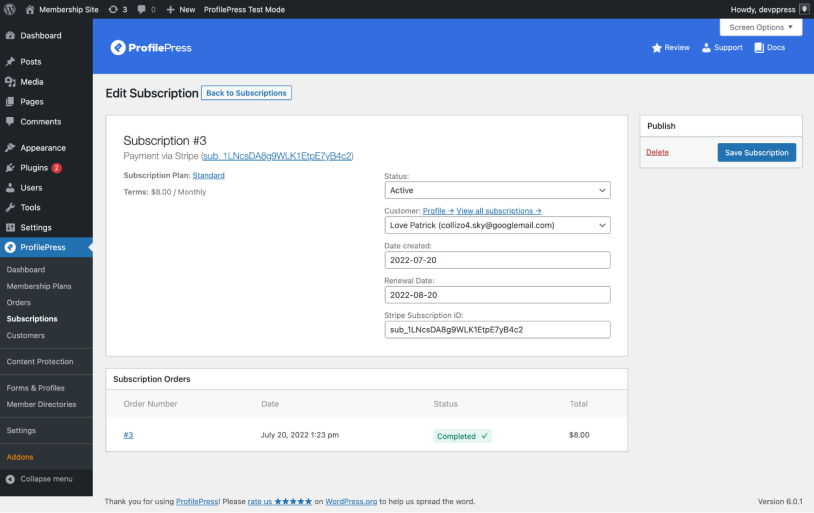
Creating membership plans is also easy. You can create one time or recurring plans, add free trials, and control how members gain access to protected content. Plus, ProfilePress supports selling digital downloads, services and other products alongside memberships.
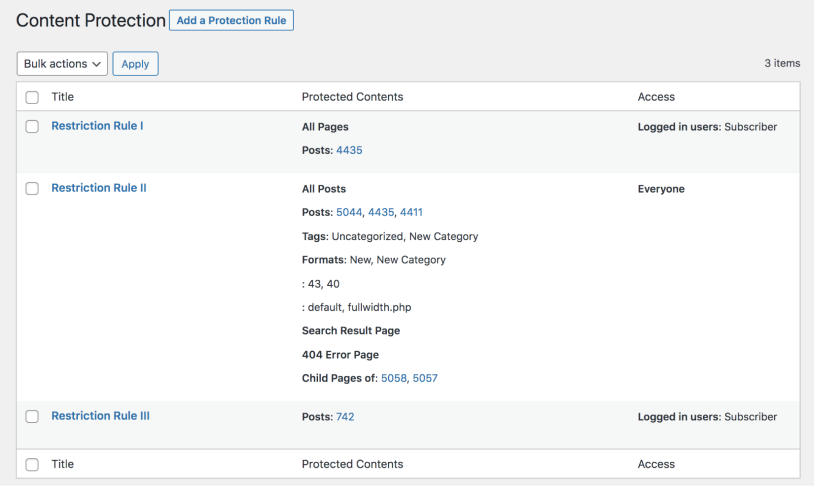
The content protection controls are particularly useful when you want to build a membership site around different types of paid content. You can protect pages and other content while also allowing visitors to see a limited amount before asking them to subscribe.
Payments are another best part of the setup. ProfilePress supports Stripe, PayPal, Razorpay, Mollie, Paystack, Paddle, and direct bank transfer, with recurring and one time payment options. Although these are still less compared to ARMember.
I even found the integrations useful for a more complete membership business. ProfilePress connects with LMS plugins including LearnDash, LifterLMS, Tutor LMS, Sensei LMS, Academy LMS, and MasterStudy LMS. It also integrates with Mailchimp, MailerLite, Brevo, Campaign Monitor, BuddyPress, WooCommerce, AffiliateWP and SliceWP.
The Standard plan currently includes 18+ add-ons, while higher plans unlock more integrations and functionality.
The biggest difference from PMPro is the overall experience. ProfilePress feels more like a membership commerce platform when you want to sell subscriptions and digital products through optimized checkout forms.
What’s Different From Paid Memberships Pro?
| What matters | ProfilePress | Paid Memberships Pro |
| Overall approach | Membership + ecommerce | Membership + subscription management |
| Free version | Yes | Yes |
| Paid membership plans | One-time + recurring plans | Membership levels + recurring billing |
| Checkout | Dedicated customizable checkout | Membership checkout |
| Digital products | Built in | Available through add-ons/integrations |
| Content protection | Built in | Built in |
| Downloads | Sell and protect downloadable files | Protected Downloads add-on |
| LMS integrations | 6 LMS integrations listed | Courses add-on + LMS integrations |
| Email marketing | Mailchimp, MailerLite, Brevo, Campaign Monitor | Multiple email integrations |
| Add-ons | 18+ in Standard | 54 premium add-ons in Standard |
| Starting paid plan | $129/year | $499/year Standard |
| Stripe fee | No extra 2% Stripe fee on paid plans | PMPro has its own Stripe fee structure |
My Verdict: ProfilePress is another best Paid Memberships Pro alternative if you want your membership site to sell subscriptions, digital products, and other paid content from the same system.
5. MemberMouse
| Feature | Details |
| Score | 82/100 |
| User Rating | 4.4/5 (12 reviews) |
| Best for | Scalable membership businesses and subscription-based websites |
| Free version | No |
| Starting Price | $149.50/year introductory price; regular price $299/year |
My Experience Testing MemberMouse:
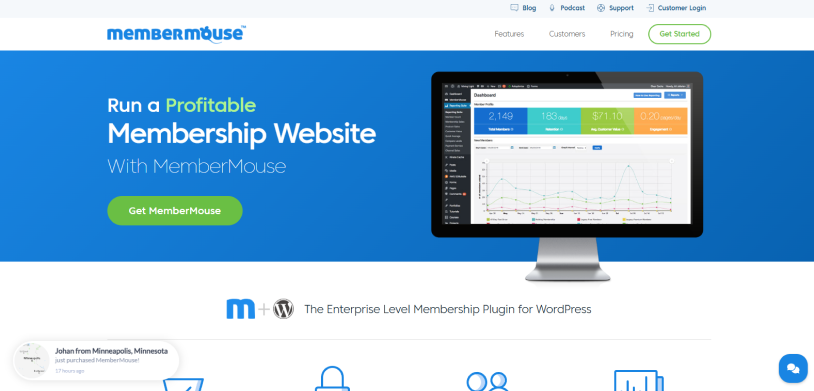
MemberMouse is built around a different idea from many WordPress membership plugins: treat the membership website like a business system rather than simply a content restriction tool.
When I tested the membership workflow, the relationship between products, membership levels and access became clear very quickly.
A membership level decides what a member can access, and the product decides what the customer actually pays for. You can connect different products to the same membership level to offer different pricing options, such as monthly and annual plans.
Besides, the product setup gives you a lot of control over billing. Products can use one time payments, recurring subscriptions or limited payment plans. Plus, you can even add free or paid trials and control the rebilling schedule.
The downside is that this flexibility also makes the system feel more complex. There are more things to understand than simply creating a membership level and assigning content to it. And the documentation didn’t work for me at least.
What’s Different From Paid Memberships Pro?
| What matters | MemberMouse | Paid Memberships Pro |
| Overall approach | Membership business + product system | Membership + add-on ecosystem |
| Membership levels | Yes | Yes |
| Products | Separate product/payment layer | Membership levels handle access/billing |
| Bundles | Built in | Add-ons/integrations for similar use cases |
| Recurring subscriptions | Built in | Built in through supported gateways |
| Payment plans | Built in | Available through membership/payment setup |
| Free/paid trials | Built in | Available through supported setup |
| One-click upsells | Built in | Available through add-ons/integrations |
| Content dripping | Built in | Available through add-ons |
| Reporting | Standard reporting; full analytics on Pro | Reports included in PMPro ecosystem |
| Starting price | $149.50/year introductory; $299 regular | $499/year Standard |
| Best fit | Complex subscription businesses | Flexible WordPress membership sites |
My Verdict: MemberMouse is another Paid Memberships Pro alternative which is worth considering when your membership business has complex pricing, subscriptions, upsells, trials, bundles and multiple ways to sell access.
Sure, it does take longer to understand because products, membership levels, and bundles all play different roles. But once that structure makes sense, it gives you considerable control over how memberships are sold and managed.
6. s2Member
| Feature | Details |
| Score | 84/100 |
| User Rating | 4.1/5 (234 reviews) |
| Best for | Developers and advanced WordPress users who want granular content protection |
| Free version | Yes |
| Starting Price | $89 one-time payment for a single-site Pro license |
My Experience Testing s2Member:
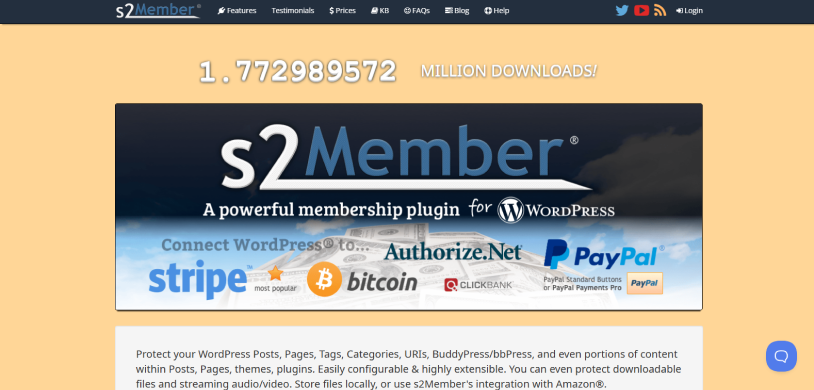
s2Member is one of the most budget-friendly and developer friendly WordPress membership management.
The first thing I noticed was how deeply it works with WordPress content, roles, capabilities, shortcodes, and access rules. s2Member can protect posts, pages, categories, tags, URLs, BuddyPress and bbPress content, downloadable files, and even portions of content inside posts and pages.
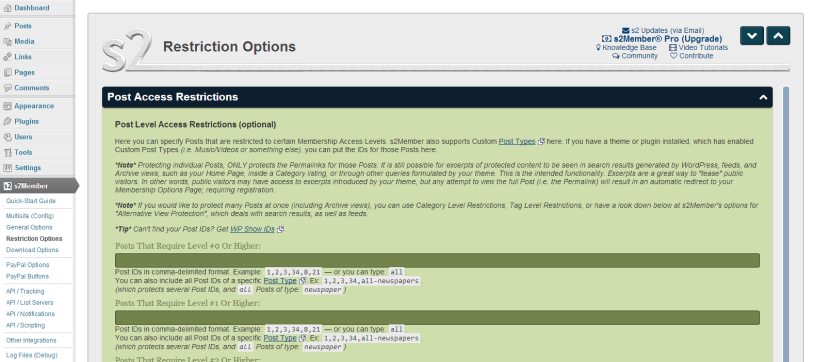
The framework is free and already offers content protection and PayPal Standard payment functionality. The Pro version adds on-site Pro-Forms and integrations with Stripe, PayPal Pro, Authorize.Net, and ClickBank.
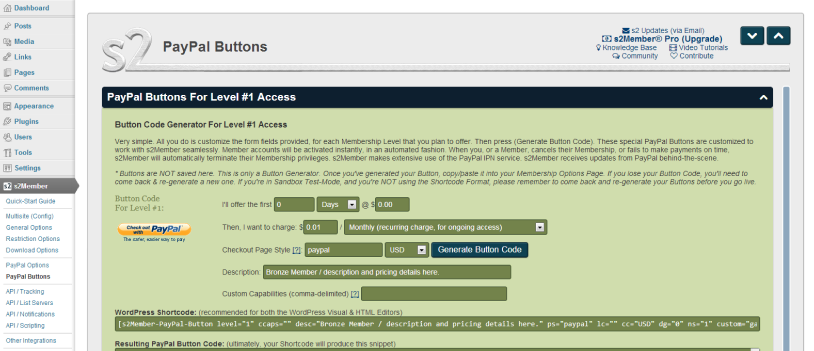
One area where s2Member wins is subscription flexibility. You can create recurring or non-recurring access, fixed-term access, lifetime access, trials and custom recurring schedules.
But, this flexibility comes with a trade-off.
s2Member relies heavily on shortcodes and configuration options. That makes it powerful, but it doesn’t feel as visually guided as newer membership plugins.
Thus if you know WordPress well and are comfortable working with shortcodes and technical settings, that flexibility can be useful. Plus, don’t hope for a polished drag and drop membership builder because its interface is too dated for that.
What’s Different From Paid Memberships Pro?
| What matters | s2Member | Paid Memberships Pro |
| Overall approach | Technical, shortcode-driven membership system | Modular membership platform |
| Free version | Yes | Yes |
| Membership levels | Unlimited | Unlimited |
| Content protection | Posts, pages, tags, categories, URLs, files, content sections | Core restriction + add-ons |
| File protection | Built in | Protected Downloads add-on |
| Shortcodes | Core part of the system | Available, but not the primary setup method |
| Recurring payments | Built in | Supported through gateways |
| Payment gateways | Stripe, PayPal, Authorize.Net, ClickBank | Multiple gateway integrations |
| Custom capabilities | Built in | Developer hooks and add-ons |
| Pro pricing | $89 one-time | $499/year Standard |
| Updates | Lifetime updates with Pro license | Annual subscription |
| Best fit | Technical users and developers | Broader membership-site use cases |
My Verdict: s2Member is one of the more technically flexible alternatives to Paid Memberships Pro. Thus, it makes sense only if you need advanced content protection, custom capabilities, and flexible subscription rules, and you’re comfortable working with a more technical interface.
Final Thoughts
Switching from Paid Memberships Pro? Look for the WordPress membership plugin that makes your membership business site easier to build and manage.
If you are still confused which is truly the “BEST” Paid Memberships Pro plugin, below is a quick decision-making sum up:
- Want more features built in and modern user interface? ARMember is the best.
- Running a WooCommerce store? WooCommerce Memberships fit naturally into that setup.
- Building a community? Ultimate Member is a strong option.
- Selling subscriptions and digital products? ProfilePress could be a better fit.
- For more advanced subscription setups, MemberMouse is good to go.
- Comfortable with a more technical setup? S2Member is worth a shot.
All in all, take a look at what you actually need, compare the costs and then only pick the plugin that fits your workflow.
You don’t necessarily need to move away from PMPro, but if you do, these are the Paid Membership Pro alternatives worth considering.
Related articles:

Share this post


