


Sometimes the membership site’s policies allow account sharing to an extent, or even provide more expensive ‘family’ or ‘friends’ plans for this. However, if you don’t do this and want to protect the revenue of your membership website, you should seriously consider the issue of account sharing.
You might be losing around a third of your revenue only because of this single problem!
But with the right software configuration, you can set the protection against this problem in particular. So, if you have a WordPress site that sells content access with the ARMember plugin, we’ll explain how to prevent shared WordPress membership account usage.
TL;DR: Prevent shared WordPress membership accounts by enabling ARMember’s Auto Lock Shared Account feature to stop simultaneous logins. For extra protection, use login history, email notifications, two-factor authentication, IP blocking, or dedicated security tools to detect and discourage unauthorized account sharing.
What Are Shared Accounts? And Why You Might Need To Care
Before we jump to the solutions, let’s clarify the basics.
In simple terms, account sharing allows an unlimited number of people who haven’t paid for your content (and aren’t actual members) to use a paying member’s credentials to access and download your content. This means that all of them – the paying member and the “free” users – can be logged in at the same time. In technical terms, this means there can exist different active sessions for the same login credentials.
Protecting your membership infrastructure from this helps with many things:
- Keeping your site more secure.
- Protecting your revenue.
- Protecting legitimate members from malicious activities.
WordPress usually thinks in terms of user accounts and sessions; thus, the most fundamental way to deal with the issue is through limiting, detecting, or adding friction to multiple people using the same credentials.
Auto Lock Shared Account – The Main Anti-Sharing Solution From ARMember
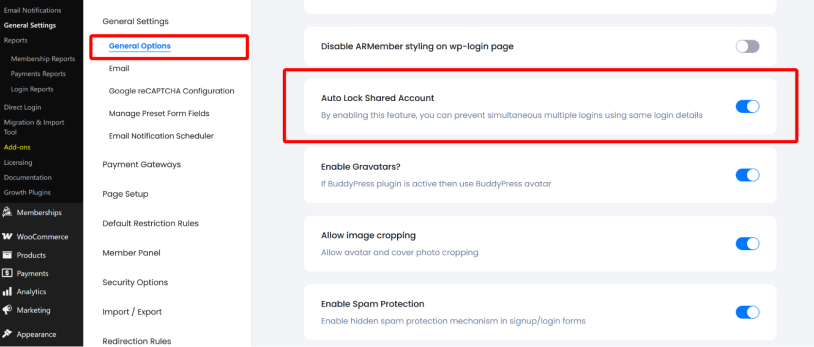
This is the most important protection layer because it was designed to solve this problem. You don’t need any add-ons to configure it. It’s all set up via the ARMember settings (General Options in particular).
If you enable it, ARMember clears all existing website frontend sessions for that user except the session belonging to the user who has just logged in.
This way, your site will prevent simultaneous multiple logins with the same credentials. Of course, it doesn’t protect from logins at different times. The setting doesn’t impose any device fingerprinting, a maximum number of registered devices, or geographic-distance detection. Consider it the sessions / simultaneous access protection.
However, in cases like online live events, the account-sharing scenario won’t work: the Auto Lock Shared Account feature allows only one person at a time to use those credentials.
This way, two people cannot comfortably use the same account at the same time because one person kicks the other person out.
Also note that when you apply this setting, it doesn’t change anything to users who were already logged in while it was disabled.
Secondary Features That ARMember Provides To Detect Account Sharing
What else can you do to detect and protect your membership site content and events from shared accounts?
Login History With Ip Address
ARMember also has a Login Report / Login History attached to IP address, browsers, and timestamps. This isn’t automatic account sharing prevention, but you can use it to manually detect account sharing: see it via ARMember → General Settings → Security Options → Display Login History.
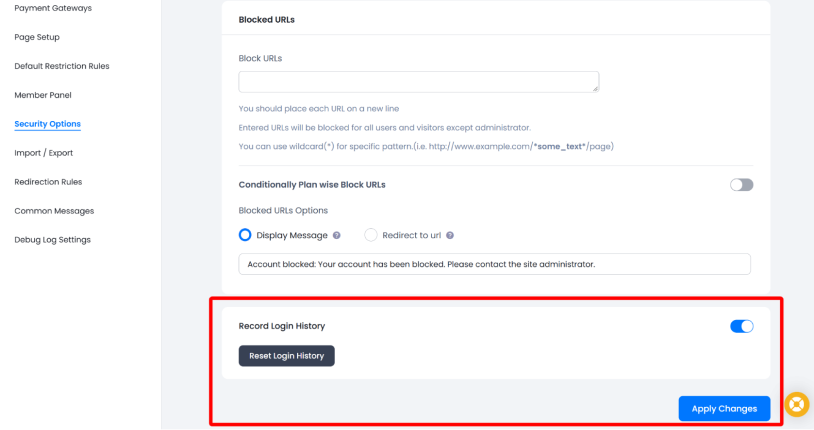
You can see and export the following info to CSV for further analysis:
- browser
- IP address
- login date/time
- logout date/time
You’ll need to manually check the records and detect suspicious logins, such as when the same account is being used from several locations/devices.
“On User Login” Email Notifications
For indirect detection, you can also test the ARMember “On User Login” email notifications. The email is sent when a user logs into their account.
You may also use it to create a lightweight login alert mechanism. But this feature is more focused on helping account owners protect their accounts from unauthorized logins or use.
Two-Factor Authentication
Did you know that ARMember also has a two-factor auth feature that you can connect with the free Two-Factor Authentication addon?
The verification can be done through the email, SMS or Wordfence 2FA/authenticator mechanisms.
How does it work for account logins? After the username/password are entered, the member must provide a verification code before the login is completed.
Customize the settings via the add-on.
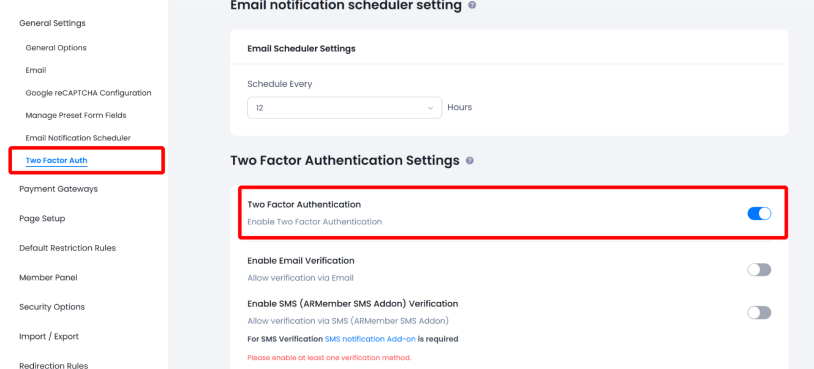
Another credential level can stop many unauthorized logins. The person receiving the username/password may not have access to extra authentication details – unless they have the code, they can’t login. Once again, this is not a reliable anti-sharing mechanism but still can discourage casual sharing.
IP-Address Blocking
As you might know, ARMember lets administrators block specific IP addresses via ARMember → General Settings → Security Options → Block IP Addresses.
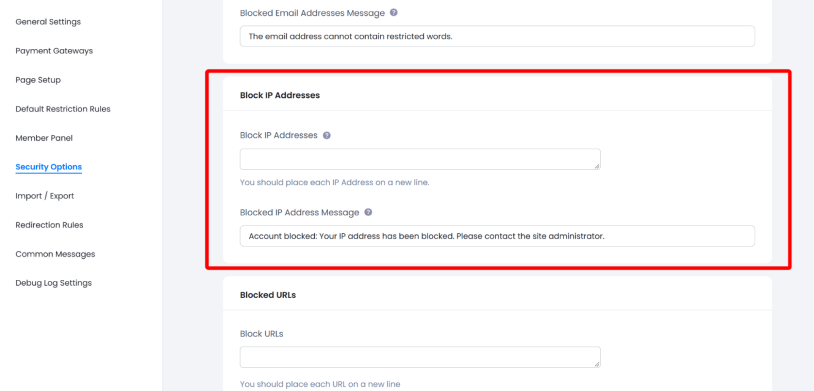
After you’ve detected a shared account, you can block associated IP addresses to prevent such logins. For example:
- Login history shows that a member’s account is used by an unauthorized location.
- You identify the IP.
- You block that IP.
This should help you stop access from these addresses.
So, for example, if your Login Report shows that a member’s account is being repeatedly used from a suspicious IP, you could manually add that IP to the block list.
However, remember that it may not always be the case when mobile networks/VPN change IPs, or many legitimate users share the same public IP. So you should be careful with such manual IP blocking enforcement.
Use a Dedicated Authentication/Security Service or Plugin
As you see, ARMember can prevent simultaneous use of a shared account with the Auto Lock Shared Account feature. But you may also consider WordPress/security/authentication level independently of the membership plugin, or simply connect plugins with more levels of protection.
So, what content-focused site can delegate to an external authentication system? Different services and plugins (e.g. LoggedInn, SessionQuota). To a different extent, they can help with:
- Sessions
- Devices
- Suspicious logins
- MFA
- Authentication policies
- Session revocation
But we recommend considering them only in case with large/high-value membership platforms or when you suspect too active account sharing.
Conclusion: How to Prevent Shared WordPress Membership Accounts
Stop leaving money on the table because of members who deliberately share their credentials with others, breaking your membership site policies. There are a few working methods for this that WordPress sites can rely on:
- To technically prevent deliberate membership account account sharing, turn on the Auto Lock Shared Account option in ARMember.
- To discourage casual sharing, you may want to enable two-factor authentication for account logins on your site (plus, it’s authentication security).
- Login notifications can make non-legitimate sharing more noticeable because the account owner can receive an email whenever the account is used.
- To add more layers of prevention, consider external plugins or additional services.
Related articles:

Share this post


