


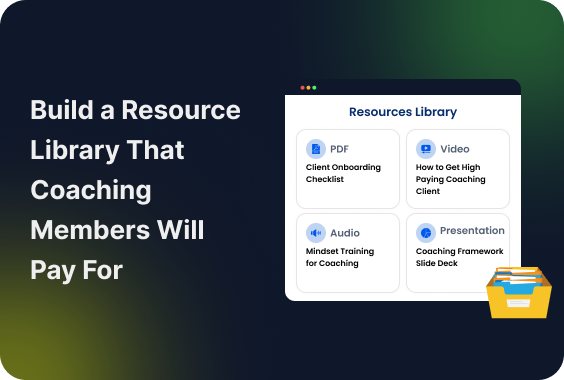
What happens to the resources you create for your coaching clients?
Some probably live in Google Drive. Others are buried in old emails. A few may be sitting on your computer, waiting for the “right time” to organize them.
That’s a missed opportunity.
With the right structure, those same resources can become a members-only resource library that helps clients:
- Take action between sessions
- Get more value from your membership
- Have another reason to stay subscribed
Overall, you need a resource library that feels curated, useful, and worth coming back to. The trick is knowing what to include, what to keep exclusive, and how to make the whole library easy to use.
In this guide, we’ll show you how to build one that members will actually use, and pay for.
TL;DR: To build a members-only resource library that coaching members will pay for, you need a flexible WordPress membership plugin like ARMember and some strategic planning ideas of what members resources to keep free and what to paywall.
What Is a Members-Only Resource Library?

A members-only resource library is a protected online collection of exclusive content and tools available only to paying subscribers or community members.
You can think of a members-only resources library as a digital VIP vault for a specific community. Rather than books, it’s packed with digital items such as templates, guides, checklists, videos or ebooks. The general public can’t access these files. A person must be a paying member.
Why a Resource Library Can Be a Smart Addition to a Coaching Membership

A resource library is one of the smartest upgrades you can make to your coaching business membership. It solves the biggest problem in coaching: trading hours for dollars. By turning your knowledge into reusable assets, you stop repeating yourself and start building true leverage.
Here’s exactly why adding a membership resource library changes the game for your business coaches:
Turn Your Expertise Into Reusable Assets

Stop trading time for dollars when you can create your assets just once, and sell them over and over again. Every framework, checklist, and guide you create can live forever in your library. Build it once, and it delivers value indefinitely.
Give Members Value Between Coaching Sessions

Coaching shouldn’t stop when the zoom call ends. A library gives your members 24/7 access to breakthroughs. They can solve problems in real time, exactly when they need it.
Make Your Membership More Useful Over Time

As your paid resource library for coaches grows, your membership becomes more valuable. Your members-only resource library can be a big competitive advantage. Plus, it makes staying subscribed a complete no-brainer.
Lower Repetitive Explanations

Tired of answering the same questions again and again? Outsource them to your library. Direct members to a pre-recorded masterclass or guide so your coaching videos can focus on deep and high-level strategies.
Create a Scalable Layer Around Your Coaching Business

Live coaching has a hard ceiling. A members-only resource library creates a digital assets layer. This allows you to onboard hundreds of new members without increasing your personal workload.
What Should Be Inside a Coaching Membership Resource Library?

A coaching membership resources library needs to balance high value with ease of use. The logic here is simple:
If you overwhelm your members, they will check out.
If you under deliver, they will cancel.
Overall, the goal is to provide just-in-time transformation, not information overload.
Here’s exactly how to structure your resources to deliver massive value:
| Resource Type | Examples |
| Templates | Email sequences, sales scripts, social media captions, client onboarding forms |
| Workbooks & Worksheets | Guided workbooks, exercises, fillable PDFs |
| Checklists & Guides | SOPs, milestone maps, step-by-step guides |
| Videos & Tutorials | Coaching replays, Q&A sessions, screen-recorded tutorials |
| Tools & Calculators | Google Sheets, calculators, quizzes, generators |
| Reference Materials | Cheat sheets, frameworks, swipe files, glossaries |
Ready to Use Templates
- Swipe files: Email sequences, sales scripts and social media captions
- Design Assets: Pre-made Canva graphics, slide decks, and workbooks layouts
- Operational tools: Client onboarding form, agreements and project tracker
Actionable Workbooks and Worksheets
- Guided workbooks: Multi-page digital booklets for more info
- Single sheet exercises: Quick one page worksheets for student practice
- Fillable PDFs: Let members type into them directly; can be used for homework
Checklists and Step by Step Guides
- SOPs: Standard operating procedures that explains complex systems
- Milestone maps: Visual roadmaps showing members exactly where they are in their journey
- Pre-flight checklists: Quick reference guides for students review
Bite-Sized Videos & Tutorials
- Q&A vaults: Organized and searchable replays of your past live coaching videos or main videos.
- Tech walkthroughs: Screen share videos
- One Shot Revision: Lets students download one-shot revision videos they can watch before exams
Automated Calculators and Tools
- Spreadsheet models: Custom Google Sheets for budgeting, tracking and forecasting.
- Quiz funnels: Self assessment tools to help members audit their own progress.
- Generators: Prompt libraries, headline generators, niche-generation worksheets, or goal-setting tools.
A great coaching membership resource library needs to feel like a goldmine, not a junk drawer. Members stay when they get immediate wins, so your library must need some highly actionable materials.
Should You Put Coaching Resources Behind a Paywall?
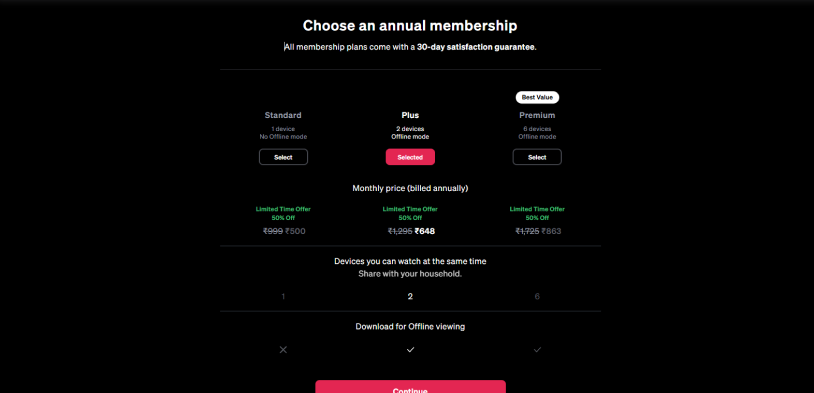
Not every coaching resource needs to be gated.
Thus a better way to do this is to give potential customers enough free value to understand your expertise while also reserving your most useful, structured and time saving resources for paying members.
| Keep Free | Keep Members-Only |
| Basic checklists | Advanced templates |
| Short educational guides | Complete workbooks |
| Sample worksheets | Full coaching frameworks |
| Introductory videos | Complete video libraries |
| One or two sample resources | Full resource collections |
| General tips | Step-by-step implementation systems |
| Blog posts | Downloadable toolkits |
| Beginner-level resources | Advanced calculators and tools |
The rule of thumb: Give away details that help people understand the problem. Put resources that help them implement the solution inside your membership.
How To Create a Members-Only Resource Library In WordPress
After you know what resources to add in your members only resource library, now’s time to build the membership resource library in WordPress.
ARMember lets you create a protected resource library using membership plans and the Digital Download Addon. If your resources include structured courses, lessons, videos or audio, you can also use the Online Courses Addon.
Step 1: Decide What Members Get

Don’t upload every resource you’ve ever created. Choose resources that help members make progress toward the outcome your coaching program promises.
For instance a business coaching membership can include:
- Client onboarding templates
- Sales call scripts
- Marketing checklists
- Business planning workbooks
- SOPs and step by step guides
- Coaching session audio recordings
- Spreadsheet calculators
- Goal-setting worksheets
- Video tutorials
Besides, you can divide resources based on membership level.
For instance lets say your basic plan gets templates and checklists, meanwhile a premium plan could have advanced frameworks, video libraries and exclusive tools.
This gives members a clear reason to pick a higher tier membership.
Step 2: Create Your Resource Library Structure
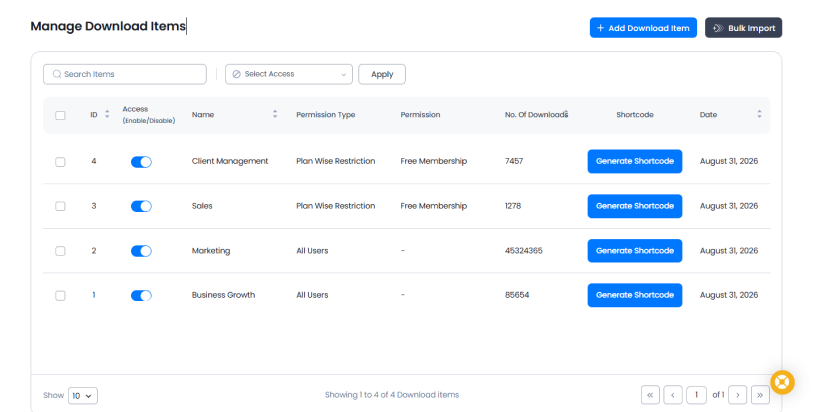
A resource library should be easy to find. Afterall, members shouldn’t have to search through dozens of unrelated files to find what they need.
You can start by grouping resources around member goals or topics.
Business Growth
- Business planning workbook
- Growth strategy checklist
- Goal setting template
Marketing
- Social media templates
- Email marketing swipe file
- Content planning worksheet
Sales
- Sales call script
- Proposal template
- Follow-up email templates
Client Management
- Client onboarding checklist
- Client questionnaire
- Project tracker
On top of that, you can create a dedicated Resource Library page in WordPress and use these categories to make navigation easier.
For downloadable files, ARMember’s Digital Download Addon lets you create download items and organize their details with names, descriptions, permissions and tags.
If you’re creating a learning focused library, ARMember’s Online Courses Addon lets you organize content into categories, courses, sections and lessons.
Tip: Keep your top level categories limited. Five to eight clear categories are usually easier to work around than a long list of highly specific categories.
Step 3: Restrict Your Resource Content
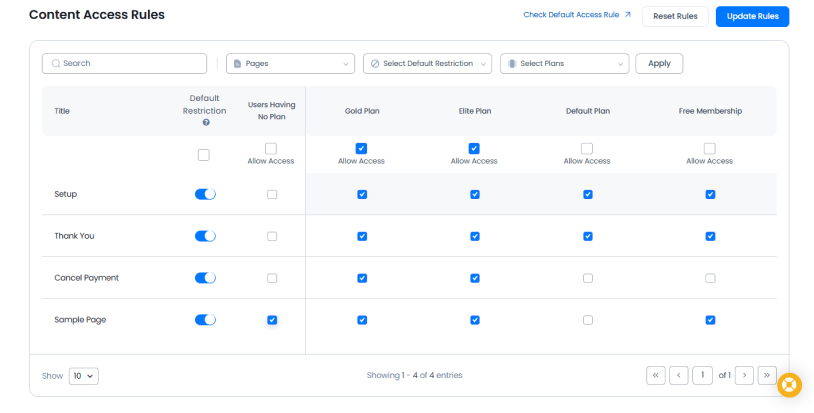
Now you need to make sure only the right members can access your resources.
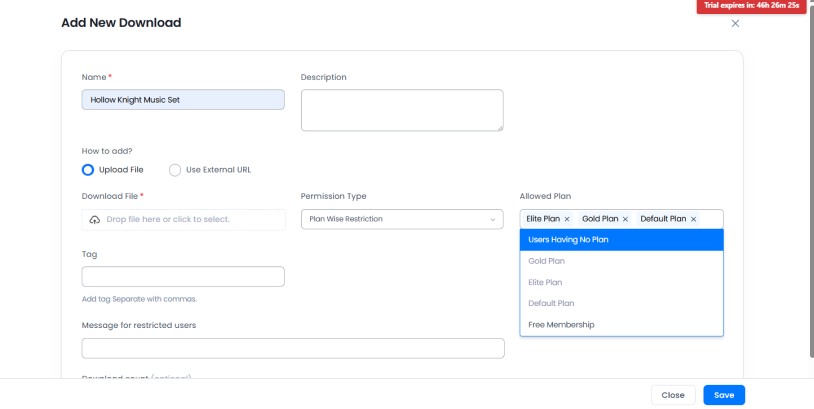
For downloadable resources, install and activate the ARMember Digital Download Addon. The addon allows you to upload files or use external download URLs and control access using different permission types.
You can restrict a download based on:
- Membership plan
- WordPress role
- Specific user
- All users
For a paid coaching library, Plan Wise Restriction is way more useful because you can connect resources to specific membership plans.
For example:
| Resource | Basic Plan | Premium Plan |
| Starter worksheets | ✓ | ✓ |
| Basic templates | ✓ | ✓ |
| Advanced frameworks | – | ✓ |
| Premium workbooks | – | ✓ |
| Exclusive video library | – | ✓ |
When creating a download item, you can even add a custom restricted message for members who don’t have permission to access it. This is useful when you want to tell a member that a resource is available with a different membership level.
Add Resources to Your WordPress Library
From the WordPress dashboard, go to ARMember → Manage Downloads → Add Download Item.
Here you can add:
- The resource name
- A short description
- The file or external download URL
- The appropriate permission type
- Relevant tags
- A restricted message if needed
- An optional download limit
After the download is created, ARMember offers a shortcode that you can use to show the download on your resource library page. Plus, you can set up how the download appears which also includes whether to show the description, file size, download count, and whether the resource appears as a link or button.
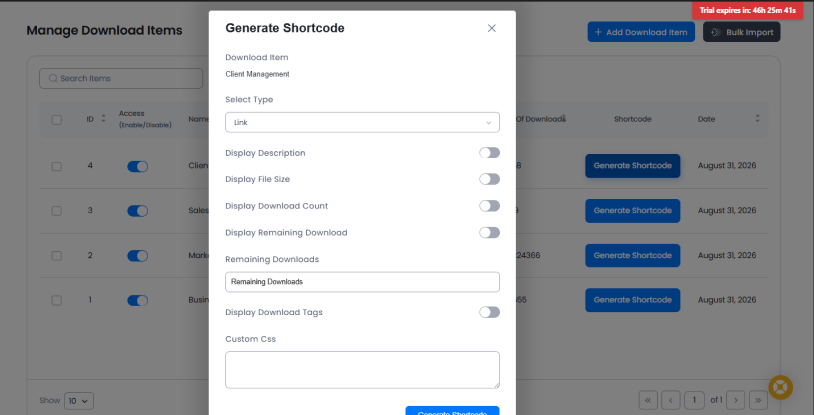
All in all, you get complete flexibility.
Step 4: Create a Better Member Experience
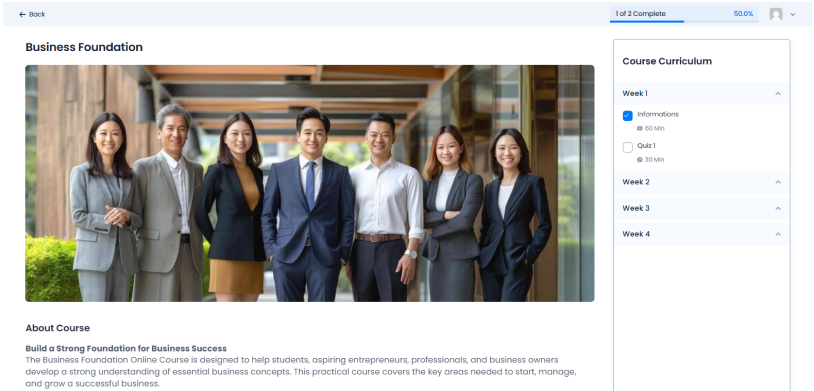
Restricting your resources is only half the job. Your members should also be able to find and use those resources easily.
Rather than presenting members with a page full of download links, create a simple library experience.
For each resource, show:
Resource Name: A clear title that tells members what the resource does.
Short Description: Explain what the member will get and when they should use it.
Resource Type: For example, Template, Workbook, Video, Checklist or Tool.
Who It’s For: Tell members which stage of their journey the resource supports.
Action: Use a clear button such as Download Template, Watch Video or Open Workbook.
You can even use tags to help organize your downloads. For example:
Marketing · Beginner · Template
This makes a growing membership resource library much easier to navigate. Also, make sure your client resource library is goal oriented. Don’t make members ask:
“Which file should I download?”
Instead, help them ask:
“What am I trying to accomplish?”
For example:
- Want to get more clients? → Open the Client Acquisition resources
- Want to improve your sales process? → Open the Sales resources
- Want to onboard a new client? → Open the Client Management resources
This small change can make a large resource library feel much more useful.
Step 5: Create Different Membership Levels
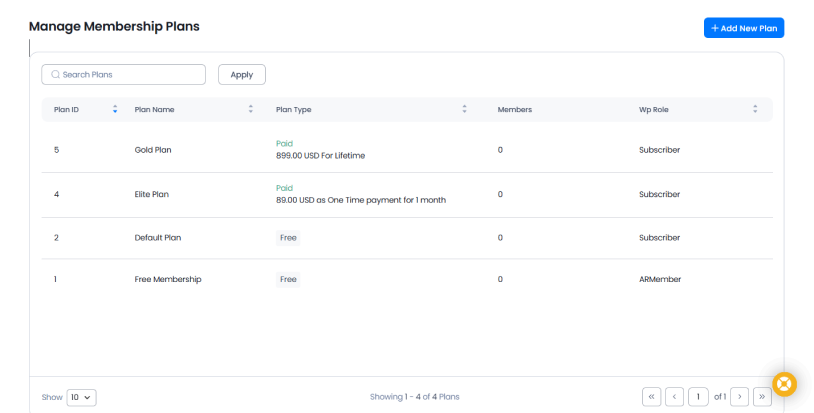
Different membership levels can turn your resource library into a better reason for members to upgrade.
Thanks to ARMember, you can create endless membership plans and control which content or resources are available to each plan. For example:
Starter
- Basic templates
- Beginner checklists
- Starter workbooks
Growth
Everything in Starter, plus:
- Advanced templates
- Business frameworks
- Video tutorials
- Additional workbooks
VIP
Everything in Growth, plus:
- Complete resource library
- Premium tools
- Exclusive coaching recordings
- Advanced courses
The key is to make each plan feel meaningfully different. Thus don’t simply put 10 resources in one plan and 20 almost identical resources in another. Give higher tier members access to resources that help them solve more advanced problems or achieve results faster.
One more thing we forgot to mention is you must turn your members library into a learning path for your coaching membership site.
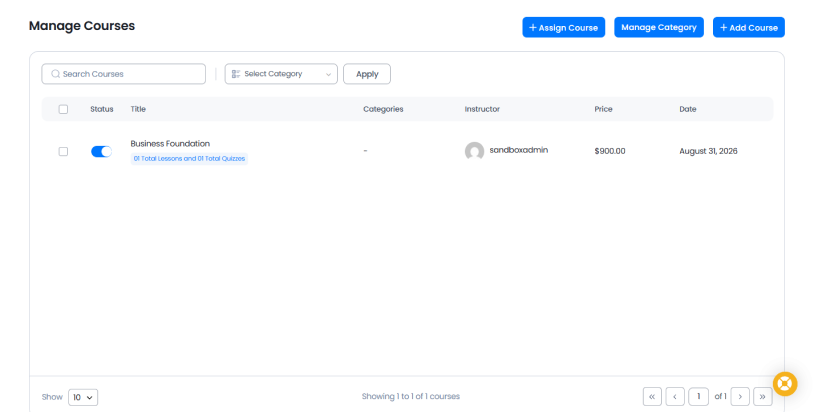
If your coaching program has structured education, consider using the ARMember Online Courses Addon instead of treating every resource as an individual download.
You can create:
Course → Sections → Lessons
Lessons can contain:
- Text/HTML
- Video
- Audio
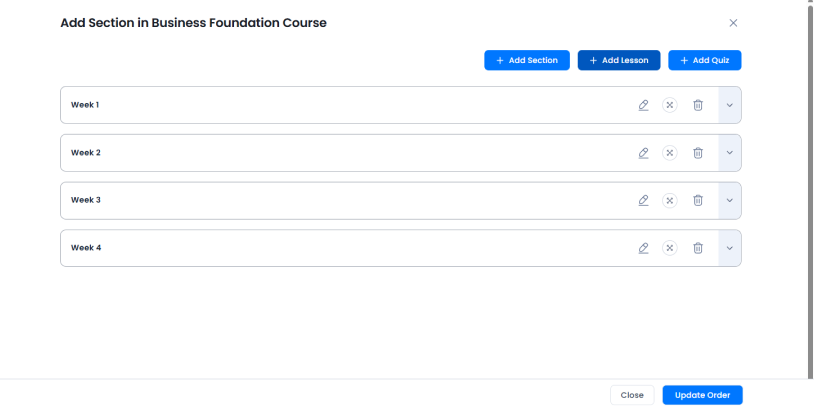
Furthermore, you can fully control how lessons become available, including making them always available, revealing them after the current lesson is completed or releasing them after a set number of days.
This works well when your “members-only resource library” is more than a collection of files and is actually part of a structured coaching curriculum.
Step 6: Test the Library Before Launching
Before giving members access, test the complete experience from a member’s POV.
Thus create a test account for each membership level and check:
- Can members find the resource library easily?
- Can the correct membership plan access the correct resources?
- Are restricted resources actually protected?
- Does the restricted message appear correctly?
- Do download links work?
- Do files open or download correctly?
- Are resource descriptions clear?
- Are categories and tags easy to understand?
- Does the library work properly on mobile?
- Can members access their resources without unnecessary steps?
Also, test what happens when a member doesn’t have access to a resource.
This is important for multi level memberships. A member on a lower tier plan should clearly understand why they can’t access a resource and, if appropriate, what they need to do to unlock it.
Don’t Let Your Best Coaching Business Resources Sit Unused
A members-only resource library doesn’t have to be complicated. Start with the resources your members already need, organize them around their goals, protect premium content with membership access, and make everything easy to find.
As your coaching business grows, you can continue adding new templates, guides, videos, and tools based on the questions members ask most often.
The result is more than a folder of files. It becomes a reusable part of your coaching membership that helps members get value between sessions and gives them another reason to stay subscribed.
Related articles:

Share this post


