


Creating audio content takes time.
Recording, editing, mastering, publishing and promoting every episode or track can take hours, or even days. Yet many creators still rely completely on third party platforms where earnings are unpredictable and audience ownership is limited.
As competition grows across podcasts, music streaming and creator platforms, finding ways to monetize audio content has become more important than ever.
The good news? You don’t need any kind of complicated tech stack nor a custom built platform to start selling audio online.
With WordPress and ARMember, you can create audio memberships, sell downloads, restrict premium content and build recurring revenue right from your own WordPress website. Sounds too good to be true, right?
This guide covers everything you need to know about selling premium audio content online. Plus, the different ways to turn your recordings into a profitable digital product.
Let’s get right into it!
TL;DR: You can sell premium audio content with ARMember through audio membership subscriptions, online courses, or sell audio files as digital downloads or pay-per-post.
What Is Premium Audio Content?

Premium audio content means studio quality or high quality listening materials such as ad-free podcasts, original audiobooks or music that costs a small fee to access.
Listeners pay a recurring or one-time fee to get an uninterrupted experience. Further into it, most of them pays for:
- Enhanced sound quality
- Original audio content
- Add free music
- Offline downloads
Many platforms like Spotify or Apple Music offer premium tiers to remove ads and unlock high-quality audio streaming.
Can You Sell Audio Content on Your Own Website?
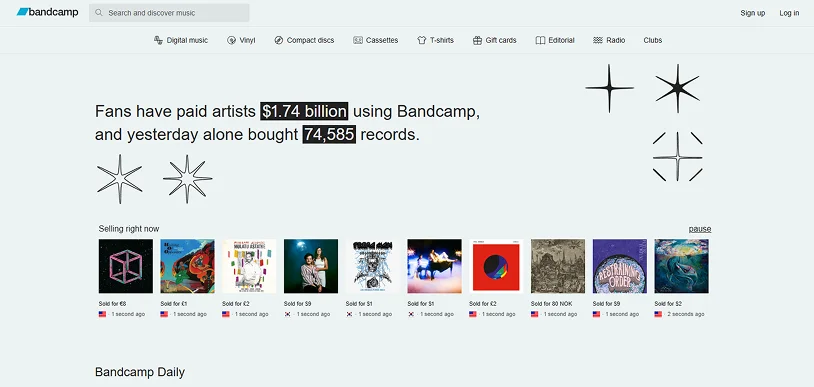
Yes, you can sell audio content on your own website.
In fact, some of the most popular music websites that successfully sell audio and albums directly to their fans are Radiohead, Bandcamp, NIN (Nine Inch Nails) and T-Pain.
After all, if you’re a content creator, music producers, audio course creator, sound designers, podcaster or business owner, you practically have two options to sell your audio content:
- Via third party platforms
- Via your own website
Most growing or new audio content creators usually pick third party platforms for selling their audio content.
However, as trends are shifting, most people these days prefer NOT to sell their audio content via platforms like Spotify or Apple Music. The reasons are simple:
Less revenue
Platforms like Spotify are streaming services, not direct sales platforms. They pay out in small royalties (Just a fraction of a cent per stream). If you have a smaller or niche audience, you will make very little money. Selling directly allows you to set your own price and keep 100% of the profits (minus standard payment processing fees).
Loss of Customer Data
When you play your music or audio on Apple Music or any other audio streaming platform, you do not “own” the listener. The platform owns the customer data, meaning you can’t see who bought your track, nor can you easily email them to market future projects or tours.
Complete Loss of Control
Most of any popular streaming platform you can name always has complete control. They decide the pricing, change their payout algorithm or remove your audio content entirely without your permission. Having your own website allows you to control the buying experience, bundle products (e.g., audio with merchandise), and set your own terms of your sales.
Promotion without compensation
When you finally manage to build a fan following and if you direct those dedicated fans to platforms like Spotify, you are indirectly driving traffic and ad-revenue to a billion dollar platform, for which they rarely compensate you.
Thus far, we can say selling your audio content from your own WordPress site is the most effective option if you want:
- Maximum profit margin
- Complete customer data
- Creative control
- Exclusive realise timelines
- Generate recurring revenue via subscription models
Still confused which way is the best to sell audio content online? Here’s a quick overview of both:
| Factor | Marketplace Platforms | Your WordPress Website with ARMember |
| Revenue | Platform fees and commissions lowers earnings. | Keep more of each sale and subscription. |
| Customer Ownership | Limited access to customer information. | Full ownership of customer and member data. |
| Pricing Control | Must follow platform pricing rules. | Set your own prices, plans and offers. |
| Brand Experience | Platform branding comes first. | Make and promote your own brand. |
| Content Access | Limited control over content restrictions. | Control who can access what content. |
| Monetization Options | Usually focused on ads, streams or one time purchases. | Memberships, subscriptions, pay per post, downloads and bundles. |
| Recurring Revenue | Often difficult to build predictable income. | Create monthly or yearly subscription plans. |
| Audience Relationship | Communication depends on platform features. | Direct communication through email and member accounts. |
| Business Stability | Subject to algorithm and policy changes. | Full control over your business model. |
| Long Term Growth | Helps with audience discovery. | Helps build a sustainable creator business. |
Third party platforms can still be useful for reaching out to new audiences. But if you’re a growing or successful creator with a loyal fan base, then selling your music via your own website gives you the most profit.
The best part? Tools like ARMember lets you monetize your premium audio content, turning casual listeners into paying members and make predictable recurring revenue out of it.
How Do Creators Make Money From Audio Content?

Creators monetize audio content by turning casual listeners into dedicated fans. As for earning by monetizing audio content, you can do that in several ways. In most cases, the answer relies on your audience and audio content type.
Yet for best profits, you can mix and match the below strategies to build a profitable audio business:
Sell Individual Audio Files
Offer music tracks, audiobooks, meditation recordings, sound effects or educational audio as one time purchases.
Sell VIP Access and Bonus Content
Exclusive recordings, private audio sessions, behind the scenes content or special member only releases.
Offer Audio Memberships
Ongoing access to premium audio content via monthly or yearly membership plans.
Launch Premium Podcast Subscriptions
Give paying subscribers access to bonus episodes, ad free content, early releases or exclusive podcast series.
Create Exclusive Audio Libraries
Build a members only collection of audio content that subscribers can access anytime.
Bundle Audio With Online Courses
Audio lessons, interviews or recordings can be part of a bigger online learning program.
What Types of Audio Content Can You Sell With ARMember?

ARMember makes it easy to monetize multiple types of audio content on your WordPress website. You can sell virtually any type of audio content such as:
- Music tracks and albums
- Premium podcast episodes
- Audiobooks
- Guided meditations
- Sleep and relaxation audio
- Language learning recordings
- Online coaching sessions
- Educational audio lessons
- Interviews and expert discussions
- Motivational audio content
- Recorded webinars and workshops
- Sound effects and audio assets
- Members-only audio series
- Spiritual and worship audio content
No matter whether you want to sell individual downloads, offer subscriptions, create audio memberships or restrict premium audio content to paying members, ARMember has got multiple ways to monetize your audio content and charge recurring fees for access, all in one place.
How To Sell Audio Content On WordPress Site With ARMember: 4 Proven Monetization Methods

Before getting started, make sure you’ve ARMember successfully installed and activated on your WordPress dashboard. It’s one of the best WordPress membership plugins for creating, selling and managing premium audio content.
Thus without further ado, let’s get selling..
Method 1: Sell Audio Through Membership Subscriptions
Best for: Podcasts, music memberships, audiobook libraries, coaching content, and ongoing audio releases.
Wondering how to sell audio content though subscription based models? ARMember is the solution. It allows you to create endless membership plans with different access rules and pricing strategies.
This selling method works best when you regularly publish new audio content and want to build recurring income. So here we go….
Step 1: Create Membership Plans
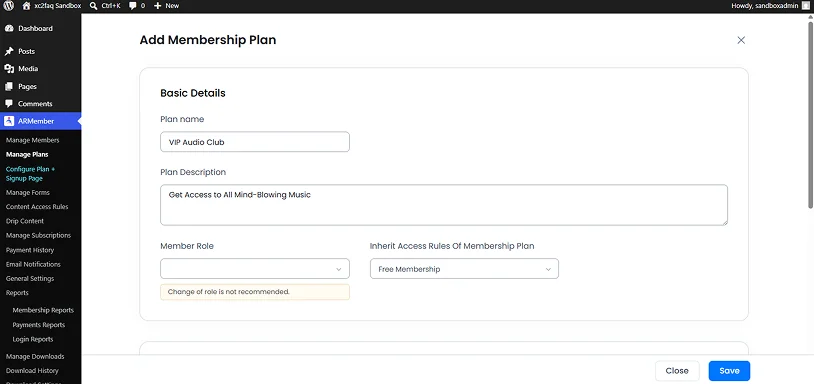
Go to ARMember → Manage Plans → Add New Plan.
Fill the basic details of your membership plans such as name, description, member role and Inherit Access Rules Of Membership Plan.
Set up different access levels based on value and content depth.
For examples:
- Basic Listener
- Premium Audio Member
- VIP Audio Club
Each membership plan can unlock different libraries or content tiers.
Step 2: Configure Subscription Billing
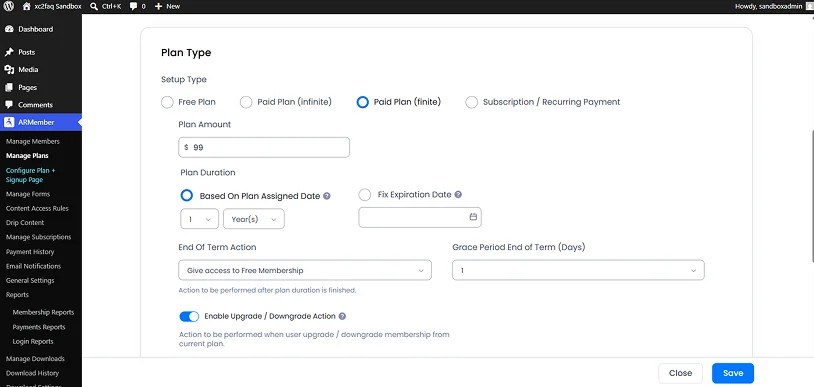
As for plan type, you can choose Paid Plan (finite) or Subscription / Recurring Payment if your goal is to charge per payment cycle.
Choose billing cycles based on your monetization strategy:
- Weekly subscriptions for short term access models.
- Monthly subscriptions for steady recurring revenue.
- Yearly subscriptions for long term commitment and discounts.
Don’t forget to save the plan you just created.
Step 3: Restrict Audio Content to Members
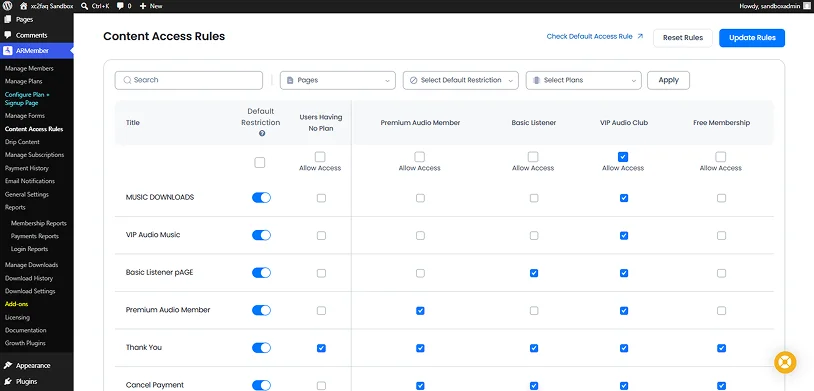
After go to the Content Access Rules, and use ARMember’s content restriction settings to control access to:
- Audio posts
- Download files
- Premium playlists
- Members-only libraries
- Music pages
Only paying subscribers should get access to locked audio content so make sure to tick access accordingly.
Step 4: Deliver Ongoing Premium Content
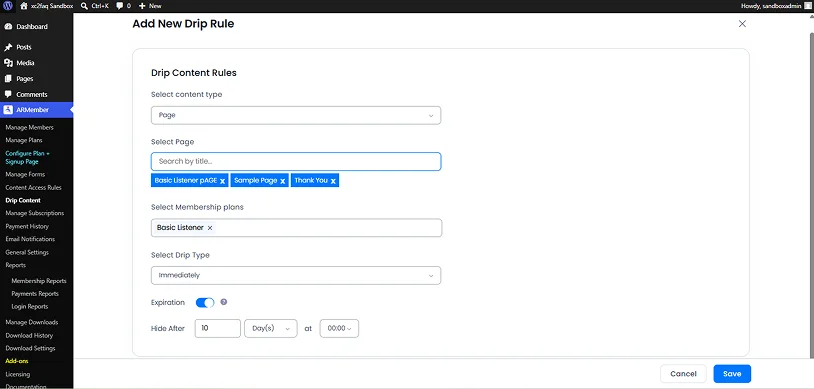
Keep members engaged by releasing audio content over a period of time. You can configure from the Drip Content tab → Add Rule. Here you can:
- Select Content Type
- Select Page
- Select Membership Plans
- Immediately
- After certain time of subscription
- Specific date onwards
- After certain time of post is published
- After certain time of post is last modified
- Expiration (Optional)
Method 2: Sell Audio Files as Digital Downloads
Best for: MP3s, music tracks, audiobooks, meditation recordings, and downloadable audio products.
Thinking about how to sell audio content as digital download? With ARMember’s Digital Download Addon, your listeners can get permanent offline access to your audio content.
In simple words, they’ll be able to download the audio.
Step 1: Activate the Digital Download Addon
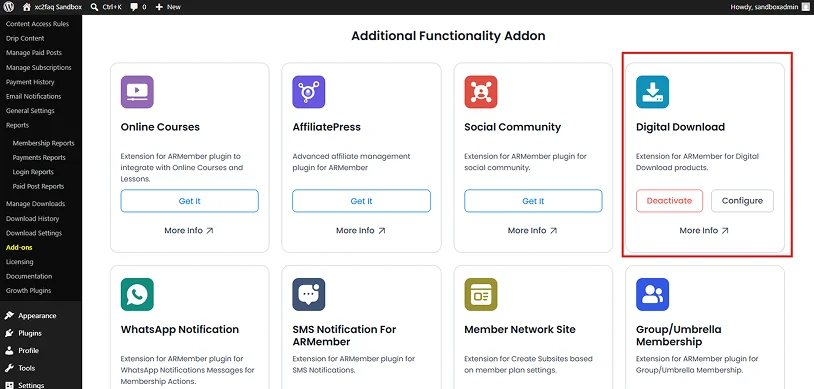
- Firstly go to the ARMember → Add-ons page.
- Look for the Digital Download addon under the Additional Functionality Addon section.
- Once you found it, click on the Activate.
ARMember’s Digital Downloads addon lets you start selling audio files securely.
Step 2: Add download Item
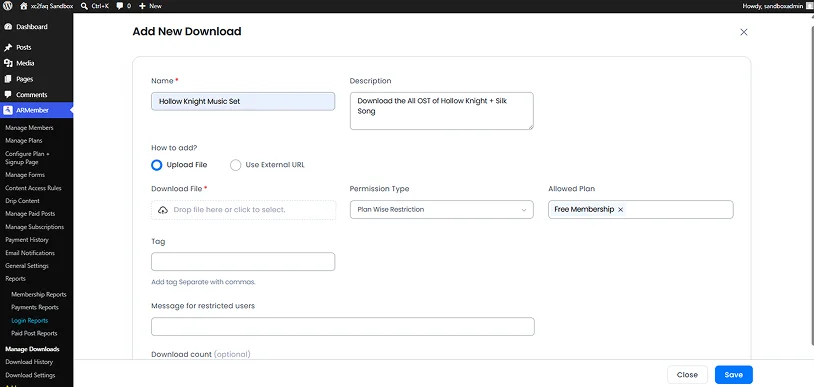
- After activating addon, go to the Manage Downloads → Add Download Item.
- Inside the “Add New Download” page, fill in all the details such as Name and Description.
- Upload File/Use External URL (for adding audio content)
- Permission Type:
- All Users
- User Wise Restriction
- Plan Wise Restriction
- Role Wise Restriction
- Lastly add tags, message for restricted users and download count (optional).
Step 3: Show Download Link On Your WordPress Membership Site
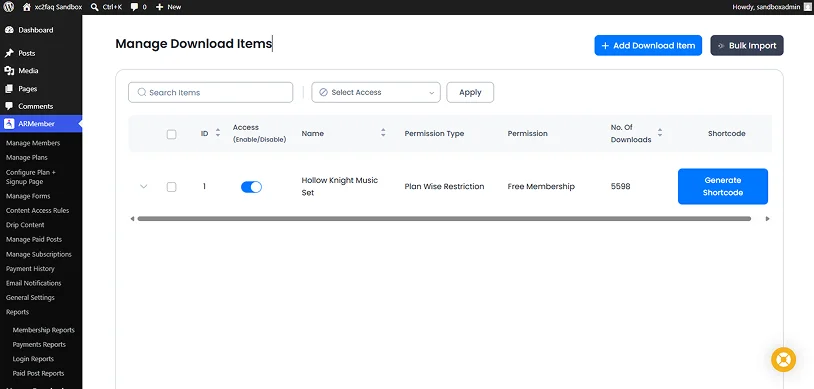
Once you create your downloadable audio file, ARMember generates a unique shortcode for your digital product.
Copy the shortcode and paste it into any WordPress post or page (it works smoothly with all popular page builders).
Just make sure to place clear purchase and download options on your sales pages or posts.
Method 3: Sell Audio Content as an Online Course
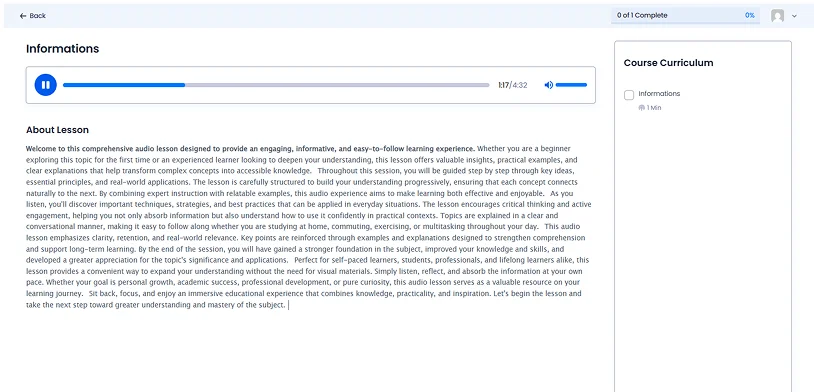
Best for: Audiobooks, language lessons, coaching programs, certification training and educational audio series, and a lot more.
Thinking about how to sell audio content as an online course? You can use ARMember’s Online Courses Addon. This model works best when your audio content is organized into a learning journey. Also, Using it, you can easily create and sell audio courses along with certificates and quizzes.
Thus here’s how it’s done….
Step 1: Activate the Online Courses Addon
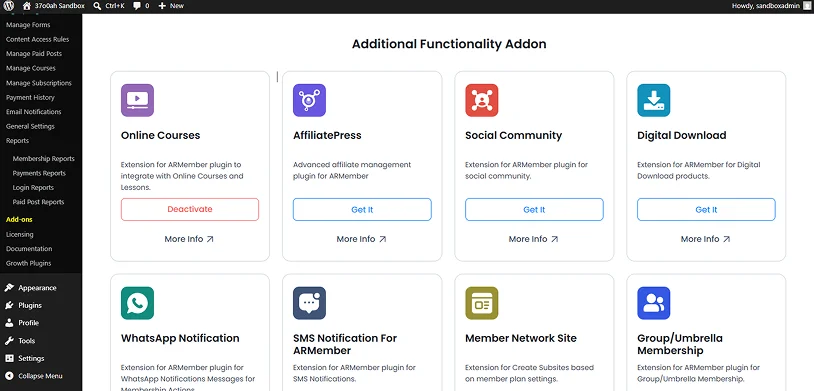
- Firstly go to the ARMember → Add-ons page.
- Look for the Online Courses addon under the Additional Functionality Addon section.
- Once you found it, click on the Activate.
This will let you create structured learning experiences with audio content – zero coding.
Step 2: Create Course Modules
After you activate the Online Courses addon, go to Manage Courses.
Firstly, we have to make categories. So for that:
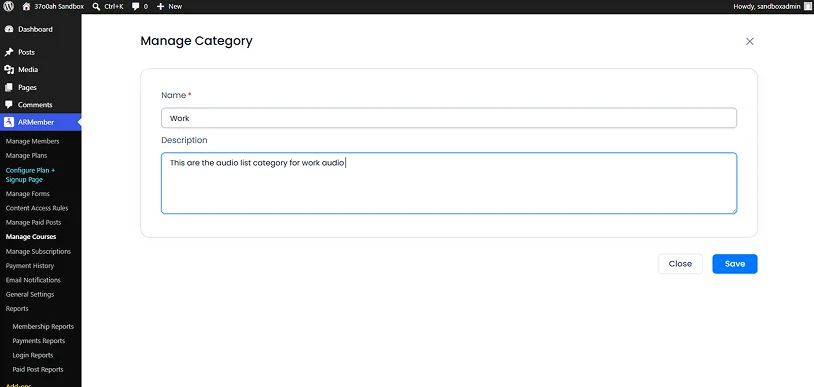
- Head over to the Manage Categories → Add Category.
- Fill in your category’s name and description.
- Hit the save button.
Now let’s add the course. And for that:
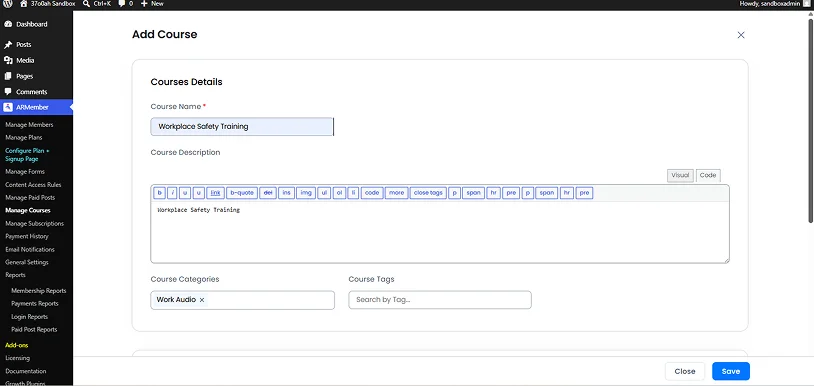
- Go to Manage Course → Add Courses.
- Now fill in all the course details such as name, description, categories and tags.
- Next set the course type such as:
- Free
- Buy Now
- Select the duration type, add course featured image and course instructor
- Lastly, toggle on the course status to Active
If possible, Break your content into progressive sections such as:
- Beginner → Advanced levels
- Topic based lessons
- Weekly learning modules
- Step by step training units
This structure helps learners stay engaged and complete the course.
Step 3: Upload Audio Lessons
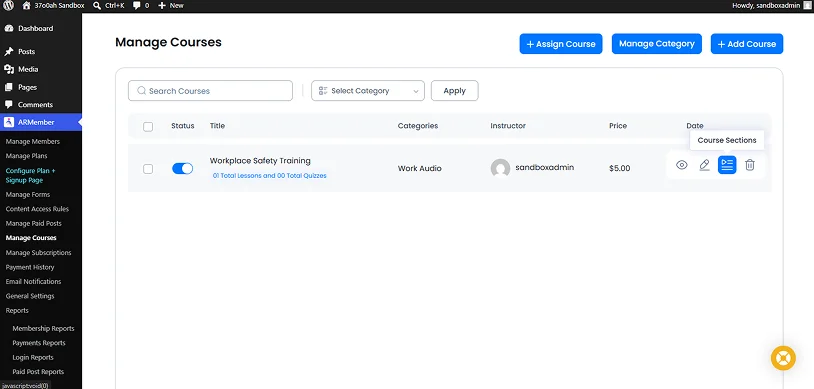
Once you created a course, now’s time to add your audio lessons.
- Inside the Manage Courses, hover over your course and select the Course sections.
- To add your audio lessons by clicking on Add Lesson.
You can add your audio content inside each section such as:
- Lectures and explanations
- Guided learning sessions
- Practice exercises or walkthroughs
- Case studies and real world examples
You can also combine audio with PDFs, quizzes or additional learning materials.
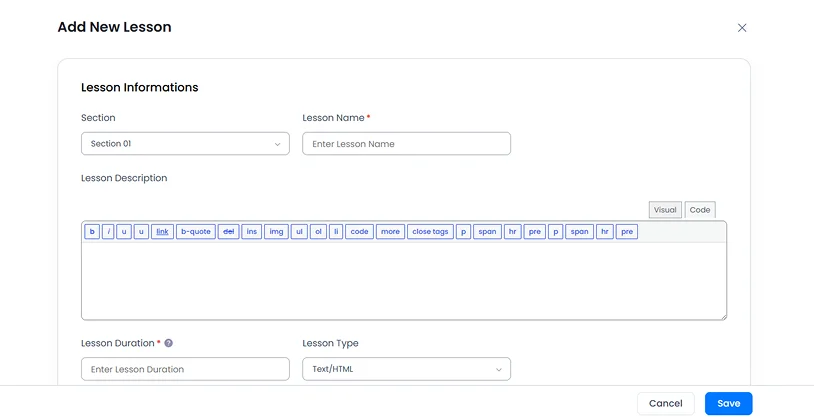
- Next, inside the Add New Lesson page, fill in all your lessons information such as:
- Section
- Lesson Name
- Lesson Description
- Lesson Duration
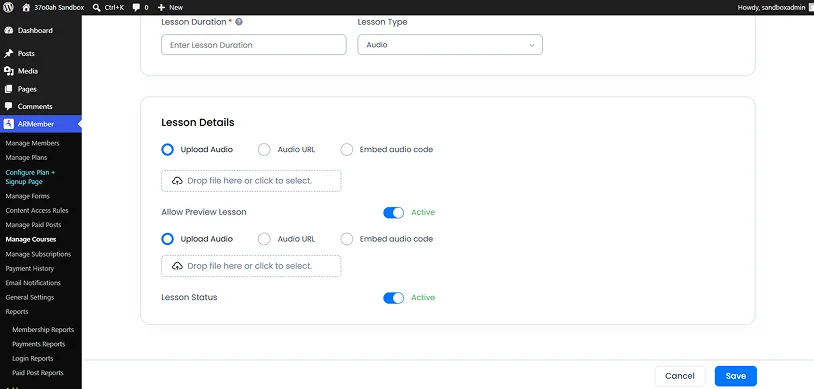
- Lesson Type (Select Audio option from the drop down)
- Scroll down to lesson details section where you can:
- Upload Audio (File)
- Audio URL
- Embed Audio code
- Lastly allow preview lesson and toggle the lesson status to active
- Hit the save button and now your audio course is ready to go!
Method 4: Sell Individual Audio Episodes Using Pay-Per-Post
Best for: Individual podcast episodes, premium interviews, lectures, special releases and standalone recordings.
If you want to monetize specific audio content rather than bundling everything into a subscription, ARMember pay-per-post is the best way to do it.
So, here’s how it goes….
Step 1: Activate Pay Per Post Addon
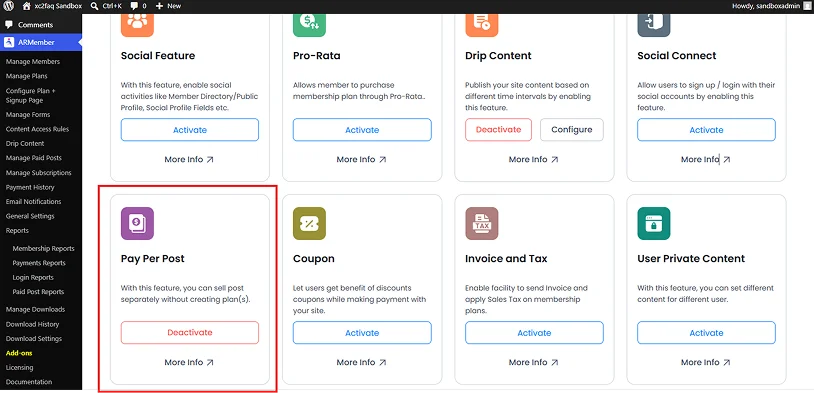
- Firstly go to the ARMember → Add-ons page.
- Look for the Pay Per Post addon under the In-built Modules section.
- Once you found it, click on the Activate.
Step 2: Upload Your Audio Content
- Next, go to WordPress → Pages/Posts.
- Here you can edit an existing one or create a new one by clicking on “Add Page”/”Add Post”.
- Now add your audio file or embed player inside or page.
- Don’t forget to save it.
Step 3: Create the Paid Content Setup
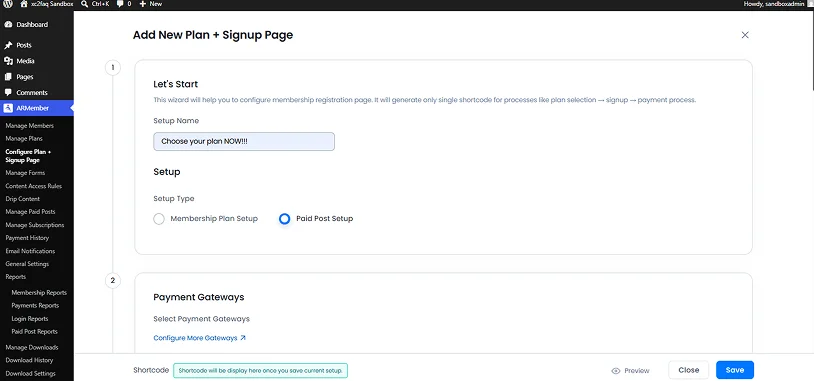
- Go to the ARMember → Configure Plan + Signup Page
- Click the Add New Setup button in the top right
- Give your setup a name and select Paid Post Setup from the dropdown.
- Lastly, your preferred Registration Form, Redirection links and Payment Gateways
- That’s it
Step 4: Manage Paid Posts
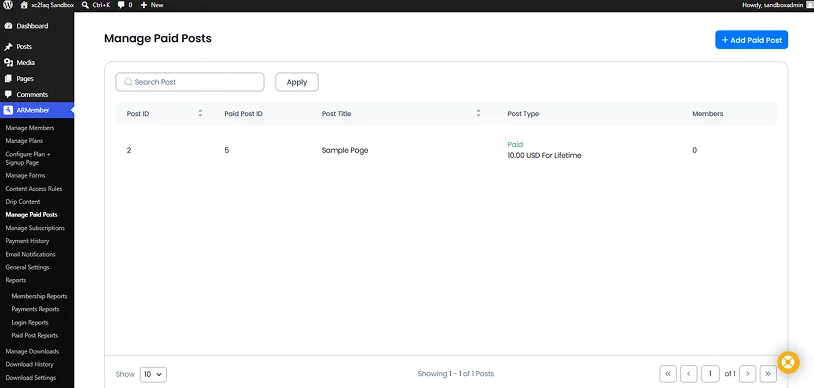
- Head straight over to the ARMember → Manage Paid Posts
- Click on the Add Paid Post
- Now choose your content type (page/post)
- Set post type:
- Free Post
- Buy Now
- Subscription/Recurring Post
- Enter alternative contents? You don’t need any kind of complicated tech stack nor a custom built platform to start sellin for users who have not (yet) bought this post.
Step 5: Publish and Sell
Now published, people can buy access to that specific audio content immediately.
In Conclusion: Which ARMember Audio Selling Method Is Right For You?
The right way to sell audio content with ARMember depends on what you create, how often you publish and the kind of revenue model you want to build.
ARMember gives you four flexible ways to monetize audio content, from one time sales to full subscription based businesses.
Still confused how to sell audio content in the best way possible? We’ve got you. Below is a quick summary to make the right choice:
- Go with Membership Subscriptions if you want recurring income (And have a loyal fan following)
- Choose Digital Downloads if you want to sell audio files individually
- Pick Online Courses if your audio is structured or educational
- Pay-Per-Post if you want flexible one-off monetization
If you don’t wanna stick with one way of selling premium audio or music on WordPress, ARMember lets you mix all four models inside a single WordPress website and create a scalable audio business with complete control over your content and revenue.
Related Articles:
- 100+ Best Digital Product Ideas to Sell & Make Money Online
- Beginner’s Guide to Selling Online Courses with Email Marketing
- 7 Best Platforms for Selling Digital Products in 2026
FAQs
How do you earn money from audio?
You can earn money from audio by monetizing it using WordPress membership plugins like ARMember. After monetizing, you can sell its access for a specific period of time and earn recurring money.
How do you sell audio files on your website?
If you have a WordPress website, then you can easily sell audio files directly from it. Just install and activate ARMember. This WordPress membership plugin turns your audio file into digital download, so people can pay and download it.
Can I sell music on WordPress?
Yes, Of Course! You can sell music on WordPress by using the ARMember WordPress membership plugin. Activate ARMember’s Digital Download addon, upload your music audio file, set the price and sell it right from your WordPress site.
What is the best way to sell music online?
One of the best ways to sell music online is from your WordPress website because unlike third party platforms, here you own the complete rights over your music, audience, and get 100% profits.
How do audio subscriptions work?
Audio subscriptions work on a simple model: Users or listeners pay a flat monthly or yearly fee to get access to unlimited audio streaming.

Share this post


