
Smart Content Dripping
Schedule full or partial content releases to keep members engaged and returning regularly.
ARMember helps you release content on your schedule, and keeps your members engaged and coming back for the next drop.
Keep your members engaged by delivering the right content at the right time.
With ARMember’s powerful Drip Content feature, you can easily schedule and release your pages, posts, or custom post types for your members based on their membership plan.
No extra add on! No complicated setup!
Just schedule → drip → engage
What is Drip Content?
“Dripping” content means releasing content gradually over time instead of making everything available all at once.
You can use drip rules to:
Wanna hear something truly fantastic?
ARMember makes drip scheduling effortless with its built-in Drip Content Module.
Drip Rules Management – All in One Dashboard
Managing your content drip schedule is a breeze with ARMember.
Head over to the Drip Content tab and you’ll find a clean grid displaying every drip rule you’ve set all in one place.
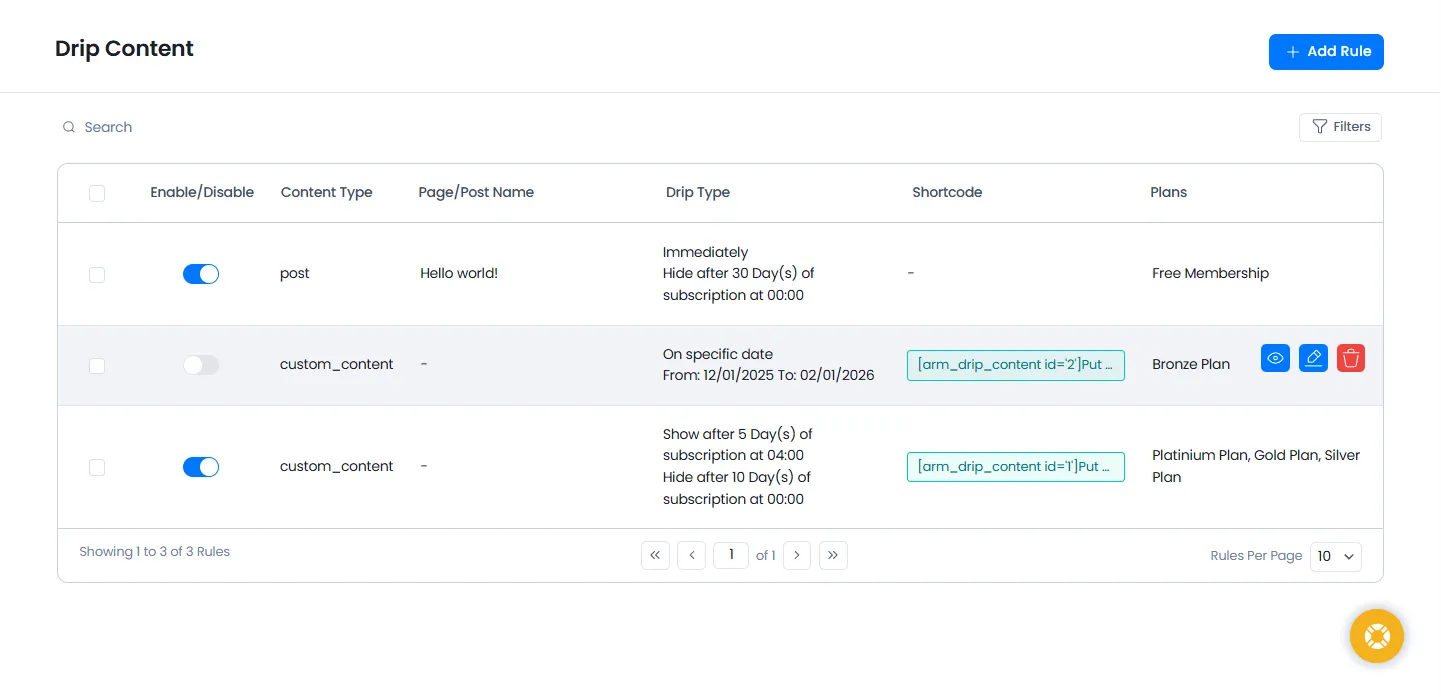
What You’ll See in the Grid:
| Column | Description |
| Status | Provides switch to ENABLE or DISABLE rule |
| Type | Content type: Post / Page / Custom Post / Custom Content |
| Name | Title of the content (or shortcode if it’s custom content) |
| Drip Type | Rule condition (immediate, date-based, time-based, etc.) |
| Plans | Membership plan(s) the rule applies to |
| Members | Number of matching members who will get affected by rule |
Now What You can Do:
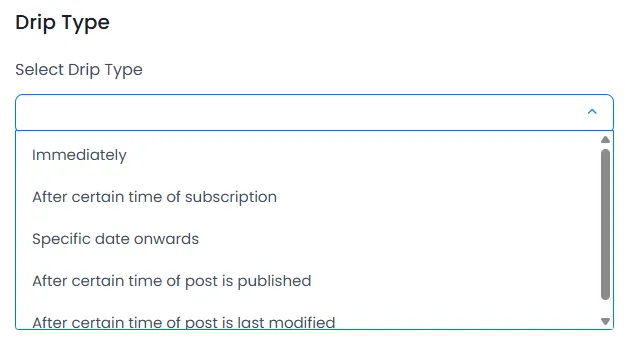
ARMember offers 5 powerful drip scheduling methods.
1. Immediately
Unlocks content instantly for members as soon as they subscribe to your membership plan. Also applies to users who are already subscribed.
2. After a certain time from subscription
Delays content access by a set number of days after a user joins a plan. For example: Unlock content 10 days after joining.
3. Specific date onward (or date range)
Show content only between specific dates
4. After certain time from content published
Unlock content X days after a post or page is published.
5. After certain time from content last modified
Unlock content X days after updates/changes.
Drip Content for Just the Part You Want (Partial Content Drip)
People love surprises. They love feeling like they’re unlocking something special. That’s exactly what ARMember’s Custom Content Drip lets you do.
Maybe you want to release a juicy bonus section after 3 days. Or reveal the next lesson only when someone’s ready.
With ARMember, you no longer have to drip full pages. You can drip just the part that matters most.
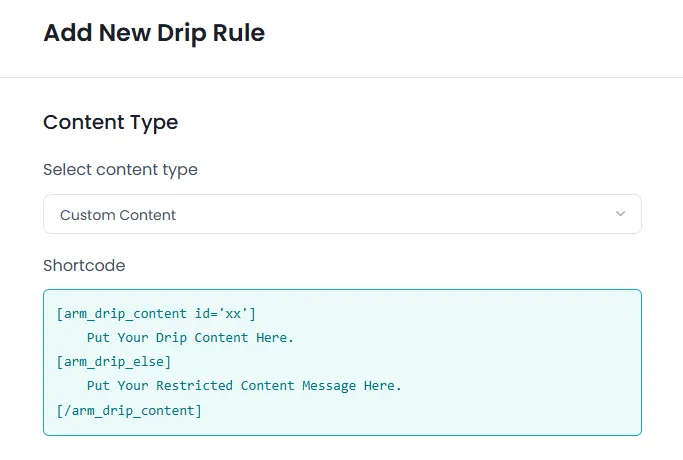
ARMember lets you drip custom content blocks using a shortcode.
Only that block will be dropped, the rest of the page stays visible.
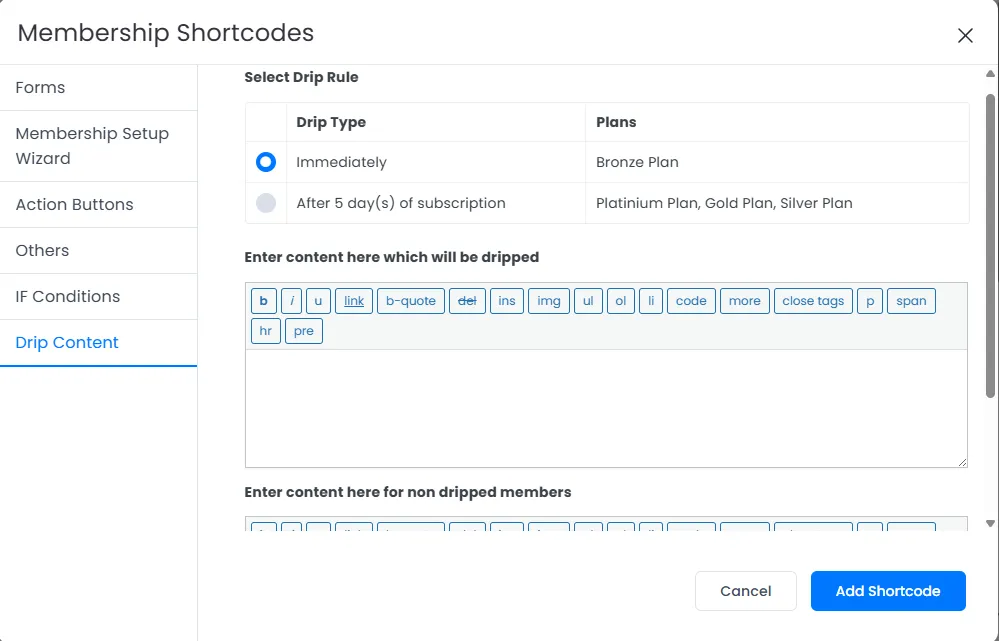
After creating custom drip content, the shortcode becomes available directly in the WordPress editor’s shortcode list.
Drip Rules in Post/Page Editor (Metabox Support)
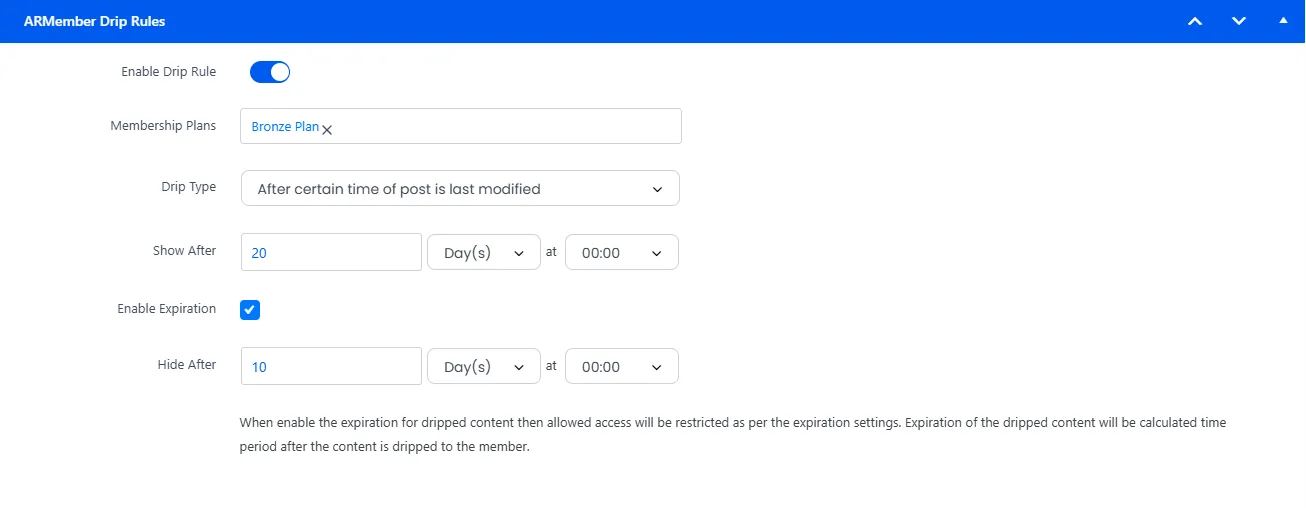
Time to fine tune the flow right where you create with ARMember Metabox.
When creating new content (page/post/custom post):
This allows you to change drip settings without leaving the editor screen.
Email Notifications: Send Content Before It Unlocks
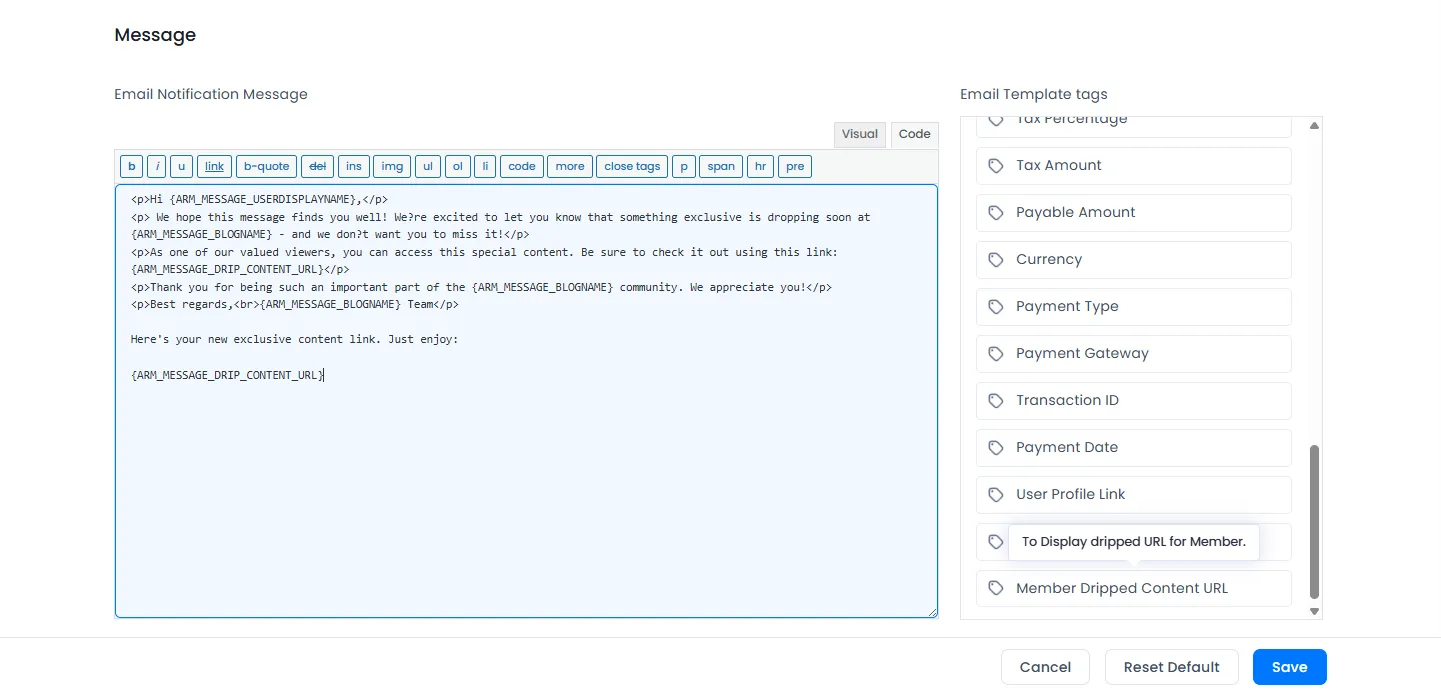
Want to keep your users excited and informed?
Enable “Before Dripped Content Available” notifications to notify members that new content is about to unlock.
Use the template tag:
Send members a direct link to their upcoming content
Best Use Cases for Drip Content in ARMember
| Use Case | How It Helps |
| Release course modules week by week with ease | Keeps students engaged with structured and perfectly timed content delivery |
| Control content access for recurring subscriptions | Offers ongoing value to subscribers, encouraging them to stay longer |
| Deliver premium content selectively | Restricts access to exclusive resources based on membership level. |
| Prevent content dumping and reduce churn | Stops users from grabbing all content at once, improving retention and loyalty. |
Endless Ways to Share Your Content Using Drip Content
Instead of giving everything upfront, keep users coming back regularly increasing member lifetime value!
FAQs
1. What is content dripping?
Content dripping is the process of releasing content over a period of time instead of giving members access to everything at once. With ARMember, you can schedule pages, posts, or custom content to unlock premium content based on membership level, specific dates or custom rules. These drip rules are perfect for online course platforms and membership sites.
2. How do drip rules work?
Drip rules work by giving you the power to decide when a member can access specific content. ARMember offers 5 flexible rule types, such as immediate access, access after X days, date-based unlocks, or content-published timers. Once a drip rule is all set, ARMember automatically handles the unlocking for each member based on their plan and timing.
3. Can I manage drip rules from the WordPress editor?
Yes, indeed! You can manage drip rules for content scheduling or content dripping right from the WordPress editor by using ARMember Drip Rules MetaBox.
4. Can I track which drip content my members accessed?
Yes, you can track which drip content your members accessed using ARMember’s drip content system. It displays how many members match each rule inside the Drip Rules Dashboard. Later, you can view rule impact, see affected members and stay tuned for who will receive the upcoming next dripped content.
5. What is drip feed content?
Drip feed content is about releasing the content in a scheduled way over the time instead of releasing all at once. This kind of content scheduling works the best for releasing lessons, modules, and bonus sections on the basis of time and events.
6. Can I drip only part of a page?
Yes, Absolutely! ARMember allows Partial Content Drip with the use of shortcodes. Thus, you can drip just a specific section like a bonus tip, extra lesson, or premium block while keeping the rest of the page behind the paywall.