
Advanced Content Restriction & Paywall
Learn how to restrict content in WordPress using ARMember’s easy access controls.
Set content restriction rules & strong paywall for posts, pages, custom post types, menus and more when ARMember gives you complete control, exactly the way you need it.
ARMember, the Best WordPress Membership Plugin, gives you complete control over who can access your content.
Note: By default, all existing site content remains publicly accessible. Once ARMember is configured, you can apply access rules to both existing and newly created content.
Whether you want to restrict posts, pages, menu items, categories or offer teaser previews before the paywall, ARMember makes it effortless with its friendly user toggle system.
No coding. No complexity.
Just ON/OFF toggles and smart access rules.
Why Content Restriction Matters?
Not everything on your website should be seen by everyone.
With ARMember, you can:
Note: By default, all content on your site remains publicly accessible. Once you configure ARMember, you decide what stays public and what becomes members only.
What ARMember Can Hide Behind a Paywall
You can protect access based on membership levels, user roles, or logged-in/logged-out status for:
However, we’ve been forgetting one more important thing: You can place a paywall on any restricted content, allowing only paid members or specific subscription plans to unlock premium sections.
Say “Hi! ” To Content Restriction Dashboard

When creating or editing a post, page, or custom post type, ARMember places a simple Access Rules box right inside the editor.
It’s a mind blowing feature for creators who want speed, control and convenience all at once.
Default Access Rules for New Content
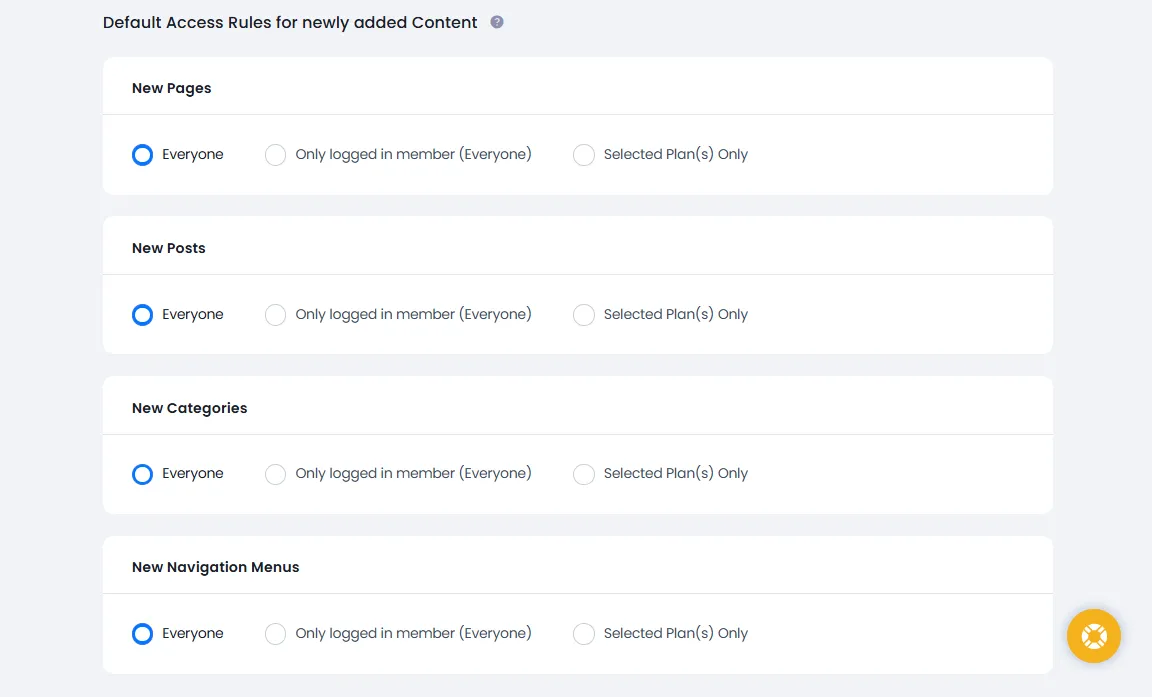
ARMember lets you set global access defaults so you don’t have to manually configure restrictions every time you publish something new.
Just ahead over to:
ARMember → General Settings → Default Restriction Rules
Set it all at once. Let ARMember handle the rest.
Show a Sneak Peek, Paywall the Rest
Sometimes, you want to show a preview and keep the real value behind a paywall. And, that’s what we call teasing out till they get it!
For example, you can show the first two paragraphs → lock the rest → display upgrade your creative personalised message
ARMember offers a built-in “Restrict Content” button above the editor. It opens a popup where you choose membership levels and access visibility.
Or use shortcode based restriction like:
[arm_restrict_content plan="{PLAN-ID}" type="show"]
Your premium content goes here.
[armelse]
Shown to non-members or logged-out users.
[/arm_restrict_content]
It’s one of the best features for:
BuddyPress & BuddyBoss Restriction Support
Are you running a social community? Sounds awesome! Then here comes ARMember’s BuddyPress & BuddyBoss integration support just for YOU!
Simply enable the BuddyPress / BuddyBoss addon and easily restrict:
So now’s the time to lock down your community features based on membership levels and grow!
Where ARMember Content Restriction Shines The Best
| Use Case | How ARMember Helps |
| Gated course or premium content | Restrict entire pages or put partial sections behind the paywall |
| Drip-fed memberships | Release content gradually over time |
| Lock specific menu items | Nav Menu Lock hides unauthorized navigation items |
| Private community (BuddyPress/BuddyBoss) | Restrict profiles, messaging, member lists |
Endless Ways to Control & Monetize Your Content with ARMember
Why give it all away at once when you can keep your members coming back for more? With ARMember’s advanced content restriction and paywall feature, you decide who sees what and when!
Quick Glossary
| Unique Terms | What It Actually Means |
| Access Rule | Think of this as a gatekeeper. It decides who gets to see what on your site |
| Partial Restriction | Don’t want to hide a whole page? No problem. This lets you block just a section of it |
| Meta-box Override | Lets you change access rules directly from the post/page editor |
| Nav Menu Lock | Hides menu items from users without access |
| Site Restriction Mode | Want to make your whole site private? Flip this switch and you’re good to go. |
FAQs
1. How do I restrict specific pages or posts on WordPress? (with ARMember)
ARMember allows you to restrict individual pages, posts, custom post types, categories, and even archive pages using built-in options. Simply toggle “ON” the protection for the specific page or post you want to restrict.
2. Is it possible to restrict content based on membership level?
Yes, indeed. It’s possible to set content restriction rules for content based on membership levels, plans, logged-in or logged-out status with ease.
3. How can I hide only part of a post or page?
You can hide any specific part of your page or post using partial content restriction shortcodes in ARMember. Now simply wrap the private content within:
[arm_restrict_content plan="{PLAN-ID}" type="show"]Your premium content goes here.[armelse]… [/arm_restrict_content]
You can also show alternate content with [armelse].
4. Can I restrict WordPress menus based on user access?
Yes, with ease. You can use ARMember’s NAV Menu Lock feature to hide or show specific navigation menu items which completely depends on membership level.
5. How do I apply default content restriction rules for new posts/pages?
Simply go to ARMember → General Settings → Default Restriction Rules to set global rules that automatically apply to all newly created content types.
6. What is a Site Wide Restriction, and when should I use it?
Site Wide Restriction is actually just a type of content restriction that makes your entire site private and requires users to log in before accessing any content
7. What do content restrictions mean?
Content restriction means limiting the access of specific pages, posts or premium content on your membership site. Thus, only the paid members can access the premium content. With ARMember’s content restriction, you decide what stays public and what becomes “members only,” for content protection.
8. What is a paywall?
A paywall is a barrier that blocks access to premium content until a user pays or subscribes. ARMember lets you set up a WordPress subscription paywall for posts, pages, custom post types, menus, and even partial content which is actually great for creators who want to monetize their content.
9. What websites have a paywall?
A website with a paywall is any site that charges users before unlocking a specific content. There are many popular websites with paywall like The New York Times and The Wall Street Journal, streaming services such as Netflix and Disney Plus.