


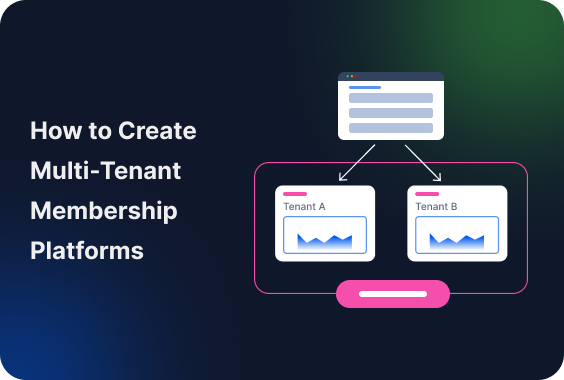
Looking to create a platform with a separate dashboard / account for each member on WordPress? Our tutorial with the ARMember membership plugin is where you’ll get it done.
Below, you’ll find all the needed details, from the basics on who needs a WordPress multi-tenant platform to the hands-on with what exactly is required to create a complete service and infrastructure for your future clients.
TL;DR: Creating a WordPress multi-tenant membership platform with WordPress Multisite and the ARMember plugin is extremely easy. It allows members to build their own mini websites inside your platform. You can charge for access using plans, limit features based on pricing and make a membership platform where everyone works on their own but under your ecosystem.
What Is a Multi-Tenant Membership Platform?

A multi-tenant membership platform is a system/site where multiple independent users (tenants) each run their own membership-based business inside one shared platform, while their data, customers, and settings remain separate.
In our tutorial, we explain how you can be the site owner who provides such access to members. In simple terms, your customers can have their own customers.
The workflow works like this:
- You (the platform owner) manage the system.
- Your members (tenants) each get their own “space”.
- Each tenant can run their own business, audience, or content.
- Data, users, and settings are separated between tenants.
What Kind Of Multi-Tenant Membership Platform Can You Build?

1. Provide A Platform For Coaches And Consultants
It lets each and every coach run their own membership program, online courses or bookings.
2. Create A Fitness And Wellness Network
If you target a fitness niche, allow trainers to manage their own clients, schedules, and subscriptions.
3. Online Education Platforms
It’s a very popular model for educational businesses. Each instructor creates and sells courses independently.
4. Agencies Or Franchises
Each and every branch or partner operates under a shared brand, yet manages their own clients.
5. Creator Platforms
Creators build paid communities, newsletters, or exclusive content hubs.
6. Niche Marketplaces Or Directories
You can create a platform for any service provider to manage their own offerings and customer base.
Given the nature of WordPress that can be extended with any plugins for any need, your customers can really run any business, from bookings to creative hubs.
What You’ll Be Able to Achieve
After setting this up with our WordPress tutorial, you’ll have:
- A scalable multi-user membership platform powered by WordPress.
- Independent subsites for each member.
- Separate customer data per tenant.
- Membership based access and monetization.
- The ability to charge for access. (subscriptions, tiers, etc.).
Your members will be able to:
- Create their own subsite.
- Manage their own users and content.
- Run their own micro-business within your ecosystem.
Tools and Requirements for WordPress Sites
For tagging along with our tutorial for a multi-tenant platform on WordPress, you’ll need:
1. WordPress Multisite Network
WordPress Multisite allows you to run multiple websites from a single installation.
A multi-site network allows you to:
- Enable multisite in your WordPress configuration.
- Set up network structure. (subdomains or subdirectories)
- Manage all sites from one dashboard.
In WordPress, a multi-site network is a workaround you need to build a platform, where you can accept user submissions, who build their own business. This will be the foundation of your WordPress multi-tenant platform.
Also, this is where you’ll be configuring which plugins work on subsites and what level of control your members have as to what kind of content and functionality they can have on their sites.
2. ARMember Plugin
This all-in-one membership plugin lets you create unlimited membership plans, manage subscriptions and control access.
3. Member Network Site extension to ARMember
This add-on connects ARMember with WordPress Multisite and allows you to build a scalable membership platform. Please note:
- Available in ARMember Enterprise plan or as a $49 add-on.
- Requires ARMember version 3.2.1 or higher.
This extension allows members to create and manage their own subsites, as well as links subsite creation to membership plans.
How to Build Your Multi-Tenant Platform with WordPress & ARMember
Step 1. Install and Activate the Add-on
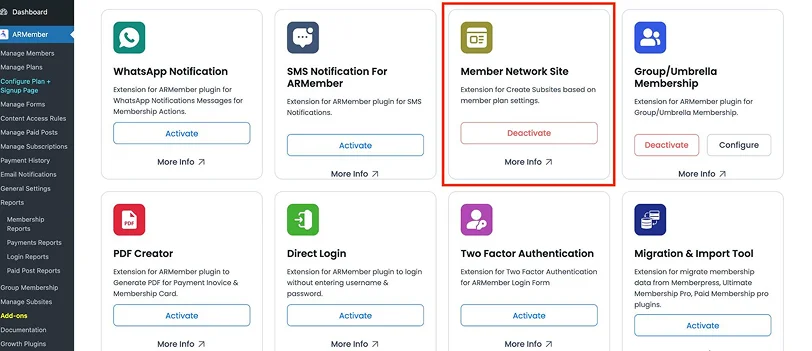
- Download the Member Network Site add-on from your ARMember account.
- Go to your WordPress dashboard.
- Go to Plugins → Add New → “Upload Plugin”.
- Upload and activate the addon.
After activation, you’ll see a new menu – Manage Subsites.
Step 2. Configure Multisite Settings in Membership Plans
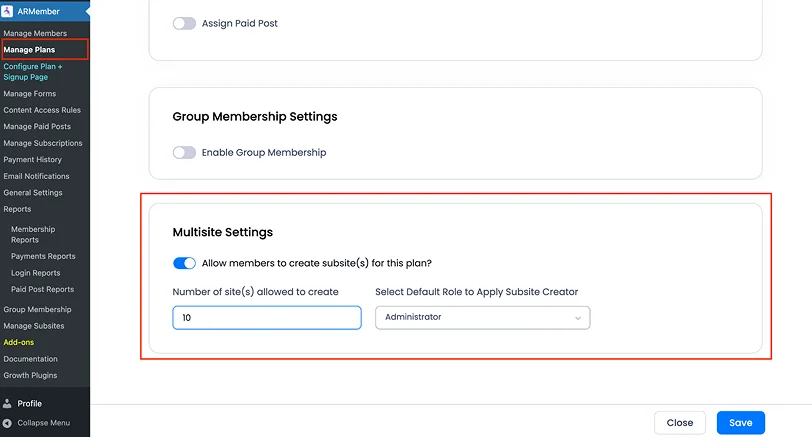
- Go to ARMember → Manage Plans.
- Edit or create a membership plan.
- Scroll to the Multisite Settings section.
There are a few related settings:
- Allow members to create subsites.
- Set number of subsites allowed.
- Choose default role for subsite creator.
For example, you can allow your customers to have:
- Basic plan: 1 subsite.
- Pro plan: 3 subsites.
- Agency plan: 10 subsites.
This is the first step to creating a specific business model using ARMember’s functionality.
Step 3. Add Subsite Creation to the Frontend
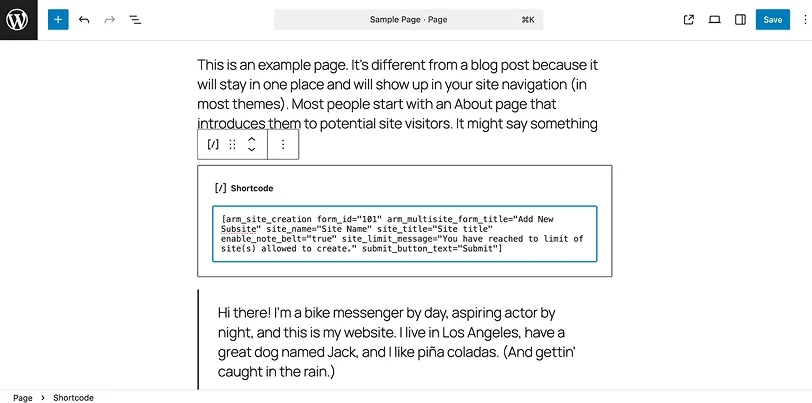
The best part is that there are a lot of dedicated shortcodes you can add to your site page for subsite creation.
Use this shortcode:
[arm_site_creation]
This shows a form where users can create their own subsite.
Example with parameters:
[arm_site_creation form_id="101" arm_multisite_form_title="Add New Subsite" site_name="Site Name" site_title="Site title" enable_note_belt="true" site_limit_message="You have reached to limit of site(s) allowed to create." submit_button_text="Submit"]
It lets users create new subsites and applies limits based on their membership plan. View all the shortcode parameters in the docs.
Step 4. Let Users Manage Their Subsites
Next step, add this shortcode:
[arm_manage_subsite]
Example:
[arm_manage_subsite form_title="Manage Subsites" records_per_page="10" no_record_message="There is no record of subsite"]
On a site page that contains this shortcode, users can view their subsites, activate/deactivate or delete sites.
Step 5. Control Your Members
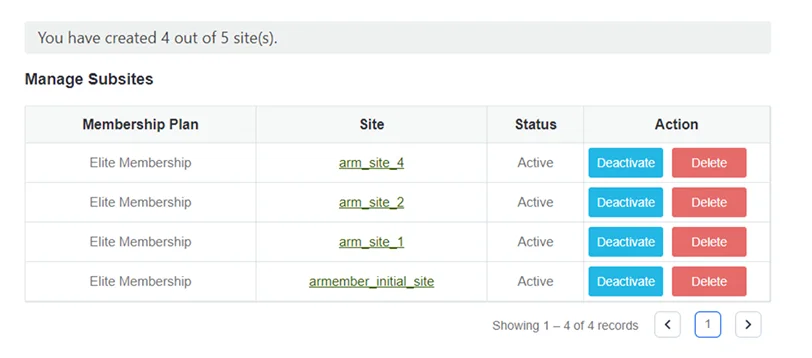
From Manage Subsites, you as a site admin, can:
- View all subsites.
- Activate/deactivate.
- Delete subsites.
- Monitor usage.
Thus, you have full control over the ecosystem.
How Membership Conditions Affect Subsites
The plugin automatically connects membership status with subsite access. What happens in different scenarios:
- Upgrade/Downgrade plan: subsite gets deactivated.
- Cancel or remove plan: subsite gets deactivated.
- Subscription suspended: subsite deactivates automatically.
- Plan renewal: subsite remains active.
- No active plan: all subsites deactivated.
To sum up on the tenant capabilities:
| Your tenants can | Your tenants can’t |
|
|
What else can you do to better manage your platform? Use more add-ons from ARMember.
Additional Improvements with the Group/Umbrella Membership Addon
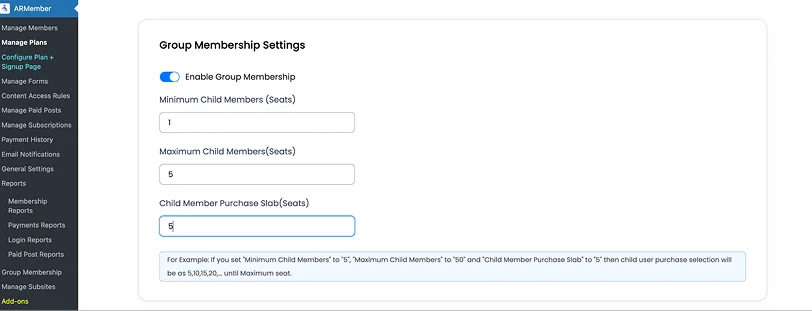
Another useful extension for your multi-tenant site built with ARMember is the Group (Umbrella) Membership add-on. This extension allows one account (group owner) to manage multiple members under a single subscription.
- One payer.
- Multiple users.
How does it differ from the Network add-on by ARMember?
| Add-on | Member Network Site | Group Membership |
| Purpose. | Create subsites. | Manage user groups. |
| Structure. | Multi-site. | Single site. |
| Use case. | Platform builders. | Teams and organizations. |
| Focus. | Independent businesses. | Shared access. |
Here is a brief guide of how you can employ the add on:
- Create a group membership plan.
- A user purchases it.
- They become a group owner.
- They invite/manage members.
- All members share plan access.
The Group Membership add-on can be used for corporate training programs, teams or organizations, family or bundled memberships, as well as agencies managing internal users.
When you might need both:
- Member Network Site – for tenant sites.
- Group Membership – for team access within a tenant.
Together, they create a more flexible ecosystem for your membership site ideas.
How to Monetize Your Multi-Tenant Platform with ARMember

There are tons of default monetization options you can use for generating your recurring income while also offering real value to your tenants.
Subscription-Based Access
The most common approach is to charge users a recurring fee to create and maintain their subsite:
- Create multiple membership plans. (e.g., Basic, Pro, Enterprise)
- Limit the number of subsites per plan.
- Restrict only some features based on pricing tier.
For example, the Pro package can host 3 subsites, the agency – 10 subsites.
Tiered Feature Access
Now go beyond just the number of subsites by monetizing feature availability and encourage upgrades. You can have:
- Advanced customization options for higher plans.
- Priority support for premium members.
- Access to premium templates or integrations.
Paywall for Platform Entry
You can require users to purchase a membership before they can even create a subsite, including such use cases:
- Creator platforms
- Coaching networks
- Niche communities
Group (Umbrella) Membership Monetization
Using the Group Membership add-on, you can sell plans where one user manages multiple members, for instance, when an agency is looking to buy access for their team or companies purchasing training accounts for employees.
Freemium Model
Offer a free plan with limited features, then upsell paid plans:
- Free – 1 subsite with limited functionality.
- Paid – more sites + advanced features.
Overall, ARMember lets you monetize your multi-tenant platform. Best of all, you can combine:
- Recurring subscriptions.
- Tiered pricing.
- One-time fees.
- Group plans.
- Upsells..
Best Practices for Managing a Multi-Tenant Platform
Building the platform is easier than managing it long-term. For this second goal, you need a good plan. Here are a few tips on what you can add to that plan.
1. Define your pricing strategy by thinking in tiers:
- Number of subsites.
- Features per plan.
- Storage or limits.
2. Keep the user experience simple with a guided onboarding and templates for subsites.
3. Get yourself a growth plan by considering your hosting performance, database size and backup strategy. WordPress Multi-tenant platforms grow fast and you need to be ready.
4. Standardize what you can. For example, offer pre-designed themes, default settings, and even shared components.
5. Monitor usage and activity by tracking active vs inactive subsites, membership churn and resource usage.
6. Set clear rules for tenants by defining:
- What is allowed content?
- Usage limits.
- Account policies.
7. Your tenants will need help, so build docs, tutorials, and support channels.
Concluding: Creating a Multi-Tenant Membership Platform
A multi-tenant membership platform transforms your WordPress from a simple membership website into a scalable business engine, where you can earn money just by giving others a place to serve their customers.
With ARMember, its Member Network Site extension, and WordPress Multisite, you can create a system where you own the platform and your users build their own businesses. Everyone operates independently, yet within your ecosystem.
Whether you’re building a creator hub, a coaching network, or a service marketplace, this model gives you the flexibility and control to grow sustainably that you’ve been dreaming about.
Related articles:

Share this post


