


Choosing the right table rate shipping plugin can feel like trying to solve a puzzle. WooCommerce’s built-in options (Flat Rate, Free Shipping, Local Pickup) are fine to start, but they quickly fall short as your store grows.
If you’ve ever wanted to say, “Charge $5 for light items, $15 if the box exceeds 10kg,” or “Make shipping cheaper when customers buy 5+ items,” then you need a table rate shipping plugin.
The best table rate shipping plugin for your store is the one that protects your margins while reducing cart abandonment by offering fair, transparent rates.
Here is our complete guide to finding the perfect shipping solution for your WordPress store.
Quick Comparison: The Best Table Rate Shipping Plugins for WooCommerce
Before diving into the details, let’s take a quick snapshot of how these table rate shipping plugins compare and how we arrived at these selections.
| Plugin | Key Highlight | Starting Price | Best For |
| WowShipping | A complete shipping solution combining flexible rates, conditional flat rates, free shipping, and carrier live rates using 30+ smart conditions. | Free ($69/yr Pro) | Stores that need highly flexible shipping (basic to advanced) and rule-based flat, free, and live carrier rates in one plugin. |
| ReachShip | A multi-carrier WooCommerce shipping solution that provides real-time rates, label generation, shipment tracking, and centralized order fulfillment across multiple carriers. | Free | Stores that need live carrier rates, multi-carrier shipping, and streamlined fulfillment. |
| Flexible Shipping | AI Configuration Assistant and massive reliability for weight-based rules. | Free ($99/yr Pro) | Established stores need high stability and an AI-guided setup. |
| WooCommerce Table Rate | Native integration with the WooCommerce core for 100% compatibility. | Pro only ($119/r) | Enterprise stores that prioritize official support and seamless updates. |
| Table rate shipping by Acowebs | Offers 89+ conditional logic triggers, including specialized GeoIP rules. | Free ($39/yr Pro) | Advanced users need highly granular geographic control and niche conditional triggers. |
| Flexible Table Rate Shipping Rules by wp-centrics | Uses a unique Packer Algorithm to calculate costs based on box dimensions. | Free ($59/yr Pro) | Stores with complex physical packaging requirements and tiered bulk items. |
| Easy Table Rate Shipping by | Focuses on a minimalist, simple UI to reduce setup time for new users. | Free ($79/yr Pro) | Beginners and small stores looking for a straightforward, “easy-to-use” shipping setup. |
| Advanced Rule-Based Shipping by Codiepress | Specializes in volume and dimension-based logic with multi-layered per-unit cost thresholds. | Free ($49 lifetime) | B2B or industrial stores, shipping bulky, heavy, or irregularly shaped items. |
How We Tested These Table Rate Shipping Plugins
To evaluate these plugins, we reviewed their core features, rule flexibility, ease of setup, and suitability for different WooCommerce store sizes. We focused on how well each plugin handles real-world shipping scenarios such as tiered pricing, mixed product carts, zone-based rules, and scalability.
Priority was given to plugins that offer clear rule configuration, predictable rate calculations, and long-term usability for growing stores.
How to Choose the Best Table Rate Shipping Plugin for Your WooCommerce Store
If you are a beginner or even an intermediate store owner, prioritize the criteria below to avoid future shipping chaos and late-night debugging sessions.
✅ Simple Rules
The “brain” of your shipping needs to be easy to use. Look for a plugin that lets you set “If/Then” rules like (If the weight is over 5kg, charge $10) without needing a manual. It should be easy to mix weight, price, and item counts.
✅ Quick Destinations
You shouldn’t struggle to ship to specific places. The best plugins let you group countries, states, or even specific zip codes with a few clicks. This is the easiest way to offer local delivery or handle remote areas.
✅ Flexible Totals
Sometimes you charge by the box, and sometimes by the item. Pick a tool that lets you choose how to add up the cost. It should also clearly show when a customer has earned Free Shipping, so there are no surprises at checkout.
✅ Stress-Free Management
Avoid “data entry hell” with a clean layout. Look for a “Duplicate” button to copy rules quickly and an “Import” feature so you can upload your shipping rates from a simple spreadsheet instead of typing them one by one.
✅ Worth the Cost
A “free” plugin that breaks your checkout is expensive. Paying for a Pro version usually pays for itself by preventing shipping mistakes. Plus, you get customer support to help you out if you get stuck.
Which is the Best Table Rate Shipping Plugin for WooCommerce Stores?
Skip the fluff, just pick your #1 priority from the list below and find your perfect plugin match in seconds.
| Do I.. | Best Fit |
| Want everything in one place | WowShipping by WPXPO |
| Want an AI-powered assistant for easy weight and total-based rules | Flexible Shipping by Octolize |
| Want the official extension with 100% compatibility and native support | WooCommerce Table Rate (Official) |
| Want hyper-granular control with over 80 conditional logic triggers | Advanced Table Rate Shipping by Acowebs |
| Want to optimize shipping costs using an advanced packer algorithm for boxes | Flexible Table Rate Shipping Rules by wp-centrics |
| Want a beginner-friendly, minimalist interface to set up rules quickly | Easy Table Rate Shipping by WebFactory |
| Want specialized volume and dimension-based rules for heavy or industrial goods | Advanced Rule-Based Shipping by Codiepress |
Best Table Rate Shipping Plugins for WooCommerce
WooCommerce store owners need precision, not guesswork. Table Rate Shipping lets you define shipping costs using weight, quantity, cart value, location, and more parameters. So bulky orders stay profitable while loyal customers aren’t punished with inflated fees.
Below is our fact-checked comparison of the best table rate shipping plugins for WooCommerce, ranked by flexibility, usability, and real-world feature depth.
1. WowShipping
WowShipping is an advanced table rate shipping solution that brings precision and flexibility to WooCommerce stores. Developed by WPXPO, this plugin excels at handling complex shipping scenarios through its innovative condition-based system, allowing you to combine over 30 parameters into a single shipping method.
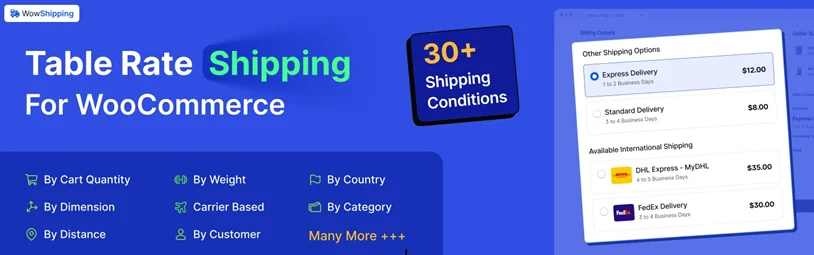
During our assessment, we found the plugin included conditions like (country + category + weight) in one shipping method. Its broad flexibility across weights, quantities, locations, user roles, and cart totals makes both simple and advanced shipping setups easy to manage.
The plugin stands out for its versatility, featuring a flexible shipping engine that lets you charge $5 for the first 5 kg and $2 for each additional kg within a single rule.
It also supports distance-based shipping, conditional flat and free shipping, and live carrier rates, making it ideal for complex, multi-factor shipping setups.
Pros:
- Highly intuitive “Flow-based” UI for building rules visually
- Revolutionary Pin Point updates that consolidate very complex scenarios
- Works with native WooCommerce shipping zones and shipping classes
- Supports cart, product, dimensions, location, and user roles-based rules
- Advanced display rules control when shipping methods appear
- Built-in analytics dashboard for optimizing shipping performance
- Carrier integrations with DHL, UPS, USPS, FedEx, Australia Post, and more.
Cons:
- Newer plugin with a smaller (but rapidly growing) user base
- Overkill for stores with very simple shipping needs
Best for small to medium businesses that need highly flexible shipping rules from basic to advanced, and also conditional flat, free, and live carrier rates in one plugin.
Pricing: Has both a free and a pro version. The Pro version starts at $69.00 per year.
2. ReachShip Multi-Carrier WooCommerce Shipping Plugin
ReachShip is a completely free multi-carrier shipping plugin for WooCommerce that helps store owners manage shipping rates, labels, and order fulfillment from a single dashboard. Instead of relying on static table rates or individual carrier plugins, ReachShip lets you compare real-time shipping rates from multiple carriers and streamline the entire shipping workflow.

The plugin supports leading carriers such as FedEx, UPS, DHL, USPS, and Australia Post, making it ideal for WooCommerce stores that want flexible, carrier-based shipping without additional plugin costs. With built-in shipment creation, label printing, and tracking, ReachShip simplifies shipping operations while improving accuracy and efficiency.
Pros:
- Supports multiple shipping carriers in one plugin
- Displays real-time carrier shipping rates
- Easy shipment creation, label generation, and tracking
- Centralized dashboard for WooCommerce order fulfillment
- Suitable for both domestic and international shipping
Cons:
- Requires individual carrier accounts for live rates
Best for WooCommerce stores are looking for a free multi-carrier shipping solution with real-time rates, label generation, and simplified fulfillment, without the complexity of table-rate rules.
Pricing: ReachShip is completely free to use.
3. Flexible Shipping
Flexible Shipping is a powerful WooCommerce plugin designed for rule-based shipping calculations. It enables precise delivery costs using weight, cart totals, and item counts for complex logistics management.
During our evaluation, the plugin demonstrated exceptional rule flexibility and a clean interface. We successfully configured tiered pricing and zone-based rules, finding the rate calculations highly predictable across various cart scenarios.
It offers unlimited shipping methods, cost calculation by weight or subtotal, and customizable titles. Advanced logic includes shipping classes, currency support, and seamless integration with major global shipping couriers.
Pros:
- Intuitive visual builder simplifies complex rule creation.
- Highly accurate logic prevents checkout price discrepancies.
- Supports multiple triggers like weight and item count.
- Seamlessly integrates with multilingual plugins like WPML.
- Easy export and import for quick site migrations
Cons:
- The interface clutters when managing numerous shipping zones.
- No native support for per-product shipping rules.
- Lacks advanced reporting for shipping cost efficiency.
Best for stores needing a reliable, rule-heavy system that scales from simple weight tiers to complex international logistics.
Offers a free version, and the Pro version starts at $99.00 per year.
4. WooCommerce Table Rate Shipping
WooCommerce Table Rate Shipping is the official extension for creating complex, rule-based shipping logic. It allows store owners to define costs based on weight, price, and item count.
Our testing focused on its ability to handle multi-tiered shipping rules within complex zones. We evaluated how efficiently the plugin processes varied shipping classes and tiered pricing for mixed-product carts.
The extension supports per-item, per-order, and per-class calculations. Key features include multiple table rates per zone, prioritized rule sets, and flexible conditions based on destination, subtotal, and total package weight.
Pros:
- Official integration ensures maximum compatibility with WooCommerce updates.
- Supports highly complex, multi-layered shipping class calculations.
- Allows multiple table rates within a single shipping zone.
- Exceptional reliability for enterprise-level stores with large catalogs.
- Guaranteed compatibility with all official WooCommerce extensions.
Cons:
- The table-based interface feels dated and less intuitive.
- Steep learning curve for beginners and non-technical users.
- No free version is available for basic store needs.
Best for established businesses that require a robust, officially supported solution to manage complex international shipping logistics and multi-item rules.
Pricing: Only has a premium version. The price starts at $119.00 per year.
5. Table Rate Shipping for WooCommerce (by Acowebs)
Advanced Table Rate Shipping for WooCommerce provides a robust framework for creating conditional shipping rules. It allows stores to define delivery costs based on weight, price, and location.

Our evaluation focused on rule flexibility and setup ease. We found it handled tiered pricing and zone-based rules efficiently, ensuring predictable rate calculations for mixed-product carts and diverse inventories.
It features unlimited shipping methods, location-based targeting, and per-item calculation. The tool includes conditional logic, handling fees, and CSV import/export for managing complex logistics across large-scale stores.
Pros:
- Visual rule builder streamlines the setup of complex scenarios.
- Precise location targeting covers countries, states, and postcodes.
- Multiple calculation modes adapt to various shipping requirements.
- Reliable condition logic prevents pricing errors during checkout.
- Lightweight code ensures minimal impact on site speed.
Cons:
- Dashboards become cluttered with a high volume of rules.
- Lacks integrated reporting for tracking shipping cost efficiency.
- The setup process can be daunting for beginner store owners.
Best for store owners requiring a scalable solution to manage intricate regional rates and multi-condition shipping calculations.
Pricing: Has both a free and a pro version. The Pro version starts at $39.00 per year.
6. Advanced Shipping Rates for WooCommerce
This is a versatile WooCommerce shipping engine that uses conditional logic to calculate rates based on weight, dimensions, price, and product attributes for precise logistics control.
Our testing focused on its unique grid-based interface and rule flexibility. We found it handled complex scenarios like volume-based shipping and product categories with impressive speed and calculation accuracy.
The plugin offers advanced conditions, including volume, dimensions, and categories. It supports various calculation modes like additive or highest-cost, alongside easy-to-manage rule groups and comprehensive location-based targeting.
Pros:
- Intuitive grid interface simplifies rule management.
- Supports advanced conditions like volume and dimensions.
- Versatile calculation modes for complex cart scenarios.
- Grouping rules help organize sophisticated shipping logic.
- Powerful “Special Actions” for unique shipping conditions.
Cons:
- Interface design feels less modern than competitors.
- Learning curve for advanced grouping logic.
- Documentation can be technical for average users.
Best for stores shipping oddly shaped or varied products that require calculations based on volume, dimensions, or specific categories.
Pricing: Has both a free and a pro version. The Pro version starts at $59.00 per year.
7. Table Rate Shipping for WooCommerce by WebFactory
WooCommerce Easy Table Rate Shipping is a streamlined solution for creating tiered shipping rules based on weight, item count, and cart total to simplify complex logistics for store owners.

We tested its performance with tiered pricing and zone-based rules. The setup was notably quick, providing predictable rate calculations and handling mixed-product carts with consistent accuracy across various store sizes.
The plugin includes unlimited shipping methods, support for shipping zones, and cost calculations based on quantity or weight. It features a straightforward interface designed for rapid configuration without requiring technical expertise.
Pros:
- A clean interface makes setup exceptionally fast and simple.
- Accurate calculations for weight and price-based shipping tiers.
- Supports unlimited shipping methods within various shipping zones.
- Reliable logic for managing tiered costs across different quantities.
- Time-based rules for special promotional shipping periods.
Cons:
- Lacks advanced conditional logic for product dimensions.
- No native support for complex per-product shipping rules.
- Interfaces become difficult to navigate with massive rule sets.
Best for small to medium-sized stores looking for a straightforward, no-fuss way to implement tiered shipping costs quickly.
Pricing: Has both a free and a pro version. The Pro version starts at $79.00 per year.
8. Advanced Rule-Based Shipping
Advanced Rule-Based Shipping by Codiepress provides precise control over delivery costs using tiered logic. It allows store owners to set rates based on weight, quantity, and cart totals.

Our testing evaluated its rule flexibility and setup efficiency. We found it handles tiered pricing and zone-based rules effectively, delivering predictable calculations for mixed carts and varied inventories across all store sizes.
The plugin features unlimited shipping methods and location-based targeting. It includes weight-based tiers, quantity-specific conditions, and user-role targeting, providing a scalable and highly customizable shipping environment for growing businesses.
Pros:
- Granular control over weight and quantity rules.
- Supports zone-specific rates for international shipping.
- User-role targeting enables personalized shipping tiers.
- Accurate logic prevents pricing errors at checkout.
Cons:
- Configuration options create a steep learning curve.
- The dashboard is cluttered with numerous overlapping rules.
- Lacks built-in reporting for shipping efficiency.
Best for growing stores that require complex, condition-based shipping rules to manage diverse products and various international customer segments.
Pricing: Has both a free and a pro version. The Pro version starts at $49.00 per year.
Why WowShipping Can Be the Best Pick for You
After testing these seven plugins and analyzing how they handle real-world shipping hurdles, we found that the right choice isn’t just about who has the most features; it’s about which tool stays out of your way while doing the heavy lifting.
Choosing a table rate shipping plugin is an investment in your sanity. A plugin that feels intuitive today and scales with your inventory tomorrow will save you from mounting support tickets, shipping overcharges, and the “data entry hell” of manual rule management.
Here’s what makes WowShipping the standout choice for WooCommerce stores:
- All-in-One: Combines all four shipping methods (Flexible, Flat, Free Shipping, Live Rates)
- Pin Point Logic: Merges multiple conditions into simple, clean rules.
- Incremental Rates: Automates base fees plus per-unit shipping costs effortlessly.
- Visual Interface: Simplifies complex “If/Then” logic with a modern UI.
- Carrier Integration: Combines live rates and flat rates in one plugin.
- Built-in Analytics: Tracks shipping performance and profitability with real data.
The Verdict: We selected WowShipping as the best all-in-one solution because it bridges the gap between “easy for beginners” and “powerful enough for enterprise logistics.” You get the granular control of high-end plugins without the steep, technical learning curve.
You May Also Like:
- How to Create Membership Levels and Pricing Plans with ARMember
- The Future of Membership Websites: Trends in 2026 & Beyond
- Top 5 WooCommerce Upsell Plugins to Boost AOV
FAQs: Best WooCommerce Table Rate Shipping Plugins
Here are answers to some of the most frequently asked questions about the WooCommerce Table Rate Shipping plugin.
1. What is the best overall table rate shipping plugin for WooCommerce?
WowShipping by WPXPO is the definitive choice for store owners seeking a complete shipping solution. It eliminates the need for multiple extensions by combining flexible table rates, conditional flat rates, automated free shipping, and carrier live rates into one powerful dashboard.
By leveraging 30+ smart conditions, it provides a level of logistical precision that other plugins simply cannot match.
2. Is there a free version of a table rate shipping plugin available?
Yes. You can explore a free version for every plugin mentioned in our list, with the only exception being the Official WooCommerce Table Rate Shipping extension (which is a paid-only product).
But if you want an all-in-one foundation that can grow with your business, WowShipping (Free Version) is the best place to start. It allows you to automate entry-level rules at no cost while offering a seamless upgrade path to Pro features. Other free options you can explore include:
- Flexible Shipping (Octolize): Great for simple weight-based rules.
- Advanced Table Rate Shipping (Acowebs): Good for basic logic triggers.
- Flexible Table Rate Shipping Rules (wp-centrics): Useful for weight/volume ranges.
- Table Rate Shipping (WebFactory): Best for a minimalist, quick setup.
- Advanced Rule-Based Shipping (Codiepress): Specialized for industrial or heavy goods.
3. Which plugin offers the most flexibility for complex shipping scenarios?
WowShipping leads the market in flexibility because it functions as a complete, all-in-one ecosystem.
By supporting over 30 distinct smart conditions, such as cart weight, item count, zip code, and subtotal, it ensures your shipping rates are always pinpoint accurate, regardless of how complex your business model or shipping requirements may be.
4. Can I manage flat rates, live rates, and table rates in one plugin?
Most plugins specialize in only one area, but WowShipping is designed to be a complete shipping solution. It is the only plugin that seamlessly integrates all four major shipping pillars:
- Flexible Table Rates for tiered pricing.
- Conditional Flat Rates for specific items or locations.
- Carrier Live Rates for real-time shipping estimates.
- Free Shipping Triggers based on smart logic.
All of these features are managed using 30+ smart conditions to give you total control over your checkout.
5. Which plugin provides the best integration for WooCommerce?
The Official WooCommerce Table Rate Shipping extension is the standard choice for native integration, though it is a premium-only product. Other popular options, such as Flexible Shipping by Octolize, Acowebs, and Codiepress, also offer robust WooCommerce integration.
As an all-in-one alternative, WowShipping also integrates directly into WooCommerce Shipping Zones and combines flexible table rate, flat, and carrier live rates.

Share this post


