


Looking to grow affiliates? The thinking of many online stores or content creators is limited to considering affiliates as external promoters who simply sign up, grab a link, and send traffic. It’s fine, but it leaves a lot of growth on the table.
Adding WordPress membership plugins like ARMember to your site is one of the powerful ways to grow affiliates.
AffiliatePress and ARMember have a seamless integration – once both plugins are installed and activated, they play nicely with each other:
- You can add AffiliatePress to your ARMember-powered site to start promoting your product or services through affiliate partnerships. You’ll see dedicated AffiliatePress settings for ARMember products.
- Any WordPress site running AffiliatePress can grow its affiliate program by introducing membership subscriptions through ARMember.
If you’re already running an ecommerce-enabled WordPress online shop and using AffiliatePress to manage affiliate commissions, let’s see how adding the ARMember WordPress membership plugin can increase the quality, motivation, and performance of your affiliates!
Let’s explore how this works in practice!
How Most Affiliate Journeys Begin: Online Store + Affiliates
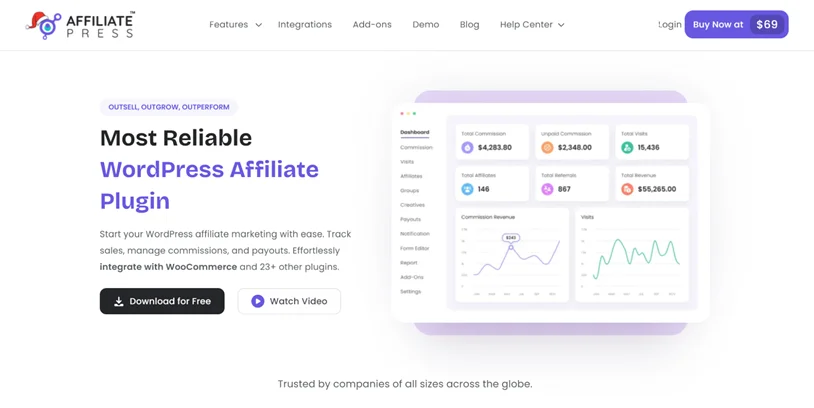
Most WordPress sites uses WooCommerce/EDD or other plugins to sell physical or digital products, while AffiliatePress effortlessly manages:
- Affiliate registrations.
- Referral tracking.
- Commission payouts.
Affiliates sign up for free, promote your products, and earn commissions when sales happen. You track and manage all that in AffiliatePress.
In this scenario, where does ARMember fit in? Well, ARMember allows you to:
- Sell subscriptions or one-time memberships.
- Restrict content behind paywalls.
- Create tiered access levels.
- Protect pages, downloads, courses, or dashboards.
In addition to using AffiliatePress to enable affiliates for ARMember products/plans, ARMember lets you turn affiliates into members, not just link distributors. That’s the key idea: memberships as an affiliate growth engine.
So, the question is: “How do memberships help my affiliates sell more?”. Here are the most effective ways ARMember can grow affiliates with memberships.
1. Create a Private Affiliate Members Area
Using ARMember, you can restrict an affiliate-only portal that includes:
- Advanced promotion strategies
- Conversion-tested landing pages
- Product positioning guides
- High-performing ad creatives
- Email swipe files
- SEO keyword lists
- Seasonal campaign calendars
Why such an advanced access and interaction through memberships can grow affiliates? Affiliates with better tools convert better traffic! AffiliatePress tracks referrals and ARMember ensures that only approved or subscribed affiliates can access premium resources.
2. Tiered Affiliate Membership Levels
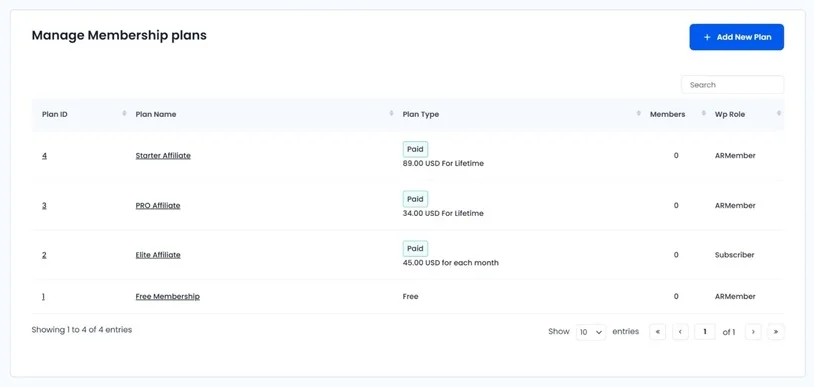
This is where you can see how memberships turn affiliates into long-term partners.
ARMember allows multiple membership tiers for your affiliates. You can use this to create affiliate levels, such as:
- Free Affiliate (basic access)
- Pro Affiliate (paid subscription)
- Elite Affiliate (invite-only or high performers)
Each tier can unlock:
- Higher commission rates (via AffiliatePress rules)
- Exclusive promotions or bonuses
- Early access to new products
- Personal support or coaching
When having such options and motivation, affiliates are incentivized to upgrade their memberships, stay active, and promote more consistently. More support from your side – better loyalty
3. Paid “Affiliate Training” Memberships
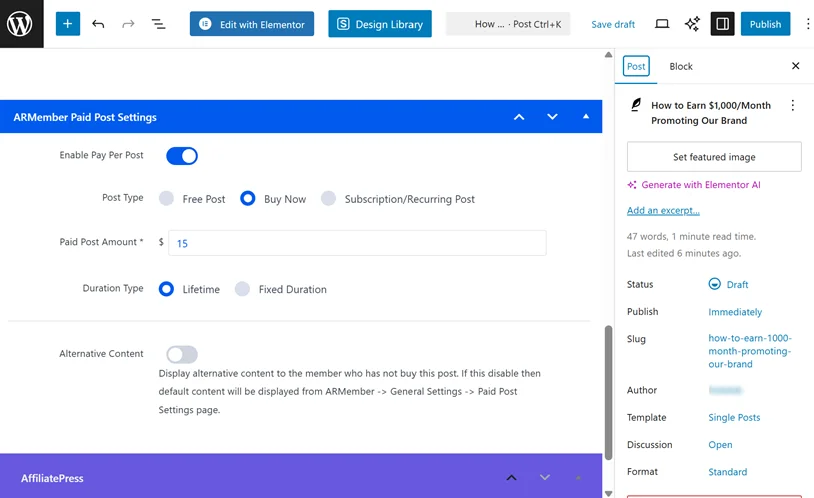
Another option you can use instead of free-for-all onboarding: sell/offer for free affiliate education with ARMember.
Examples:
- “Affiliate Mastery for Our Store”
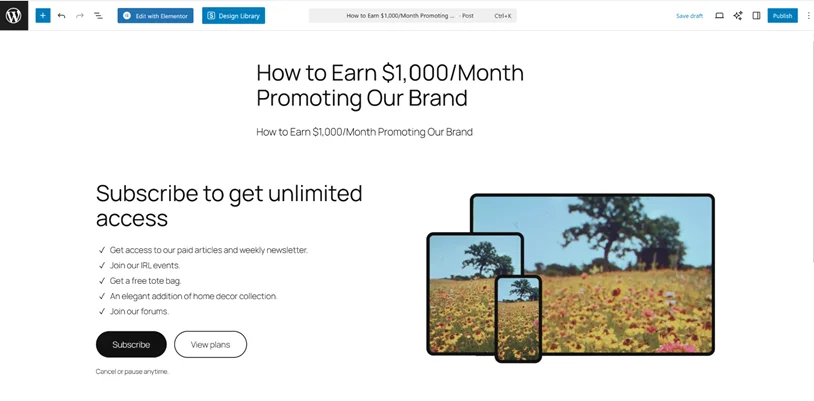
- “How to Earn $1,000/Month Promoting [Brand Name]”
- Product-specific deep dives
These paid or free memberships can include video tutorials, live webinars, case studies, or even funnel breakdowns. You can use a paid post feature for this.
Affiliates who invest financially are far more likely to take promotion seriously, search for working solutions and actually implement strategies to generate higher-quality traffic.
4. Exclusive Products or Bundles for Members to Promote
By using ARMember + WordPress ecommerce plugins like WooCommerce, you can create member-only products, special bundles or discounts and limited-time promotions only to affiliates with specific memberships. They traditionally convert much higher than public offers.
Affiliates can promote:
- Private deals
- Insider offers
- VIP-only bundles
Some of these things can be managed on the AffiliatePress side but if you want a full-scale process, memberships help significantly.
5. Performance-Based Access Unlocks
AffiliatePress helps you automatically upgrade affiliates to better commission structures when they reach certain levels.
If you allow that with the membership levels, you may use upgrades through ARMember access level to unlock:
- Higher commissions
- Premium content
- Exclusive launches
ARMember helps add gamification to the process, which is incredibly powerful for affiliate motivation.
So, let’s sum up how it works. AffiliatePress integrates with both e-commerce plugins (WooCommerce/EDD/Lifter LMS/GiveWP) and content restriction/membership plugins like ARMember.
- WooCommerce/other plugin handles product/service sales.
- AffiliatePress tracks referrals and commissions.
- ARMember controls access, memberships, and subscriptions for advanced affiliate interaction.
Creating Affiliate Program for ARMember-Based Site
If you already have ARMember for selling subscriptions, gated content, or member-only access on your WordPress, you’re in a perfect position to launch an affiliate program.
You don’t need to rebuild your site or change how memberships work. By adding AffiliatePress, you can turn your existing ARMember-powered content and subscriptions into affiliate-promotable products.
You can access AffiliatePress settings in both the Lite and Pro versions of ARMember.
Step 1: Install AffiliatePress on Your ARMember Site
AffiliatePress installs like any standard WordPress plugin and comes with built-in integration for ARMember.
Once activated:
- AffiliatePress detects ARMember membership plans.
- Subscription purchases can be tracked as affiliate referrals.
- Commissions are calculated automatically when a referred user signs up (after a membership plan is purchased).
Your membership ARMember-based site becomes affiliate-ready right away!
Step 2. Enable ARMember in AffiliatePress & Customize General Settings
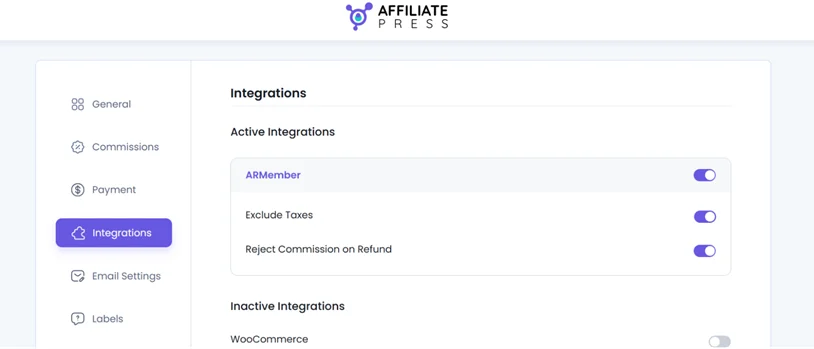
Go to AffiliatePress > Settings > Integrations > Enable ARMember > enable or disable tax and ‘rejected commission on refund settings’.
Using the Products selection addon that you can optionally install, you’ll also see extra settings here for selecting only specific membership plans available/eligible for affiliate commissions.
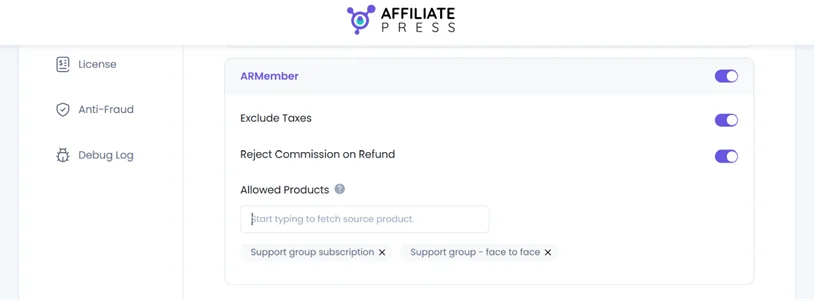
Further, plan specific commissions can’t be disabled when the Commission Basis in AffiliatePress is set to “Commission Per Order.” So if you want to disable commissions for individual plans, make sure you’ve selected the right commission basis in the AffiliatePress settings.
Step 3: Enable Affiliate Promotion for Memberships and Restricted Content
One of the advantages of this integration is that AffiliatePress settings appear right in your ARMember-enabled areas of your WordPress site.
This includes membership plans that define your subscription products, restricted pages/posts, and premium content access rules.
To decide which memberships are affiliate-enabled, go to ARMember > Manage Plans > Add/Edit Plan, and customize affiliate commission for the plan.
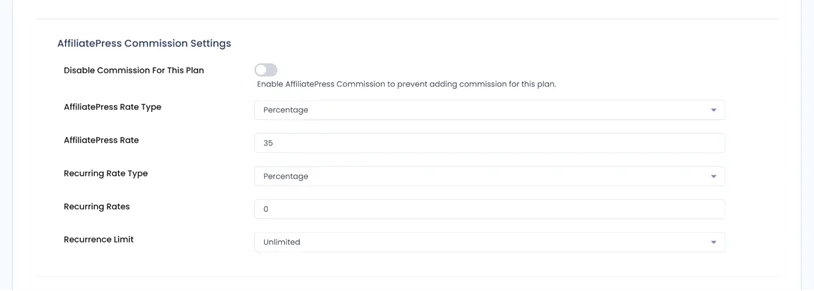
- Enable or disable affiliate promotion per plan.
- Assign commission rates specifically for subscriptions or content access per plan.
- Optionally set recurring rates.
You stay fully in control of what affiliates are allowed to promote.
This way, you can enable affiliate programs that only focus on physical or digital products, allowing affiliates to promote monthly or yearly memberships, courses or training portals and premium resources.
Affiliates earn commissions when:
- A referred user purchases a membership plan which is enabled for commissions.
- A subscription payment is completed.
Super useful for recurring revenue businesses, where one referral can generate commissions over time.
Wrapping Up: Scale Your Affiliates with Memberships in No Time
Adding ARMember to grow affiliates with memberships helps you build a professional affiliate ecosystem beyond affiliate accounts provided by AffiliatePress.
This creates a perfect opportunity to make affiliates feel educated, rewarded, and exclusive, helping them sell more and helping you recruit more affiliates.
Try combining WooCommerce + AffiliatePress + ARMember, you transform your affiliate program from a basic referral system into a unique membership-powered sales engine.
If you simply want to enable an affiliate program for your ARMember, there are just a few steps you need to follow – AffiliatePress smoothly works alongside ARMember’s plan and access rules.
FAQs
How to grow an affiliate program?
To grow your affiliate program, you can smoothly connect AffiliatePress with a membership plugin like ARMember. This way, you never rely only on affiliates sharing links. You can offer memberships, gated resources, training content and exclusive promotions that help affiliates perform better and stay encouraged.
What is affiliate growth?
Affiliate growth is about expanding your business’s sales, traffic and reach via affiliate marketing. Plus, it also involves increasing the quality, engagement and performance of your affiliates, not just the number of signups.
How can I grow affiliates using memberships?
If you want to grow your affiliates using memberships, you can offer them recurring commission or lifetime commission. Or you can grow affiliates using memberships by turning them into members with access to exclusive resources such as training content, promotional materials and tier-based rewards.
Can I use AffiliatePress with ARMember?
Yes, Of Course! You can absolutely use AffiliatePress with ARMember. This allows you to manage your memberships and track your affiliates sales for the plans sold via ARMember with ease.
Related articles:

Share this post


