


Discount coupons are the easiest way to drive sales to your membership site. But with all the diversity of such sites and complexity of the infrastructure, a simple discount coupon might not be enough.
To fit various requirements, you need a smart coupon management machine at hand!
Today, we want to guide you through exactly such a thing.
How to Create & Customize Coupons with ARMember
The ARMember WordPress membership plugin lets you run a course/membership/paid content subscription site – and one way or another, you might need to provide discounts for your services or content.
And no doubt, you want those discounts to work smart and actually generate you revenue!
ARMember offers a dedicated add-on for this: Coupon Management.
It provides flexible and user-friendly tools for managing membership coupons. The add-on makes it easy to manage high-volume coupons and customize them for specific access plans or even individual WordPress pages.
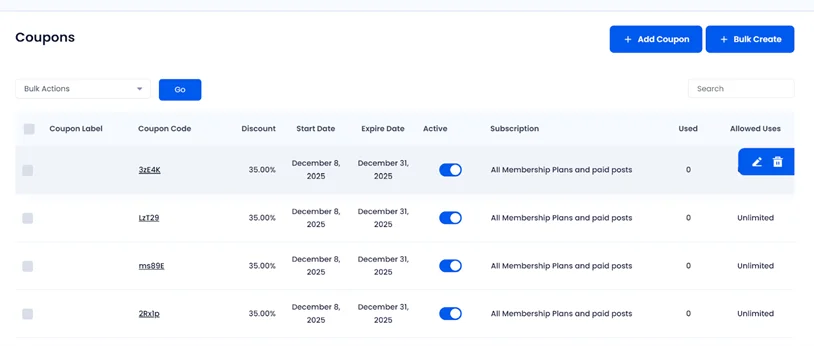
You may generate random codes or create custom ones and control how and when they’re used.
Key features of the Coupon Management add-on:
- Create custom or random coupon codes, including plan-specific coupons.
- Set fixed or some % discounts with flexible validity dates.
- Limit usage per coupon or allow unlimited use, with usage tracking included.
- Enable discounts for trial plans and recurring payments.
- Quickly activate or disable coupons.
Ready to get your hands dirty?
Step 1. Enable the Coupons Addon
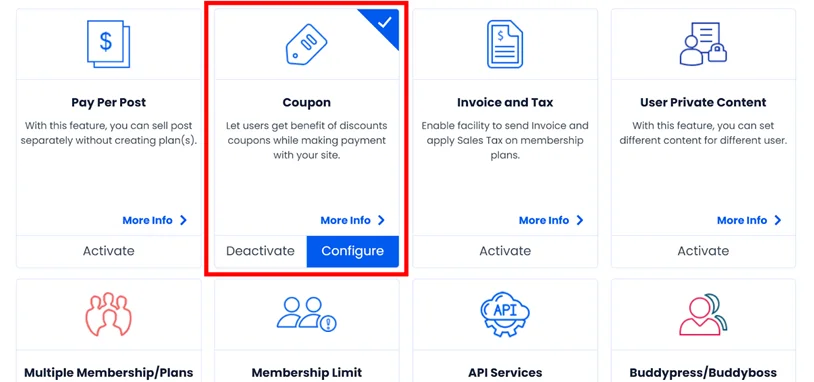
First, find and activate the add-on from your plugin dashboard > Add-ons. If you can’t do it, make sure that you’ve downloaded this add-on in your ARMember account.
Once done, go to ARMember > Coupon Management (or click Configure if you are in the add-ons menu). Use the Add Coupon button to add every new discount.
Step 2. Customize membership discounts

When adding your first coupon, you can either type in your own coupon code (like SUMMER20), which is nice if you want a clean, branded code for marketing emails, for example. Another way round, just hit the Generate button and the plugin will automatically create a random code – for instance, when you need to give it privately and quickly to someone.
Choose your discount type
You can choose between a fixed amount (like $10 off) or a percentage discount (like 20% off). Which one to use? A fixed discount might work well for a low-cost membership site and a percentage discount makes more sense for higher-priced premium content plans.
Select a period type
ARMember lets you set how long a coupon stays valid. This is perfect for limited-time campaigns, like “Black Friday weekend” or a “48-hour promo for new course subscribers.” You can define a specific date range or just make the coupon valid indefinitely if you’re running an ongoing offer.
Decide on coupon eligibility
You can decide whether a coupon applies to membership plans, paid posts, or both.
If you’re running a membership site that also sells standalone content (like individual tutorials or downloadable assets), this flexibility helps you promote specific products only, for specific campaigns.
Moreover, if your paywall-protected plans include a free trial, you can allow members to apply the coupon during the trial – there is a dedicated setting for this. This works well for membership sites that want to boost conversions after the trial, still encouraging people to sign up now.
Set the maximum coupon usage
You can set how many times the coupon can be redeemed in total. You might release a coupon that’s “limited to the first 20 signups” to build urgency, or allow unlimited redemptions if it’s part of a long-term loyalty program.
Set a coupon label
This is simply the internal name of the coupon for clarity, like “Flat 15% Off” or “New Year Deal”. Good to have, especially if you run multiple campaigns!
Customize settings for recurring plans
If you enable this, the discount doesn’t just apply to the first payment, it applies to every recurring billing cycle. Many subscription sites that want to offer a lifetime discount (“lock in your price forever”) use this motivation for long-term signups.
Coupons applied to specific WordPress posts
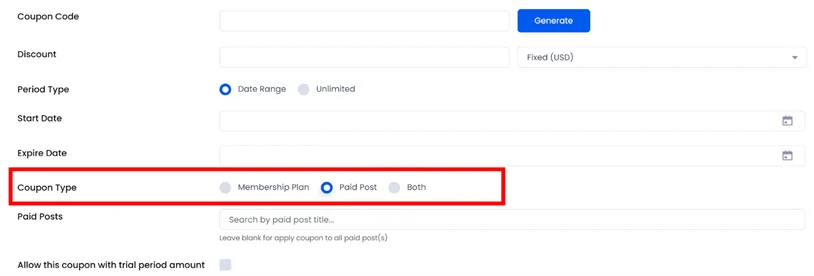
This is a unique feature you get only with the ARMember plugin, which gives you a lot of flexibility as to which content can be discounted. It works with the Pay Per Post module, so you’ll see the ‘paid post’ option in the ‘Coupon type’ if the module is enabled.
If you choose ‘Paid Posts’, the coupon only applies to specific posts. Click ‘Both’ to discount both plans and paid posts. Leaving both selections blank applies the discount across everything.
And it’s not that coupons can be applied to the entire cart only; with this feature, you can discount individual posts in WordPress, which were initially created as paid.
Absolutely must-have for content subscription sites that sell premium articles, videos, or downloads on a per-item basis.
Bulk coupon customization options
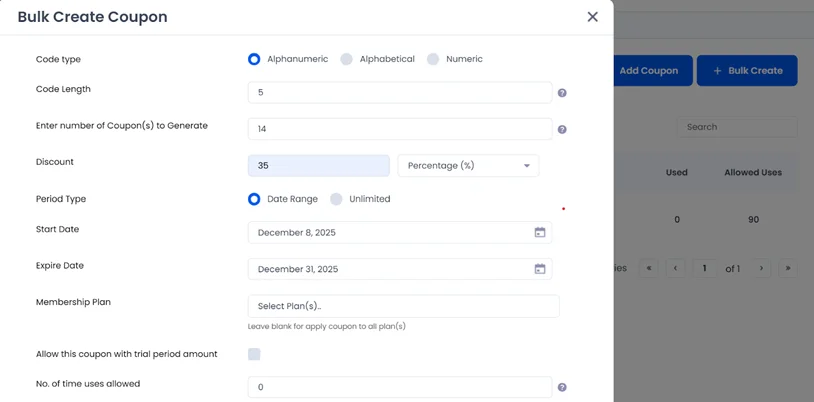
If you ever find yourself needing to pump out a big batch of coupon codes without setting them up one by one, use the Bulk Create feature that will save you a ton of time.
If you need this, in the Coupon Management menu, click “+ Bulk Create”.
From there, you can generate as many coupon codes as you need in one go, using the same settings you’d normally apply when creating a single coupon.
It’s super useful for businesses that frequently hand out unique promo codes, such as online course platforms that give each student their own discount code or membership communities running giveaways.
Step 3. Add the coupon field to the website checkout & payment page

Once you’ve created your coupons, you still need to turn them on for your signup page.
Just go to ARMember > Configure Plan + Signup Page, edit the setup you’re using, and switch “Enable coupon with payment?” to Yes.
That’s it – users will now be able to enter coupon codes during signup.
Step 4. Automate coupons in emails and invoices
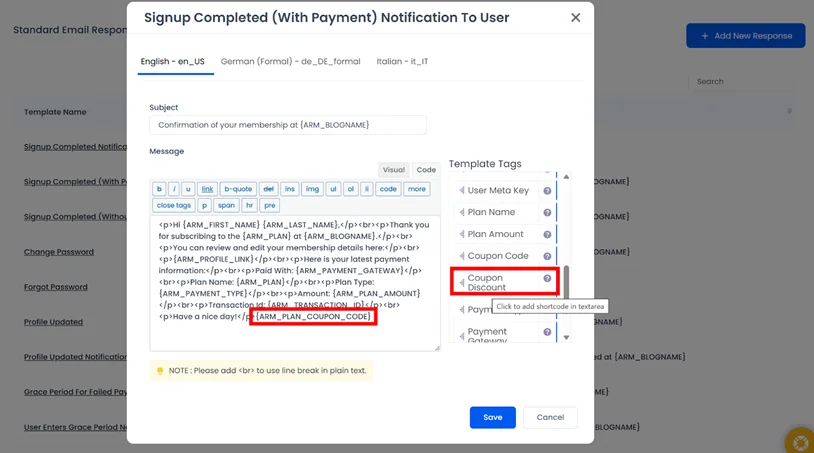
ARMember lets you automatically display the coupon code used and the discount applied inside membership emails and invoices by adding simple template tags.
Members instantly see what discount they received, and you don’t have to manually edit or explain it.
Find all the tags in the Email Notifications menu and for the activated Invoice add-on.
Many subscription sites and any business where discounts are part of the checkout experience find it a great way to reduce support questions.
Step 5. Track your membership coupons

Keeping track of coupon usage is essential if you run promotions, partner campaigns, or offer special pricing to different audiences.
ARMember’s Coupon add-on doesn’t just help you create coupons but also gives you accessible insight into who used your coupons and how often.
From the ARMember > Coupon Management page, you’ll see a “Used” column next to each coupon. Clicking the number opens a popup showing a list of members who redeemed that code, including their username, email address, and the exact coupon they used.
For a deeper look at performance, ARMember also offers Coupon Reports. These reports break down coupon usage on an hourly, daily, and monthly basis! So, you can easily spot trends, measure campaign success, or identify your most active users.
Go to your site > ARMember > Reports > Coupon Reports to access them.
Concluding: Make the Most of Your Membership Coupons on WordPress
Membership coupons are an easy thing to give you flexible control over your promotions, whether you’re trying to boost subscription signups or increase conversion on individual content pieces. All is doable with ARMember and the Coupon Management extension, which is included with any paid plan.
For those of you running seasonal promotions or member-exclusive deals, tracking tools provided by the plugin also help you understand what’s working, and where to optimize. So you are fully prepared for any campaign!
FAQs
How do I create a coupon code in WordPress?
You can create a coupon code for your WordPress membership site by using ARMember, which includes built-in coupon management that lets you create and manage coupon codes easily.
If you are not using ARMember, you can also create coupon codes by using a WordPress coupon plugin that supports your membership or eCommerce setup.
Do coupons really expire?
Yes, most coupons you create come with an expiration date. If you are creating membership coupons, you can set a specific validity period for every coupon using ARMember.
Further, you can even choose a date range such as Black Friday weekend only or keep the coupon valid indefinitely if it’s part of an ongoing offer.
How many times can I use a coupon code?
All coupon codes can be used for a specific number of times only based on the terms and conditions set by the company. You can use the usage limit for your membership coupons in ARMember. It lets you define how many total redemptions a coupon allows, such as “only the first 20 signups,” or set it to unlimited use for long term promotions or membership loyalty programs.
What is a coupon QR code?
A coupon QR code is a QR code which customers scan to get instant discounts or special offers. With this, customers simply have to scan the QR code to get a discount instead of typing long coupon codes.
How do I promote my coupon codes to get more signups?
If you want to prompt your membership coupon code to attract new members, start promoting them on your official website, online gift card marketplaces, social media platforms or via email marketing campaigns.
Related articles:

Share this post


